
Snom PA1 Plus broadcast over IP system

Frequently Asked Questions

First, confirm that both the phone and the PA1 Plus are on the same VLAN and subnet, as multicast paging typically does not cross subnets without special configuration. Then check that the phone is sending the page to the correct multicast IP address and port. If the issue persists, a Toronto-based VoIP support provider can usually resolve this remotely.
Verify that the speaker wiring is securely connected to the loudspeaker connector and that the impedance of the connected speakers matches 600 ohms. Also, ensure the volume level on the PA1 Plus is not muted or set too low via its web interface or DTMF controls.
Start by reseating the Ethernet cable at both the device and the PoE switch to rule out a loose connection. If the issue continues, try a different port on the switch or a known-good PoE injector to isolate whether the problem is with the port or the device's PoE circuitry.
The PA1 Plus is designed for SIP-based paging and multicast announcements, not for streaming audio from external services. You would need a SIP source or a compatible device on your network to send audio to the PA1 Plus. For music playback, consider using a dedicated audio source connected to the line input.
Use the freely configurable relay contacts on the 4-pin I/O connector. You will need to wire the door strike's control circuit to the normally open (NO) and common (COM) terminals. Then configure the relay in the PA1 Plus web interface to be triggered by a DTMF tone or a SIP command from your phone.
Check that the input level from your phone or audio source is not too high, as the PA1 Plus expects line-level audio. Also, ensure the connected speakers are rated to handle the 6.5-watt amplifier output and that the speaker wires are not shorted. Lower the volume in the PA1 Plus settings and test again.
Log into the PA1 Plus web interface and navigate to the call settings section. Look for the auto-answer feature and enable it, then save the configuration. Also, verify that your phone system is sending the call to the extension assigned to the PA1 Plus and that the device is registered.
First, confirm that your phone is sending DTMF as in-band or SIP-INFO, as the PA1 Plus supports both. Then check the PA1 Plus DTMF configuration in its web interface to ensure the expected digits are mapped to the correct actions. If the problem persists, test with a different phone to rule out a phone-side issue.
A factory reset should be a last resort. Before doing that, try pressing and holding the reset button on the device for about 10 seconds while it is powered on. If that does not work, please contact your VoIP support provider for guidance, as a reset will erase all custom settings.
Yes, the PA1 Plus is a standard SIP device and should work with any SIP-compatible PBX or phone system. However, some features like multicast paging may require specific configuration on the PBX side. For best results, ensure your system supports multicast or use the SIP paging method instead.
PA Systems

Snom PA1 Plus broadcast over IP system
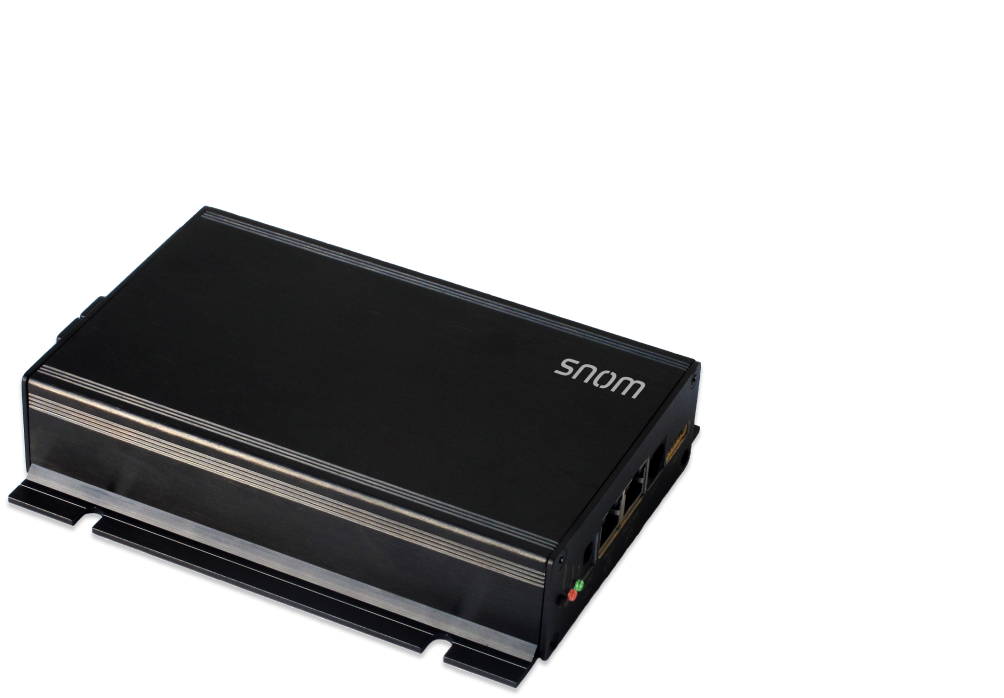
• The Snom PA1+ is a versatile system that can be used as a broadcasting platform for HD audio announcements from any Snom SIP phone or to play background music in rooms and corridors. • It features an integrated 6.5-watt high-performance amplifier that can fill large rooms with sound using existing 600-ohm speakers, and can also be expanded with larger PA systems via the existing connections. • The system includes freely configurable relay contacts that can be remotely controlled via SIP or DTMF to integrate existing door opening systems, such as those used in offices and buildings. • Additional network components like LAN cameras can be connected to the gigabit switch to set up or expand a security system. • Key features include: • Power over Ethernet (PoE) • IPv6 & IPv4 • Headset connectable • Security (TLS & SRTP) • Plug & Play • HD audio Weight: 1.4 lb Dimensions: 9.25 × 6.75 × 2 in Paging Unit Type: Paging Adapter Technical Specifications: • Model: PA1Plus / PA1+ • Box Contents: Public announcement system unit, wall mount plate, wall mount screws, drill template, wire set, Quick Installation Guide (QIG), GNU General Public License, and OS: Linux. • Wall Mountable • Snom PA1+ power options include Power over Ethernet (PoE), IEEE 802.3af, class 3, with a power adapter of 100 – 240 V AC / 50 – 60 Hz | 5 V DC (SELV) / 2 A / 10 W. • Wired interfaces: 1 coaxial power adapter connector, 2 RJ45-8P8C Gigabit Ethernet ports, 2 RCA jack (1 Mic In / 1 Line Out) for wired headset connection, 4 pin I/O connector, and 1 loudspeaker connector. Call Features: • Outgoing call features: Multicast paging • Incoming call features: Auto answer Audio Devices and Codecs: • Amplifier: 6.5 W, class D amplifier with impedance 600 Ω • Audio codecs: G.711 (A-law, μ-law), G.722, G.723.1, G.726, G.729 • Dual-tone multi-frequency signaling (DTMF): In-band, out-of-band, SIP-INFO

About This Product

The Snom PA1 Plus is a network-based paging adapter designed for businesses that need to broadcast HD audio announcements over IP. It's a good fit for office environments, retail spaces, or school corridors where you want to play background music or make live or scheduled announcements from any Snom SIP phone on the same network. The integrated amplifier can drive existing 600-ohm speakers, and the unit also includes relay contacts that can be used to control door locks or other building systems remotely via SIP or DTMF commands. This makes it a practical choice for small to medium-sized deployments where you want to combine paging with basic access control without adding a separate controller.

It pairs naturally with Snom IP phones for multicast paging and can be expanded with larger PA systems if needed. The built-in gigabit switch lets you daisy-chain a LAN camera or another network device without losing a port on your switch. However, the PA1 Plus requires Power over Ethernet (PoE) from a compliant switch or injector, so you'll need to confirm your network gear supports 802.3af. For a GTA office, this unit works well in a single-zone setup; if you need multi-zone paging or integration with a legacy analog paging system, you may need additional hardware. It is not a full PBX or intercom system, so it's best used as a paging endpoint controlled by your existing VoIP platform.
Services We Provide
  • Professional Installation & Configuration
  • Ongoing Maintenance & Support
  • Troubleshooting & Repairs
  • System Upgrades & Updates