
D735 Snom sensor-supported IP telephone Black

Frequently Asked Questions

Verify that the Ethernet cable is firmly connected to the LAN port and that your switch or injector supports Power over Ethernet (802.3af). If you're using the optional power adapter, make sure it's plugged into a working outlet. A simple reseat of both ends of the cable often resolves intermittent contact issues.
This usually indicates a one-way audio problem. Start by checking that your network allows SIP and RTP traffic through any firewall or router. Temporarily connect the phone directly to your modem (bypassing the office switch) to isolate the issue. If audio works in that configuration, the problem is likely your network equipment's SIP ALG settings.
The motion sensor is enabled by default. Standby mode will dim the display and keys after inactivity. When you bring your hand within a few inches of the screen, it should light up and show the key labels. If it doesn't, go to Settings > Display > Sensor and ensure it's set to 'On.' A soft reboot (unplug power for 10 seconds) can also re-calibrate it.
First, confirm that you've assigned labels via the phone's web interface under Function Keys. The D735 uses an LCD window above each physical key; if the labels appear blank or garbled, try refreshing the display by pressing the up/down navigation keys. If the issue persists, check the firmware version—older releases had a rare display rendering bug that a firmware update fixes.
Yes, the Snom D735 is a SIP-standard phone that should work with any Canadian carrier supporting SIP trunking. You will need the server address, username, and password from your provider. Enter them in the phone's web interface under Identity. Some carriers require outbound proxy or STUN settings; if registration fails, contact your provider for those exact parameters.
Start by moving the phone closer to the access point to rule out signal strength. The D735 supports 2.4 GHz only via the USB WiFi adapter, so interference from microwaves or Bluetooth devices can cause drops. Change your router's WiFi channel to 1, 6, or 11. If the problem continues, consider using the wired Ethernet connection for more reliable call quality.
Connect the D7 module to the D735 using the supplied cable (the module attaches to the side). The phone should automatically detect it and add 60 extra programmable keys. If the module isn't recognized, power cycle the entire phone while the module is attached. No software configuration is required beyond setting the key labels in the phone's web interface.
Echo on speakerphone is often acoustic feedback. Lower the speaker volume slightly and ensure you're not too close to the phone. Also check that the room isn't too reverberant (hard surfaces like glass walls worsen echo). If the problem remains, adjust the 'Speakerphone Echo Cancellation' settings in the phone's audio menu to a more aggressive level.
The phone stores settings in non-volatile memory, but if power is interrupted during a save, corruption can occur. To safeguard against this, configure auto-provisioning via a TFTP or HTTP server so that settings reload automatically after a reboot. Contact your IT provider to set up a provisioning file; this is common in GTA offices with multiple phones.
Double-check the server address for typos—sometimes it's 'sip.provider.ca' not 'sip.provider.com'. Ensure the phone's network settings have a valid DNS server. If you're behind a firewall, enable 'NAT Traversal' in the SIP settings and set 'STUN Server' to a public STUN server (e.g., stun.l.google.com:19302). A Toronto-based VoIP support provider can often verify this remotely if it persists.
IP Phones

D735 Snom sensor-supported IP telephone Black
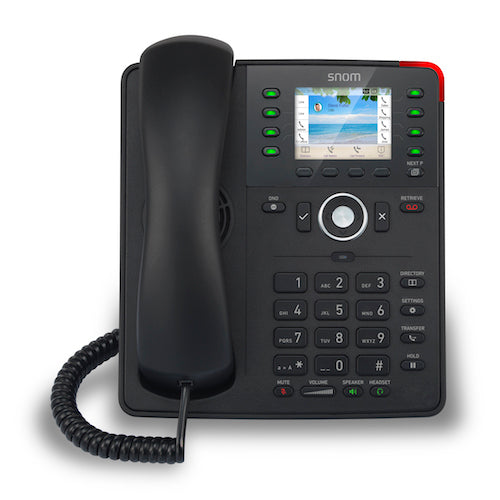
*Timeless design and modern colour variants make the Snom D735 a cutting-edge telephone that combines technical innovation with sleek appearance. The high-resolution 2.7” graphical TFT display is surrounded by eight multicolored function keys, allowing users to label them according to their preferences. A built-in motion sensor enables responsive UI, automatically displaying key assignment information when a user's hand approaches the display or function keys. Key Features: • High-resolution 2.7” graphical TFT display • 32 self-labeling function keys (8 physical) • Sensor technology enables responsive UI • Wideband hands-free talking (speakerphone) • Digital Signal Processor (DSP) enhanced audio quality • 2-port Gigabit Ethernet switch (RJ45) • Power over Ethernet IEEE 802.3af, Class 2 • USB headset ready • D7 Expansion Module ready • Support for USB WiFi stick • Electronic Hook Switch (EHS) support for wireless headsets Weight: 2.4 lb Dimensions: 11 × 9 × 4 in Phone Type: Desk Call Features: • Speed dialing • URL dialing • Local dial plan • Automatic redial on busy • Call completion (busy/unreachable) • Caller identification • Call waiting • Call blocking (deny list) • Auto answer • Hold • Music on hold (2) • Blind and attended transfer • Call forwarding • 3-way conferencing on the phone • Extension monitoring, call pickup • Call park, call unpark • Multicast paging • DND mode (do not disturb) • Keyboard lock • Client matter code (CMC)

About This Product

The Snom D735 is a desk IP phone designed for professional office environments where a clean, modern appearance and responsive interaction are valued. Its motion sensor automatically illuminates function labels as your hand approaches, which can reduce fumbling in dimly lit cubicles or shared workspaces. The phone pairs naturally with Snom's D7 expansion module for receptionists or managers who need more than 32 self-labeling keys, and it supports USB headsets and an optional WiFi stick for flexible desk layouts. While the D735 offers solid wideband speakerphone audio and a gigabit Ethernet pass-through for daisy-chaining a computer, its 8 physical function keys may feel limiting for power users in high-volume call centers who rely on dozens of dedicated line appearances. For a typical GTA small-to-medium business using a hosted VoIP provider, this phone delivers a balanced feature set without overcomplicating the desktop. It is not the right choice if you need a large colour touchscreen or built-in Bluetooth, but for a reliable, sensor-enhanced desk phone with PoE simplicity, the D735 fits well in modern offices where aesthetics and ergonomics matter.
Services We Provide
  • Professional Installation & Configuration
  • Ongoing Maintenance & Support
  • Troubleshooting & Repairs
  • System Upgrades & Updates



