
D735 Snom sensor-supported IP telephone White

Frequently Asked Questions

First, verify that the phone has a valid IP address and can reach the internet. Check the network settings under Menu > Settings > Network. Then confirm the SIP credentials (username, password, and server address) are entered correctly in the account settings. If the issue persists, a Toronto-based VoIP support provider can usually resolve this remotely.
Ensure the Ethernet cable is securely connected to both the phone and a PoE switch or injector. If using a power adapter, confirm it is plugged in and the outlet is live. Try a different Ethernet cable or port to rule out a faulty connection.
The proximity sensor is enabled by default. When you move your hand near the phone, the display and function key labels will light up. You can adjust the sensor sensitivity in the phone's settings under Menu > Settings > Display > Proximity Sensor.
Check that the handset cord is fully inserted into both the handset and the base. If using the speakerphone, ensure the microphone is not blocked. Also verify that the correct audio device is selected during the call (handset, speaker, or headset).
Press the Menu key, go to Settings > Function Keys, and select the key you want to program. You can assign it to a line, speed dial, or other feature. The 8 physical keys have multi-coloured LEDs to indicate status.
First, check your network connection. A wired Ethernet connection is recommended over Wi-Fi for VoIP. Ensure your internet bandwidth is sufficient and that there is no excessive network congestion. You can also try switching the audio codec in the phone's settings to G.711 for better compatibility.
Yes, the D735 supports USB headsets. Plug the headset into the USB port on the back of the phone. You may need to select the headset as the audio device in the phone's settings under Menu > Settings > Audio > Headset.
This usually indicates a problem with the SIP registration. Double-check your account settings, including the server address, port, and credentials. Also ensure that the phone's time and date are correct, as some servers require accurate time for registration.
Firmware updates are typically managed by your VoIP provider or IT administrator. If you have the update file, you can upload it via the phone's web interface under Administration > Firmware Update. Always back up your settings before updating.
First, check that the function keys are programmed and assigned to a line or feature. The LEDs will only light up when the key has a function assigned. If they still don't work, try a power cycle by unplugging the phone for 30 seconds.
IP Phones

D735 Snom sensor-supported IP telephone White
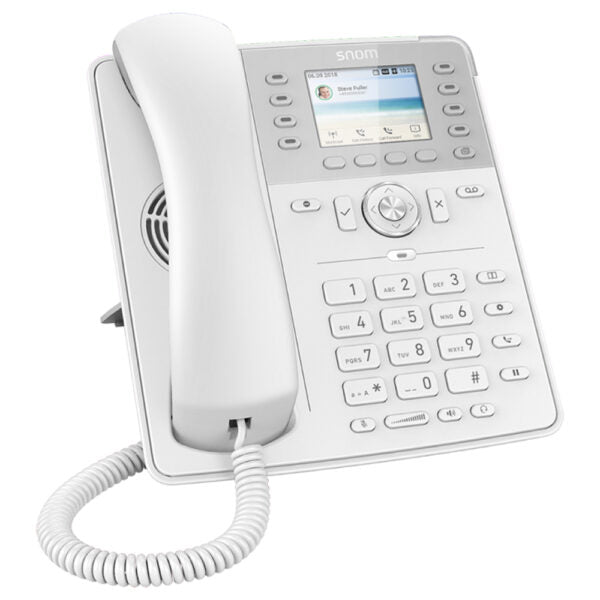
• The Snom D735 boasts a timeless design and two colour variants, accompanied by a high-resolution 2.7″ color display, featuring 8 self-labelling function keys with multi-coloured LEDs and a proximity sensor for optimal labelling. • Key features include: • Colour: White • Sensor-based user interface • High-resolution 2.7 Zoll TFT colour display (6.9cm) • 32 freely programmable function keys (8 physical) • USB headset compatible • Additional information includes: • Weight: 2.4 lb • Dimensions: 11 × 9 × 4 in • Phone Type: Desk • Technical specifications include: • Model: Snom D735 White • Part number: 80-S052-01 • Operating system: Linux • Box Contents: • IP desk phone D735 • Foot stand • Corded receiver • Ethernet cable • Quick Installation Guide (QIG) • GNU General Public License • Display and indicators feature a TFT liquid crystal display (LCD), true colour, backlit with 13 LED indicators. • Audio devices, codecs, and features include: • Corded receiver: Hearing aid compatible (HAC) • Speakerphone mode: Full duplex, HD audio, acoustic echo cancellation (AEC) • Audio codecs: G.711 (A-law, μ-law), G.722, G.726, G.729AB, GSM 6.10 (FR) • Dual-tone multi-frequency signaling (DTMF / RFC2833): SIP-INFO, in-band, out-of-band • Related features: Built-in assignable ringtones, Comfort Noise Generator (CNG), Voice Activity Detection (VAD) • For a full list of specifications, please refer to the product datasheet.

About This Product

The Snom D735 is a desk IP phone designed for professional office environments where a clean, modern look and a sensor-driven user interface are valued. Its proximity sensor automatically adjusts the display and function key labels when you reach for the phone, which can be a practical convenience in busy shared or open-plan workspaces. The phone pairs well with hosted VoIP services or on-premises PBX systems that support standard SIP, and it is compatible with most Canadian business VoIP carriers. While the D735 offers 32 programmable keys (8 physical with multi-coloured LEDs), it lacks built-in Bluetooth or Wi-Fi, so it is best suited for desks with wired Ethernet and PoE connectivity. For a small to mid-sized office in the GTA, this phone provides a solid balance of features and ease of use, but it may be overkill for a simple reception desk and underpowered for a power user who needs dozens of dedicated line appearances or advanced call center features.
Services We Provide
  • Professional Installation & Configuration
  • Ongoing Maintenance & Support
  • Troubleshooting & Repairs
  • System Upgrades & Updates



