
Fanvil A320 Video Phone
Frequently Asked Questions
First, confirm that the Ethernet cable is securely connected to the WAN/LAN port and that the phone has obtained a valid IP address from your network. Then, verify that the SIP server address, username, and password entered in the account settings exactly match the credentials provided by your VoIP carrier, paying close attention to any uppercase or lowercase characters. If the phone still fails to register, check that your firewall is not blocking SIP port 5060 or that your router's SIP Application Layer Gateway (ALG) is disabled, as ALG can often corrupt registration packets.
Start by reseating both ends of the power supply or, if you are using PoE, the Ethernet cable that delivers power to the phone. Confirm that the PoE switch or injector is rated for 802.3af/at and is actively supplying power to that port. If the phone is receiving power but the screen remains dark, try disconnecting any USB accessory, as a faulty device can sometimes prevent the phone from completing its boot sequence.
Echo is often caused by the speaker volume being too high or the microphone picking up sound from the phone's own speaker. Lower the speaker volume during the call and ensure the handset is resting properly in its cradle if you are not using the speakerphone. If the issue continues, check whether the acoustic echo canceller (AEC) is enabled in the phone's audio settings; it should be turned on by default for full-duplex calls.
From the phone's home screen, navigate to the Android settings menu, select 'Wi-Fi,' and enable the Wi-Fi radio. Choose your corporate network from the list, enter the password, and the phone will connect. For best video performance on a 5 GHz network, position the phone where the signal is strong, and be aware that in a high-density office tower in the GTA, you may need to work with your IT team to avoid congested channels.
Confirm that the phone is connected to a Gigabit Ethernet port rather than relying on Wi-Fi, as a wired connection provides the most stable bandwidth for video. If you must use Wi-Fi, move the phone closer to the access point and check that no large file downloads or uploads are consuming bandwidth on your local network. You can also temporarily reduce the video call quality in the phone's settings to see if the freezing stops, which would confirm a local network congestion issue.
Because the A320 runs Android 9.0, you can install compatible applications from the built-in app store or by sideloading the APK if your IT policy allows it. Keep in mind that the phone's native SIP interface and the third-party app will operate independently, so your SIP calls and app-based meetings will not be integrated into a single call history or directory unless your VoIP platform provides that unification on the server side.
Start by cleaning the screen with a soft, dry microfiber cloth, as accumulated oils or dust can interfere with touch detection. If the problem persists, disconnect the power or PoE cable for 30 seconds and then reconnect it to allow the phone to perform a full reboot. Avoid pressing the screen while it is powering back on, as the calibration routine runs during startup.
During an active call, use the on-screen conference softkey to place the current call on hold and dial the next participant. Once they answer, press the conference key again to merge the calls. Repeat this process to add up to 10 parties. The phone handles the audio mixing locally, so for the best experience, ensure the A320 is on a stable wired connection and that no one speaker is positioned too far from the microphone.
First, make sure your headset is in pairing mode and within one meter of the phone. On the A320, go to the Android Bluetooth settings, ensure Bluetooth is switched on, and tap 'Pair new device.' If the headset does not appear, turn Bluetooth off and back on, then try again. If it still fails, charge the headset fully, as a low battery can sometimes prevent a successful handshake.
The administrator password is separate from your SIP account credentials and is often set during initial provisioning. Check with the person or IT provider who deployed the phone, as they may have recorded it in your documentation. If the password was changed and lost, you will need to contact the support team that manages your phone system; they can guide you through a secure recovery process rather than attempting a factory reset, which would erase all of your configuration.
IP Phones
Fanvil A320 Video Phone
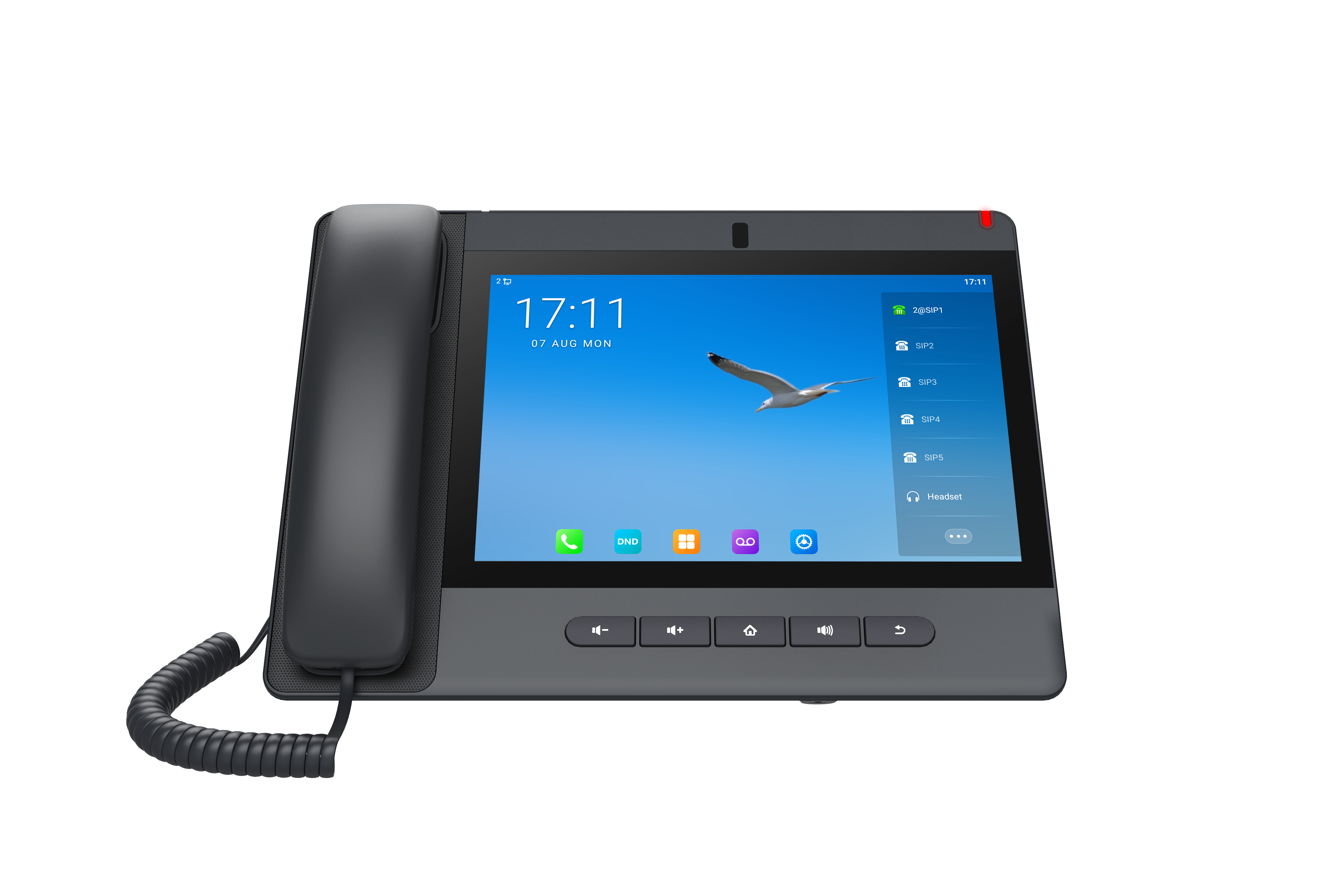
• 10.1-inch 1280 x 800 Color Touch Screen • Operating System: Android 9.0 • SIP Lines: 20 • Camera: 8 Mega pixels, adjustable angle with privacy shutter • DSS keys: 112 softkeys • HD Audio: • HD Audio with G.722 Opus • Full-duplex Acoustic Echo Canceller (AEC) • Noise Reduction technologies • Conference: 10-party audio conference, 3-party video conference • Video Decoding: H.264 • Network: 10/100/1000 Mbps • WiFi/Bluetooth: WiFi 2.4GHz&5GHz、BT5.0 • USB Interface: USB Type A x 1 • Power Supply: PSU / PoE • Color: Gun Grey • Installation: Desktop For a full list of specifications, please refer to the product datasheet.
About This Product
The Fanvil A320 is a premium desktop video phone built for executives and managers who spend much of their day in virtual meetings but want a dedicated, always-on endpoint separate from their computer. Its large 10.1-inch touch display and Android 9.0 operating system position it as a hybrid between a traditional desk phone and a compact video conferencing panel. It fits well in private offices and small huddle rooms where a full room system would be overkill, but a standard audio-only phone feels insufficient for a modern workflow.
This model pairs naturally with SIP-based VoIP platforms and is a strong candidate for organizations migrating away from legacy video hardware or supplementing a softphone-first culture with a purpose-built device. The adjustable 8-megapixel camera with a physical privacy shutter addresses a real concern for executives handling sensitive conversations. Its 20 SIP lines and 112 on-screen DSS keys also make it viable as an advanced call-management endpoint for administrative staff who need to monitor and direct high call volumes alongside occasional video calls.
A practical limit to keep in mind is that its video conferencing capability tops out at three parties. For larger team meetings, it will need to be paired with a server-side conference bridge or a cloud meeting service running on its Android OS, which shifts the processing load and user experience away from the native phone interface. The single USB Type-A port offers some flexibility for a headset or accessory, but it is not a full peripheral hub. The device is well-suited to a standard corporate LAN with PoE, but in a WiFi-only deployment, careful site planning is needed to maintain video quality on congested airwaves.
For a Toronto-area business deploying this in a Bay Street office, the combination of Gigabit Ethernet and dual-band WiFi provides reliable connectivity options in dense high-rise environments where wired drops may be limited in older floors. It is over-specified for a common-area phone or a lobby, but for a professional who splits their day between audio calls and face-to-face video check-ins, it consolidates two devices into one without forcing reliance on a desktop PC.
This model pairs naturally with SIP-based VoIP platforms and is a strong candidate for organizations migrating away from legacy video hardware or supplementing a softphone-first culture with a purpose-built device. The adjustable 8-megapixel camera with a physical privacy shutter addresses a real concern for executives handling sensitive conversations. Its 20 SIP lines and 112 on-screen DSS keys also make it viable as an advanced call-management endpoint for administrative staff who need to monitor and direct high call volumes alongside occasional video calls.
A practical limit to keep in mind is that its video conferencing capability tops out at three parties. For larger team meetings, it will need to be paired with a server-side conference bridge or a cloud meeting service running on its Android OS, which shifts the processing load and user experience away from the native phone interface. The single USB Type-A port offers some flexibility for a headset or accessory, but it is not a full peripheral hub. The device is well-suited to a standard corporate LAN with PoE, but in a WiFi-only deployment, careful site planning is needed to maintain video quality on congested airwaves.
For a Toronto-area business deploying this in a Bay Street office, the combination of Gigabit Ethernet and dual-band WiFi provides reliable connectivity options in dense high-rise environments where wired drops may be limited in older floors. It is over-specified for a common-area phone or a lobby, but for a professional who splits their day between audio calls and face-to-face video check-ins, it consolidates two devices into one without forcing reliance on a desktop PC.
Services We Provide
- Professional Installation & Configuration
- Ongoing Maintenance & Support
- Troubleshooting & Repairs
- System Upgrades & Updates



