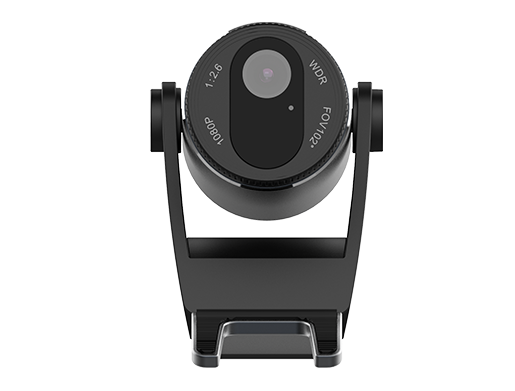
Fanvil CM60 Portable USB Camera
Frequently Asked Questions
First, confirm the USB cable is seated firmly at both the camera and the phone’s USB port. Try a different USB port if the phone has more than one, and reboot the phone while the camera is connected. If the phone still doesn’t see the camera, check that the phone’s firmware is up to date, as older firmware may lack the necessary USB video drivers.
The most common cause is the privacy shutter being closed. Slide the physical shutter on the front of the camera to the open position. If the shutter is open and the screen remains black, try unplugging and reconnecting the camera while on a call to force the phone to reinitialize the video stream.
It will likely be recognized as a standard USB video device on Windows or macOS, but the camera is optimized for Fanvil phones. You won’t get the same seamless integration, and some features like privacy shutter status may not be passed through. For PC‑only use, a general‑purpose webcam may offer better driver support.
Start by cleaning the lens gently with a microfiber cloth. Make sure the camera is positioned no more than arm’s length from you; beyond that, the fixed‑focus lens can’t keep you sharp. Also check the lighting in the room—strong backlight from a window will force the sensor to underexpose your face. Adding a small desk lamp facing you often helps dramatically.
The clip and hinge are designed for lightweight adjustment, but over time the hinge can loosen. Try repositioning the clip on a thinner edge of the phone or monitor to reduce leverage. If the hinge has genuinely worn out, contact your supplier about a replacement; don’t force it, as the plastic housing can crack.
The camera itself is provider‑agnostic—it only sends video to the phone. As long as your Fanvil phone is registered and making video calls through your VoIP service, the CM60 will work. In Canada, it functions equally well with hosted providers like those commonly used in Toronto and the GTA.
This usually points to network congestion rather than a camera fault. Check that your phone’s Ethernet connection is stable and that Quality of Service (QoS) is configured on your router to prioritize voice and video traffic. Temporarily reducing the call’s video resolution through the phone’s settings can also help isolate whether bandwidth is the issue.
The CM60 does not have user‑updatable firmware; it relies on the phone’s USB video drivers. Keeping your Fanvil phone’s firmware current is the best way to ensure compatibility and performance. If you suspect a camera hardware fault after all other steps, reach out to your support team before attempting any invasive troubleshooting.
IP Cameras
Fanvil CM60 Portable USB Camera
The CM60 HD video camera is designed to complement Fanvil's executive phones, such as the X7A Phone. It can be easily installed and placed in various locations to achieve the best possible angle. Key features: • Plug and Play • Adjustable Angle and Flexible Placement • High-Definition 2 Mega Pixels Camera • Privacy Shutter Switch for added security • Suitable for Fanvil high-end phones For a full list of specifications, please refer to the product datasheet.
About This Product
The Fanvil CM60 is a straightforward USB camera built to add video to Fanvil executive desk phones like the X7A. It suits private offices and small huddle spaces where a dedicated video endpoint would be overkill, but a quick face-to-face call is still valuable. Because it draws power and video over a single USB connection, setup is genuinely plug-and-play on compatible Fanvil phones; no separate power supply or driver installation is needed.
In a Canadian business context, this camera often shows up in Toronto financial offices or law firms where professionals use Fanvil’s high-end handsets for voice and want to add occasional video without a full conferencing system. The 2‑megapixel sensor delivers clear enough video for a one-person call, but it won’t rival a proper conference camera in a larger room. The adjustable clip and flexible positioning are practical, though the field of view is fixed and best suited to a single user sitting within arm’s reach of the phone.
A practical trade‑off to know is that this camera is designed specifically for Fanvil’s ecosystem. While it may work as a generic USB webcam on a PC, its primary value comes from the tight integration with Fanvil’s phone interface—auto‑detection and direct control from the phone’s screen. If you’re not using a supported Fanvil executive phone, you’re paying for integration you won’t use. Conversely, for a deployment that already standardizes on those handsets, the CM60 is a tidy, cost‑effective way to add video without adding complexity.
For a larger boardroom or a space where multiple people need to be seen, this camera is underpowered; a dedicated PTZ camera or a full conference bar would be a better fit. But for the one‑person executive office, it’s a sensible accessory that stays out of the way until a video call comes in.
In a Canadian business context, this camera often shows up in Toronto financial offices or law firms where professionals use Fanvil’s high-end handsets for voice and want to add occasional video without a full conferencing system. The 2‑megapixel sensor delivers clear enough video for a one-person call, but it won’t rival a proper conference camera in a larger room. The adjustable clip and flexible positioning are practical, though the field of view is fixed and best suited to a single user sitting within arm’s reach of the phone.
A practical trade‑off to know is that this camera is designed specifically for Fanvil’s ecosystem. While it may work as a generic USB webcam on a PC, its primary value comes from the tight integration with Fanvil’s phone interface—auto‑detection and direct control from the phone’s screen. If you’re not using a supported Fanvil executive phone, you’re paying for integration you won’t use. Conversely, for a deployment that already standardizes on those handsets, the CM60 is a tidy, cost‑effective way to add video without adding complexity.
For a larger boardroom or a space where multiple people need to be seen, this camera is underpowered; a dedicated PTZ camera or a full conference bar would be a better fit. But for the one‑person executive office, it’s a sensible accessory that stays out of the way until a video call comes in.
Services We Provide
- Professional Installation & Configuration
- Ongoing Maintenance & Support
- Troubleshooting & Repairs
- System Upgrades & Updates