
Fanvil H1 Hotel Phone
Frequently Asked Questions
The H1 draws power over Ethernet, so first confirm the switch port supports 802.3af PoE and is enabled. Try a known-working PoE cable and port, and check that the Ethernet link lights are active. If the phone still shows no signs of life, the midspan injector or switch may be under power budget.
Double-check the SIP server address, extension number, and password entered in the web interface. Verify the network settings allow the phone to reach the server (ping test from a laptop on the same VLAN). Common registration failures come from a typo in the authentication ID or an IP address change on the PBX side.
Log into the phone's web UI and confirm that at least one SIP line has registration status 'Registered'. Also ensure the handset cord is firmly seated in the base socket. If the line shows registered but no dial tone, the PBX may be routing calls to a different device or the dial plan is incomplete.
Use the phone's web interface to assign quick-dial extensions to the programmable keys. You can also upload a custom XML configuration file to define labels and dial codes, then link it via the auto-provisioning server. After saving, reboot the phone so the new labels appear on the display.
Network jitter and packet loss are the usual suspects. Check the switch port for errors, confirm QoS is tagging voice traffic with a high priority, and test with a direct patch cable to the core switch. If the issue occurs only during heavy network use, segment the voice VLAN or increase bandwidth reservation for voice.
Yes, as long as the provider supports standard SIP credentials and the phone can reach the server over the internet. You will need to configure the correct outbound proxy address and possibly use a local NTP server. Test latency is under 150 ms for acceptable call quality.
A factory reset is destructive, so first try password recovery through the auto-provisioning server or your phone management platform. If you must proceed, confirm you have backed up any custom configurations, then contact Fanvil support for the specific reset procedure for this model. Doing this without guidance can render the phone unreachable.
Intermittent PoE power is often triggered by a failing switch, a cable that doesn't meet Cat5e standards, or a power budget overrun. Move the phone to a known-good PoE port on a separate switch to narrow down the cause. Also check the phone's uptime logs for brownout events.
The H1 can auto-prov via TFTP/HTTP/HTTPS if DHCP option 66 or vendor-specific options point to the provisioning URL. Confirm your DHCP server is serving the correct next-server address and that the configuration files are accessible. A factory-fresh phone will fetch the setup on first boot; if it doesn't, inspect the MAC-specific config file name for typos.
Clean the plastic lens with a lint-free cloth and mild cleaner, then apply the overlay slowly from one edge to avoid air pockets. If bubbles appear, lift the nearest corner gently and re-smooth. For lasting results, order official Faceplate papers from Fanvil, as third-party prints may not adhere well over time. If the issue persists, a Toronto-based VoIP support provider can usually source the correct media.
IP Phones
Fanvil H1 Hotel Phone
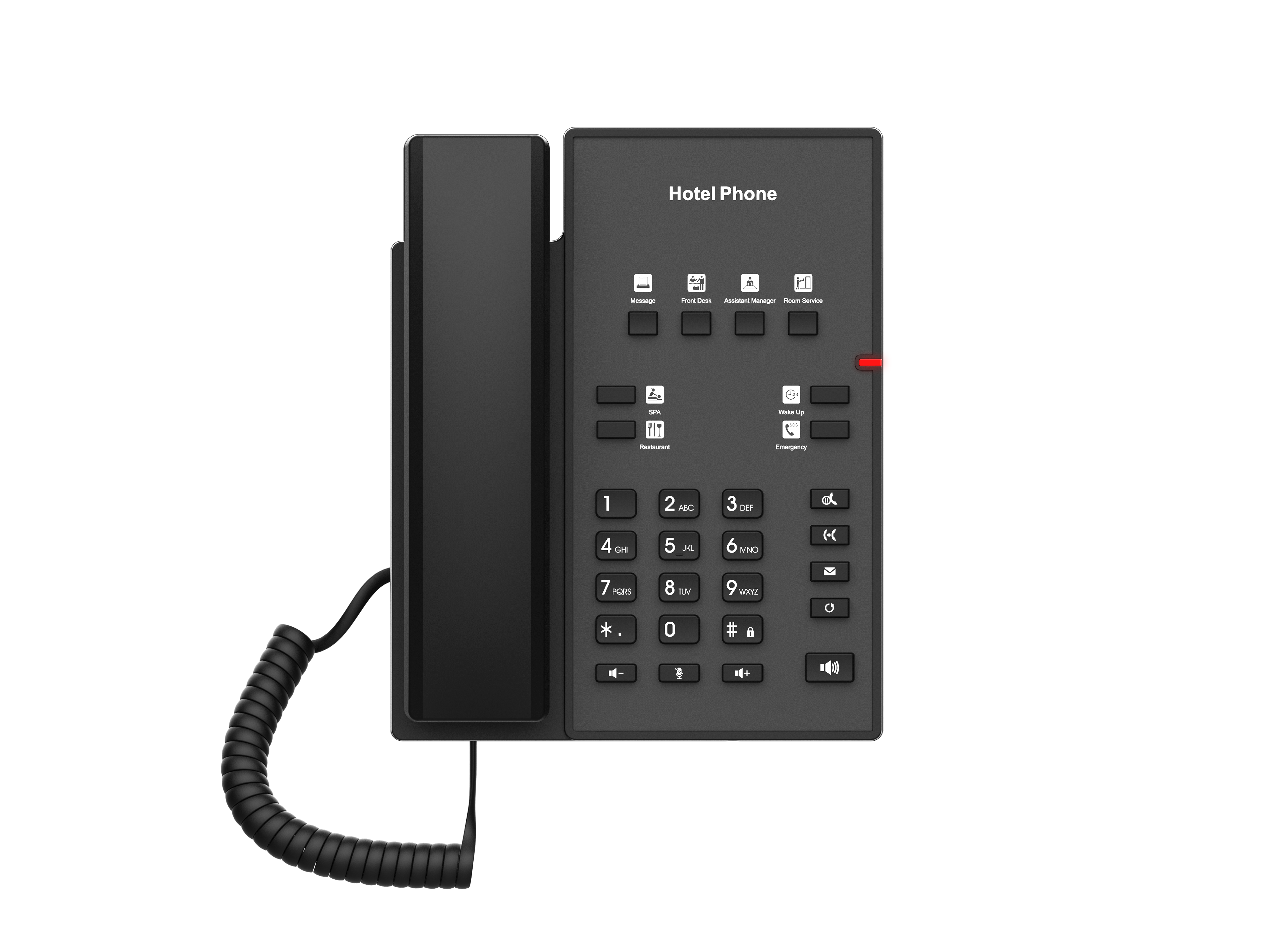
The Fanvil H1 Hotel Phone is a cost-effective, multi-function hotel phone with a contemporary appearance and excellent voice quality. It features: • 8 programmable soft keys for customizable services • HD audio with G.722 and Opus support • 10/100Mbps network port and integrated PoE for high-quality user experience • Unique customizable faceplate • 2 SIP lines For a full list of specifications, please refer to the product datasheet available for download.
About This Product
The Fanvil H1 targets hospitality providers who need a functional, no-fuss guest room phone without inflating per-room costs. Its slim footprint and customizable faceplate let properties maintain a consistent brand look, while integrated PoE streamlines cabling where switch power is already available. Small to mid-size hotels, B&Bs, and senior residences in the GTA often choose it because it slots into existing network infrastructure without major rework.
In a typical deployment, the H1 pairs with an on-premise or cloud-based hotel PBX that supports SIP registration. It is not a general-purpose desk phone for administrative staff: with only two SIP accounts and basic programmable keys, it handles room-to-room dialling, front desk requests, and wake-up calls cleanly but would struggle under the demands of a front desk or reservation centre. Buyers who need advanced call handling, Bluetooth, or gigabit passthrough should look at the Fanvil X or i series instead.
The 10/100 Mbps port is adequate for voice but means the phone will not pass through gigabit speeds if daisy-chained from a guest's laptop. That trade-off is acceptable in setups where the phone sits on its own VLAN and in-room data is delivered via Wi-Fi. Audio quality from the G.722 and Opus codecs is crisp on clean LANs, though like any VoIP device it depends on proper QoS and low jitter. Operations in old Toronto buildings with degraded copper may need to verify that the upstream switch reliably delivers 802.3af power before bulk ordering.
Given the price point, the H1 is overkill for a home office where a basic analogue handset would suffice, yet it is underpowered for a busy concierge desk that juggles multiple simultaneous calls. It shines where the priority is a guest-friendly, branded phone that simply works when the receiver is lifted.
In a typical deployment, the H1 pairs with an on-premise or cloud-based hotel PBX that supports SIP registration. It is not a general-purpose desk phone for administrative staff: with only two SIP accounts and basic programmable keys, it handles room-to-room dialling, front desk requests, and wake-up calls cleanly but would struggle under the demands of a front desk or reservation centre. Buyers who need advanced call handling, Bluetooth, or gigabit passthrough should look at the Fanvil X or i series instead.
The 10/100 Mbps port is adequate for voice but means the phone will not pass through gigabit speeds if daisy-chained from a guest's laptop. That trade-off is acceptable in setups where the phone sits on its own VLAN and in-room data is delivered via Wi-Fi. Audio quality from the G.722 and Opus codecs is crisp on clean LANs, though like any VoIP device it depends on proper QoS and low jitter. Operations in old Toronto buildings with degraded copper may need to verify that the upstream switch reliably delivers 802.3af power before bulk ordering.
Given the price point, the H1 is overkill for a home office where a basic analogue handset would suffice, yet it is underpowered for a busy concierge desk that juggles multiple simultaneous calls. It shines where the priority is a guest-friendly, branded phone that simply works when the receiver is lifted.
Services We Provide
- Professional Installation & Configuration
- Ongoing Maintenance & Support
- Troubleshooting & Repairs
- System Upgrades & Updates



