
Fanvil H3 Basic Hotel IP Phone in Black
AIM Telecom provides troubleshooting and configuration support for this product to businesses across Toronto and the GTA. Contact us to confirm whether the issue can be handled by phone or requires on-site service.
Get Support Call 416-312-4819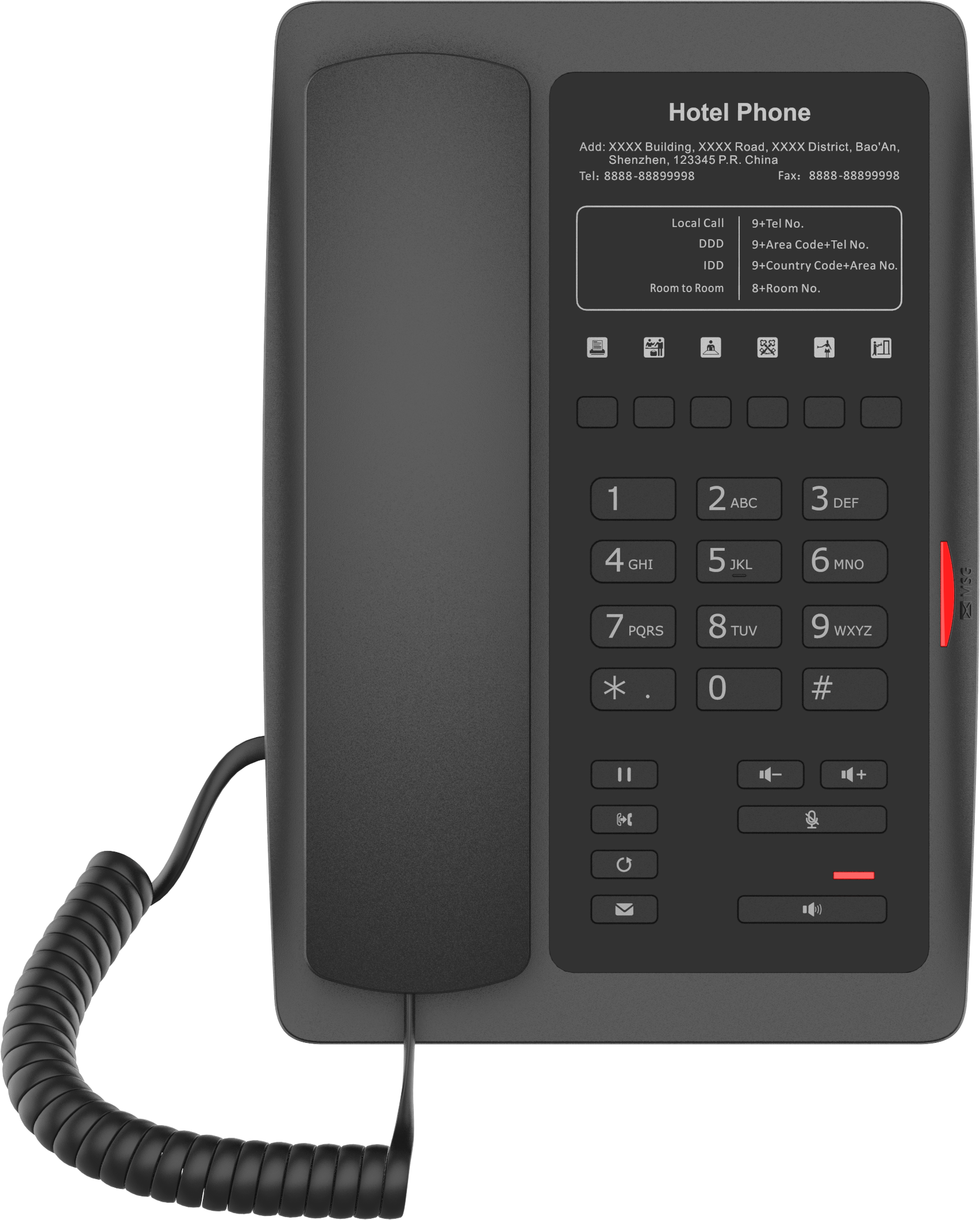
Common issues and fixes
Reviewed troubleshooting steps are not yet available for this model.
Ask AIM Telecom about this productAbout this product
The Fanvil H3 is an economical, yet reliable hotel phone with a contemporary appearance and excellent voice quality. It features 6 programmable soft keys for quick extensions such as housekeeping, ticketing, food & beverage, and more.
Key Features:
• Compatible with major communication platforms
• Easy to use and install
• Elegant design for a great guest experience
• Available in White
The Fanvil H3 includes:
• 1 SIP Line
• 6 Programmable keys
• 1 USB Charging Port
• PoE (Power over Ethernet) capability
• Indicator Light
• Call Transfer functionality
Key Features:
• Compatible with major communication platforms
• Easy to use and install
• Elegant design for a great guest experience
• Available in White
The Fanvil H3 includes:
• 1 SIP Line
• 6 Programmable keys
• 1 USB Charging Port
• PoE (Power over Ethernet) capability
• Indicator Light
• Call Transfer functionality
More product details
The Fanvil H3 is a straightforward IP phone purpose-built for hotel guest rooms, where reliability and simplicity matter more than advanced telephony features. Its six programmable soft keys can be set for housekeeping, front desk, room service, and other common requests, giving guests one-touch access without hunting for a directory. A built-in USB charging port adds everyday value for travellers who need to top up a phone or tablet, and PoE support means a single Ethernet cable handles both data and power, keeping bedside installations tidy. Mid-scale hotels, motels, and B&Bs looking to replace aging analog sets with a modern SIP endpoint will find it a sensible, budget-friendly option.
This phone pairs well with any standards-based SIP PBX—whether on-premise systems like FreePBX or Asterisk, or hosted platforms commonly used in Canadian hospitality. It’s not a fit for front-desk or administrative stations that need multiple line appearances, busy lamp fields, or a colour screen; those roles demand a more feature-rich desk phone. Similarly, if your deployment requires Wi-Fi or Bluetooth, the H3 is limited to a wired Ethernet connection. For a typical guest room, however, its single SIP line and essential call functions are exactly what most properties need.
Trade-offs include the absence of a display, so visual call information like caller ID or message waiting must be conveyed through the indicator light alone. The single line also means only one active call at a time—fine for a guest, but something to plan around if you were considering it for suite kitchens or lounge areas with heavier usage. Large hotel chains should confirm that their provisioning server can push the required configuration template to the H3; it’s compatible with standard TR-069 or HTTP provisioning, but any custom integration should be validated in advance.
In a Canadian business context, the H3 works well with domestic VoIP providers that prefer G.711 or G.729 codecs, and its PoE support plays nicely with most enterprise-grade switches found in GTA hotels. For properties upgrading from traditional two-wire analog, it represents a low-risk move into IP-based voice without guest-facing complexity.
This phone pairs well with any standards-based SIP PBX—whether on-premise systems like FreePBX or Asterisk, or hosted platforms commonly used in Canadian hospitality. It’s not a fit for front-desk or administrative stations that need multiple line appearances, busy lamp fields, or a colour screen; those roles demand a more feature-rich desk phone. Similarly, if your deployment requires Wi-Fi or Bluetooth, the H3 is limited to a wired Ethernet connection. For a typical guest room, however, its single SIP line and essential call functions are exactly what most properties need.
Trade-offs include the absence of a display, so visual call information like caller ID or message waiting must be conveyed through the indicator light alone. The single line also means only one active call at a time—fine for a guest, but something to plan around if you were considering it for suite kitchens or lounge areas with heavier usage. Large hotel chains should confirm that their provisioning server can push the required configuration template to the H3; it’s compatible with standard TR-069 or HTTP provisioning, but any custom integration should be validated in advance.
In a Canadian business context, the H3 works well with domestic VoIP providers that prefer G.711 or G.729 codecs, and its PoE support plays nicely with most enterprise-grade switches found in GTA hotels. For properties upgrading from traditional two-wire analog, it represents a low-risk move into IP-based voice without guest-facing complexity.