
Fanvil H3 Basic Hotel IP Phone White | Single-Line, PoE, 6 DSS Keys

Frequently Asked Questions

First, double-check that the SIP server address, username, and password are entered correctly in the phone's network and account settings. A common mistake is a typo in the server URL or a mismatch between the extension credentials and what the provider expects. If the issue persists, a Toronto-based VoIP support provider can usually resolve this remotely.
Verify that your network switch supports Power over Ethernet (PoE) and that the port is enabled. If your switch does not provide PoE, you will need to use a PoE injector or a separate power adapter (not included). Also, try a different Ethernet cable and a different switch port to rule out a bad cable or port.
Access the phone's web interface or use the phone's menu to assign each DSS key a speed-dial number. You can set the key to call a specific extension, like housekeeping or front desk, so guests just press that key to connect. This can also be done via mass provisioning if you are deploying many phones.
This usually means the phone is not registered to your VoIP server. Check the phone's status page for registration errors. Also, confirm that the network cable is securely plugged into the LAN port (not the PC port) and that the phone has obtained an IP address (check via the phone's settings under Network).
No, the H3 is a SIP-based IP phone and requires a VoIP service or PBX to function. It will not work with a traditional analog phone line (POTS). You would need an ATA (analog telephone adapter) to connect an analog line to your network, but that is a different setup.
First, ensure the phone's volume is not set too high, and that the speakerphone is not placed near walls or hard surfaces that cause reflections. You can also adjust the acoustic echo cancellation (AEC) settings in the phone's web interface under Audio. If the issue continues, try a different network cable or check for background noise in the room.
The H3 supports provisioning via FTP, TFTP, HTTP, HTTPS, or TR-069. You can set up a provisioning server with a configuration file that includes all common settings (SIP credentials, DSS keys, etc.) and then point each phone to that server via its network settings or DHCP options. This allows you to configure dozens of phones without touching each one individually.
Dropped calls are often a network issue, not a phone defect. Check that your network has a stable connection and that the phone's Ethernet cable is secure. Also, verify that your router or firewall is not set to drop long-running UDP sessions; some VoIP providers recommend enabling SIP ALG or adjusting NAT settings. If the problem only happens with one provider, contact them for guidance.
Yes, the integrated USB port on the side is designed for charging guest devices, such as smartphones or tablets. It is a convenient feature for hotel rooms, but note that it is for charging only and does not support data transfer or peripheral connections.
Try a different Ethernet cable and a different switch port. If the phone still shows the error, check that your switch port is active and that the cable is not damaged. You can also try plugging the phone directly into a known-good network drop to isolate the issue. If it works elsewhere, the problem is with the original cable or port.
IP Phones

Fanvil H3 Basic Hotel IP Phone White | Single-Line, PoE, 6 DSS Keys
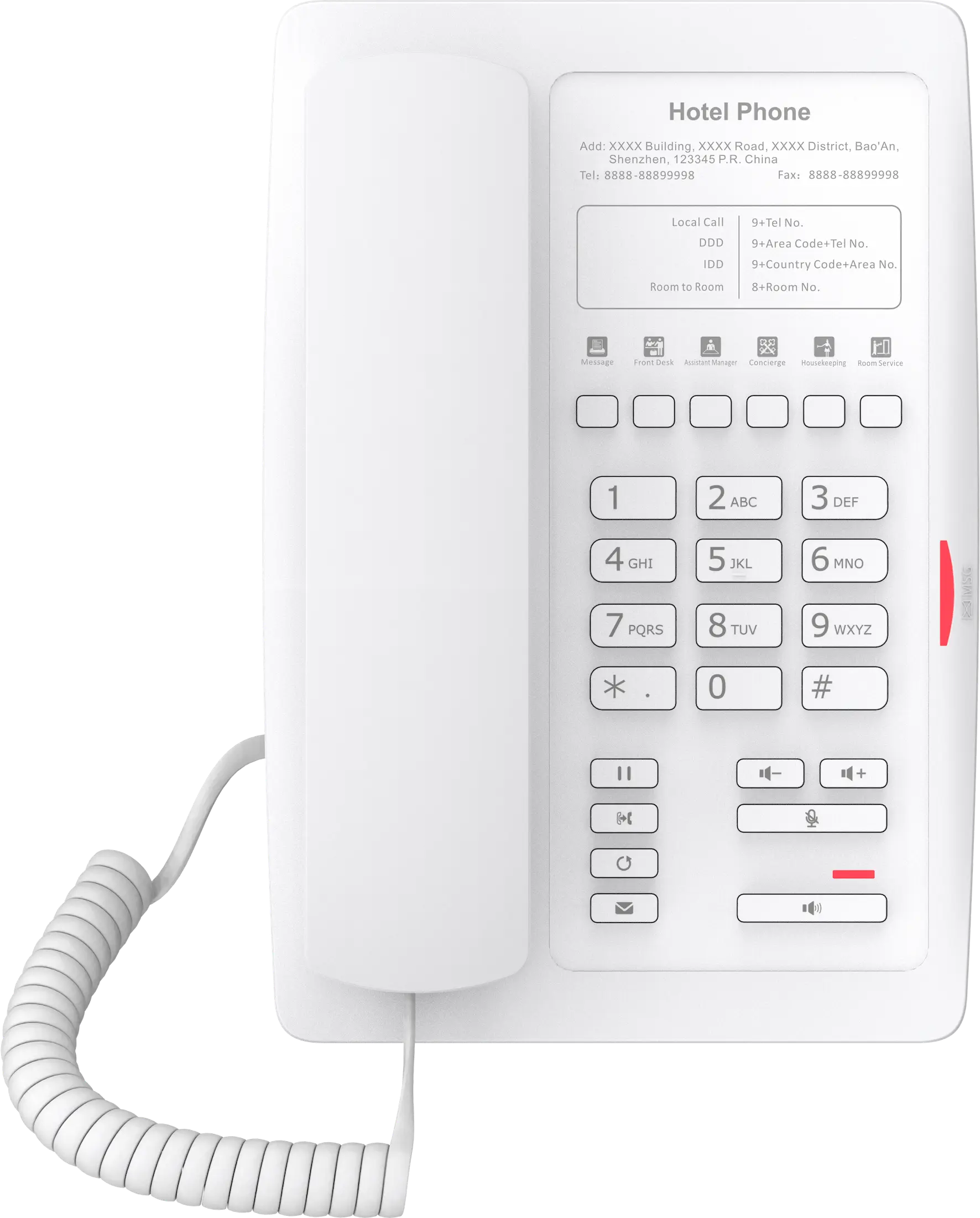
• The Fanvil H3 White is a compact, high-quality Basic Hotel IP Phone designed for seamless integration into modern hotel rooms or corporate environments. • Features: • Single-line SIP communication • Minimalist design with professional white color • Integrated USB charging port on the side • 6 programmable DSS keys (Soft Keys) for customizable quick dialing of critical services • Instant access to phone functionality, eliminating need for guests to dial extensions or refer to directories • High-quality audio with Full-Duplex Hands-free Speakerphone and AEC (Acoustic Echo Cancellation) • PoE support with Dual 10/100 Mbps Ethernet Ports and Power over Ethernet (PoE) capabilities • Easy provisioning via FTP/TFTP/HTTP/HTTPS/TR-069 for effortless mass configuration and management • Package contents: • Fanvil H3 White IP Phone Unit • Handset with Handset Cord • Desk Stand • Ethernet Cable • Quick Start Guide

About This Product

The Fanvil H3 is a single-line hotel IP phone designed for guest rooms where simplicity and ease of use are the top priorities. Its minimalist white finish and compact footprint make it a natural fit for bedside tables or desks in hotels, motels, and corporate guest suites. The six programmable DSS keys allow front desk staff to pre-configure one-touch dialing for housekeeping, room service, or concierge, eliminating the need for guests to look up or dial extensions. For small offices or shared workspaces that need a basic, low-cost endpoint, the H3 can serve as a straightforward replacement for an analog desk phone, provided your network supports Power over Ethernet (PoE).

A key tradeoff to consider is that this is a single-line phone, so it cannot handle multiple concurrent calls or hold-and-swap between lines the way a multi-line model would. It is overkill for a room that will never use the handsfree speakerphone or USB charging, but underpowered for any desk that needs call park, BLF, or more than one active call. The lack of a built-in power adapter means you must either have PoE switches or purchase a separate power supply, which is a common consideration in Canadian deployments where older buildings may not have PoE-ready network drops. For straightforward hotel rollouts or simple front-desk positions, the H3 delivers exactly what it promises—no more, no less.
Services We Provide
  • Professional Installation & Configuration
  • Ongoing Maintenance & Support
  • Troubleshooting & Repairs
  • System Upgrades & Updates



