
Fanvil H3W 2-Line WiFi IP Phone for Hospitality and Retail-H3W White

Frequently Asked Questions

First, confirm the phone is connected to the correct WiFi network and has a valid IP address by checking the phone's network status in its menu. Then, verify the SIP server address, username, and password are entered exactly as provided by your VoIP carrier, paying close attention to any capitalization. A simple power cycle of the phone and your network equipment can also resolve transient registration glitches.
Choppy audio on a WiFi phone is almost always a signal strength or interference issue. Check the WiFi signal indicator on the phone's screen; if it’s low, try moving the phone's location to see if the quality improves. You should also ensure your wireless access point is not overloaded and that Quality of Service (QoS) is configured on your router to prioritize voice traffic.
First, test the electrical outlet with another device to confirm it is working. Then, check that the power adapter's barrel connector is fully and firmly seated in the phone's power port. If you are using Power over Ethernet, confirm the Ethernet cable is plugged into a PoE-enabled switch or injector and that the switch port has power enabled.
You can program the six function keys through the phone's web interface, typically by navigating to the 'Function Keys' or 'Programmable Keys' section. You can assign each key a direct number, such as the front desk or housekeeping, and label it with a descriptive name. This configuration can be done remotely by your IT administrator if the phone is set up for auto-provisioning.
This message usually means the phone cannot reach the provisioning server to download its configuration. First, double-check the provisioning server URL in the phone's settings against the one provided by your VoIP provider. Ensure the phone has internet access by verifying its IP address and DNS settings, and confirm that no firewall is blocking the phone's connection to the server.
Yes, the Fanvil H3W is compatible with standard IEEE 802.3af PoE switches and injectors, which is the common standard in most offices and hotels. If you are deploying multiple phones, using a PoE switch simplifies installation, but the phone will draw power from a standard PoE port without needing a special adapter. If you are using the phone over WiFi, however, you will need the optional external power supply as PoE is not available over a wireless connection.
The default login credentials are typically 'admin' for both the username and password, so try those first if they haven't been changed. If a custom password was set and forgotten, a factory reset is the primary way to regain access, but this will erase all configurations. Before attempting a reset, contact your phone system administrator or a VoIP support provider, as they may have a record of the password or a back-up of your settings.
From the phone's menu, go to the WiFi settings and choose the option to manually add a network. You will need to enter the exact SSID, select the security type, and carefully type the password. The phone should then be able to connect and obtain an IP address automatically via DHCP.
The USB port on the H3W is designed for charging and should provide power whenever the phone is powered on. If it's not working, first try a different USB cable to rule out a cable fault. If the issue persists, check that the phone's power source is providing adequate power, as a faulty adapter could affect the USB output.
This suggests an issue with the phone's microphone. First, confirm that the mute button is not accidentally engaged, as this is the most common cause. If unmuted, try making a call with the handset to see if the internal microphone works there; if it does, the problem may be isolated to the speakerphone microphone and could require further diagnostics.
IP Phones

Fanvil H3W 2-Line WiFi IP Phone for Hospitality and Retail-H3W White
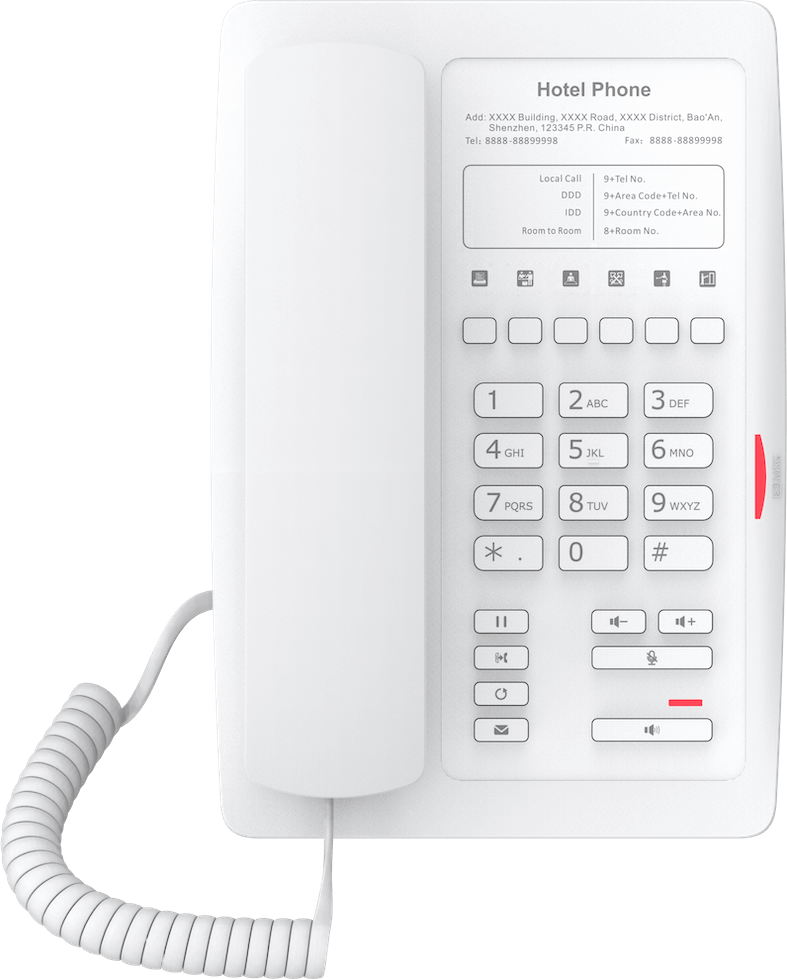
• The Fanvil H3W IP Phone White offers an incredibly easy and affordable way to deploy a complete telephony system in hotels, retail outlets, and hospitals. • Key features include: • Integrated Wi-Fi for flexible deployment • 2 SIP lines supporting HD Audio and Opus Codec for superior audio quality • Built-in USB Charging Port for convenient charging of mobile devices • 6 programmable keys designed for quick-access functions like Speed Dial, Service Hotline, or direct department access • Reliable performance with flexible power solutions, including PoE (Power over Ethernet) and an Optional External Power Supply • The phone includes standard hotel and business functions such as Call Hold, Redial, Call Transfer, and Voice Mail. • For a full list of specifications, please refer to the Fanvil H3W Wireless White Hotel IP Phone Datasheet (PDF).

About This Product

The Fanvil H3W is a purpose-built endpoint for environments where simplicity and reliability matter more than advanced telephony features. It is designed for guest-facing deployments in hotels and patient rooms in healthcare facilities, as well as light-use desks in retail settings. The integrated Wi-Fi removes the need for a network cable at every bedside or counter, which can simplify installation in buildings where running new cabling is impractical or expensive. For a Canadian hotel or hospital wing, this phone is a practical way to deliver a consistent, professional voice service without adding clutter.

The two-line capacity and HD audio support mean it handles basic call traffic clearly, and the built-in USB charging port addresses the modern expectation that any surface in a room should be able to charge a phone. The six programmable keys can be set for common one-touch actions like dialing the front desk, housekeeping, or a local taxi service, which makes it genuinely useful for guests. It is not a device for heavy office use; the handset and interface are streamlined for short, transactional calls rather than all-day use by a knowledge worker.

If you are outfitting a small or mid-sized hotel in the GTA, this model pairs well with a hosted PBX platform that supports zero-touch provisioning, allowing your IT provider to pre-configure units before shipping them to the property. The dual power option—PoE or an external adapter—gives some flexibility, but in a WiFi deployment where a cable is not already present, the external power supply is often the practical reality. Keep in mind that WiFi reliability depends entirely on the site’s access point coverage; a weak signal in a guest room will directly impact call quality, so a site survey is essential.

For a large corporate office or a call center, this device would be underpowered. It lacks the gigabit pass-through, advanced programmable logic, and wideband handset design of a business-class desk phone. It is best understood as a hospitality appliance: easy to clean, easy to use, and easy to deploy at scale, but not a replacement for a full-featured executive or reception phone.
Services We Provide
  • Professional Installation & Configuration
  • Ongoing Maintenance & Support
  • Troubleshooting & Repairs
  • System Upgrades & Updates



