
Fanvil H3W WiFi Hotel IP Phone in Black
Frequently Asked Questions
First, confirm the phone is within good range of an access point and that the SSID you are trying to join is broadcasting on 2.4 GHz, as the H3W does not support 5 GHz bands. Next, double-check that the WiFi password was entered exactly as provided, including any uppercase or special characters. If the network uses a captive portal, note that the H3W cannot complete browser-based authentication on its own; you will need to whitelist the phone's MAC address in the access-point controller or use a pre-shared-key network.
Verify that the SIP server address, username, and password entered in the phone's account settings match exactly what your VoIP provider supplied. Also confirm that the WiFi network allows outbound SIP traffic on port 5060 or the custom port your provider uses; some guest networks block SIP by default. A quick test is to temporarily connect the phone to a mobile hotspot with no firewall restrictions and see if registration succeeds, which would point to a network policy issue.
Check that the handset or speaker volume is not turned all the way down by pressing the volume-up key during a call. If that is fine, the problem is often one-way audio caused by a NAT or firewall rule on the local router; confirm that the router has SIP Application Layer Gateway (ALG) disabled, as ALG can rewrite audio ports incorrectly. If you are behind a double-NAT setup, such as a WiFi network that feeds into another router, ask your IT provider to ensure the phone's RTP port range is forwarded or that a session border controller is in use.
No, the USB port on the H3W is strictly for charging external devices like a smartphone. It does not support connecting a headset, a WiFi dongle, a flash drive for recording, or any data peripherals. For a headset, you will need to use the dedicated RJ9 handset port or the speakerphone.
You can set them through the phone's web interface by logging into its IP address and navigating to the programmable key or DSS key section. Assign each key a memory type of Speed Dial, then enter the target extension or phone number and an optional label. Alternatively, if your hosted PBX supports remote provisioning, you can push the speed-dial configuration to all handsets from a central management portal.
Start by moving the phone to the same room as the access point to rule out distance or interference as the cause. In the access-point settings, disable any band-steering or 'fast roaming' features that may push the phone between bands it does not support, and ensure the minimum data rate is not set so high that the phone gets excluded. If the issue persists, a Toronto-based VoIP support provider can usually resolve this remotely by analyzing the WiFi controller logs and adjusting the quality-of-service rules for voice traffic.
The H3W is a standard SIP phone, not a native Teams or Zoom-certified device. It can work with Teams Direct Routing or Zoom's bring-your-own-device SIP gateway if your VoIP provider has configured that integration, but it will not give you the full Teams or Zoom user interface or one-touch meeting join. For a guest-room phone that simply needs to make and receive external calls through a SIP trunk, it works well without any of those platforms.
First, dial into your voicemail box and delete any saved messages, then hang up and wait a moment for the message-waiting indicator to refresh. If the light remains on, log into the phone's web interface and check the SIP account's message-waiting subscription settings; the voicemail server address may be incorrect or the subscribe period may be set too short. A power cycle after correcting the settings often clears a stuck indicator.
PoE and WiFi are unrelated; the phone can receive power through its Ethernet port using PoE, but that same cable also provides the wired network connection. If you use the Ethernet port only for power and rely on WiFi for data, you must disable the wired network interface in the phone's settings, otherwise it may try to register over the wired link instead. Most WiFi-only deployments simply use the optional external power adapter and leave the Ethernet port empty.
Confirm that the Opus codec is enabled and prioritized in the phone's audio settings, as it generally delivers better voice quality on constrained WiFi links. Also check the access-point configuration for any deep-packet inspection or traffic-shaping rules that may be delaying voice packets; placing the phone's traffic in a dedicated QoS queue with strict priority can make a noticeable difference. If the problem only happens on certain calls, the far-end network or handset may be the bottleneck rather than your own setup.
IP Phones
Fanvil H3W WiFi Hotel IP Phone in Black
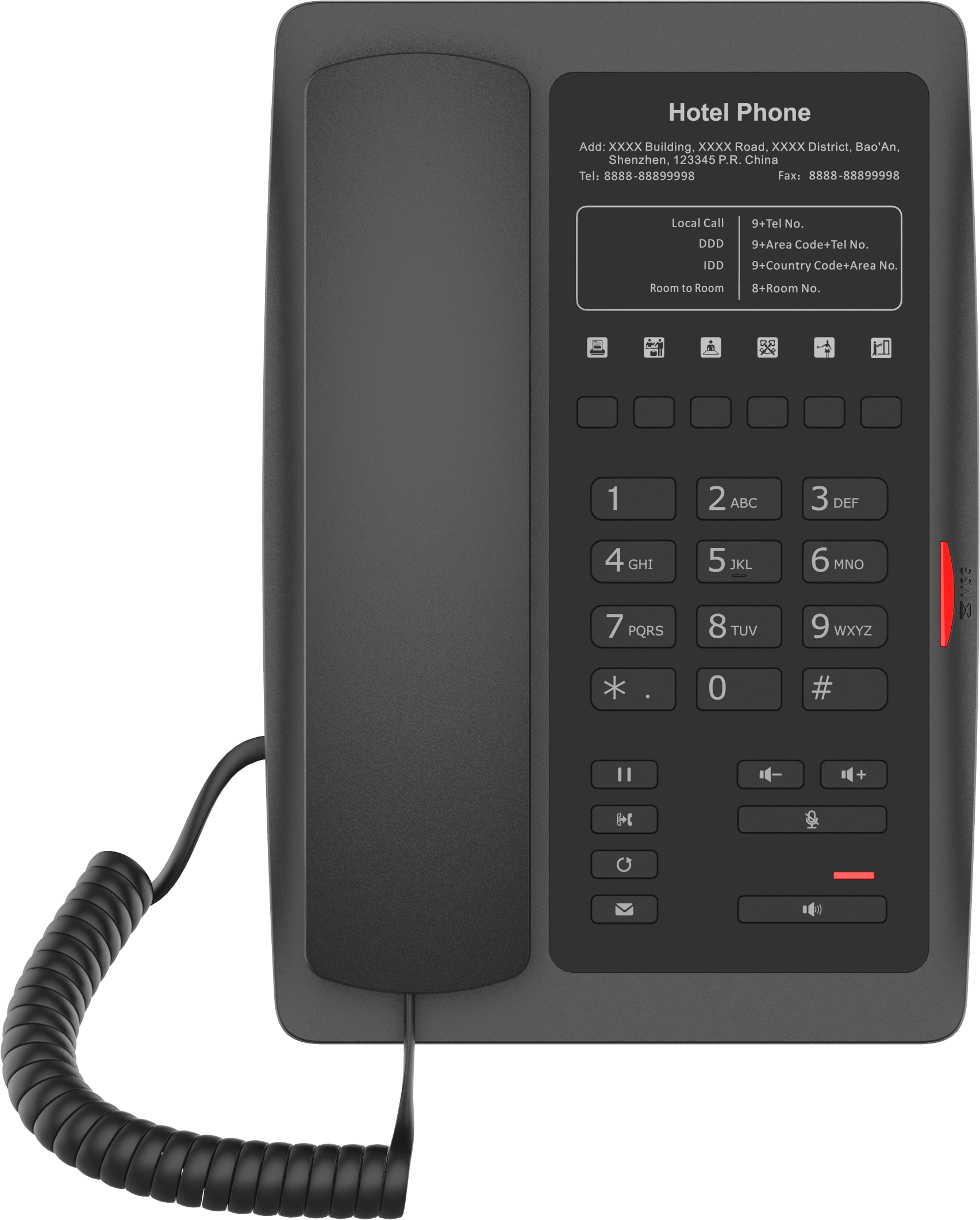
• The Fanvil H3W IP Phone is a wirelessly deployable solution for hotels and businesses, offering ease of use and impressive features. • Speed dial • Service hotline • Integrated USB charging port • Supports Opus Codec • High Definition Audio • Key Features: • Black finish • 2 SIP lines • 1 USB port for phone charging • 6 programmable keys for speed dial functions • Support for PoE • Optional external power supply • Indicator light • Call hold, redial, call transfer, hotline, voice mail features • For a full list of specifications and product details, please refer to the Fanvil H3W WiFi Hotel IP Phone datasheet.
About This Product
The Fanvil H3W is a purpose-built WiFi IP phone designed for environments where running Ethernet cables to every bedside or desk is impractical or unsightly, such as boutique hotels, senior living residences, and dormitories. Its black finish and compact footprint let it blend into a nightstand or workstation without dominating the space. Because it connects over wireless, the H3W makes sense for properties that want to add or relocate extensions without opening walls, provided the site already has a well-engineered WiFi network that can handle real-time voice traffic reliably.
What the H3W does well is cover the handful of tasks a guest or resident actually needs: a couple of SIP lines, a few one-touch speed dials for front desk or concierge, and a USB port to top up a personal phone. It is not a knowledge-worker device; there is no large screen, no browser, and no support for expansion modules or busy-lamp-field monitoring. For a front-desk supervisor or a multi-line attendant, this phone would be underpowered, but for a guest room it hits the right balance of simplicity and function.
A practical limitation to weigh is that WiFi voice quality depends entirely on the access-point layout, channel congestion, and whether the network has been tuned for low-latency traffic. In a Toronto hotel with dense walls, a single AP per floor may not be enough to guarantee clear calls in every corner suite. The phone supports PoE, which is helpful if you are already running a powered Ethernet drop nearby, but its primary deployment model is wireless, so most buyers will rely on the optional external power supply and a nearby AC outlet.
For a Canadian property manager upgrading from analog handsets on an aging PBX, the H3W offers a straightforward path to a hosted VoIP platform without rewiring the building. Pair it with a cloud-based PBX that supports zero-touch provisioning over WiFi, and you can stage dozens of handsets in a maintenance room and have them auto-configure when plugged in at their final location. It is not the right tool for a call-center floor or an executive desk that needs wideband video and a dozen line appearances, but for a guest-facing extension that needs to look clean and stay out of the way, it fits the brief.
What the H3W does well is cover the handful of tasks a guest or resident actually needs: a couple of SIP lines, a few one-touch speed dials for front desk or concierge, and a USB port to top up a personal phone. It is not a knowledge-worker device; there is no large screen, no browser, and no support for expansion modules or busy-lamp-field monitoring. For a front-desk supervisor or a multi-line attendant, this phone would be underpowered, but for a guest room it hits the right balance of simplicity and function.
A practical limitation to weigh is that WiFi voice quality depends entirely on the access-point layout, channel congestion, and whether the network has been tuned for low-latency traffic. In a Toronto hotel with dense walls, a single AP per floor may not be enough to guarantee clear calls in every corner suite. The phone supports PoE, which is helpful if you are already running a powered Ethernet drop nearby, but its primary deployment model is wireless, so most buyers will rely on the optional external power supply and a nearby AC outlet.
For a Canadian property manager upgrading from analog handsets on an aging PBX, the H3W offers a straightforward path to a hosted VoIP platform without rewiring the building. Pair it with a cloud-based PBX that supports zero-touch provisioning over WiFi, and you can stage dozens of handsets in a maintenance room and have them auto-configure when plugged in at their final location. It is not the right tool for a call-center floor or an executive desk that needs wideband video and a dozen line appearances, but for a guest-facing extension that needs to look clean and stay out of the way, it fits the brief.
Services We Provide
- Professional Installation & Configuration
- Ongoing Maintenance & Support
- Troubleshooting & Repairs
- System Upgrades & Updates



