
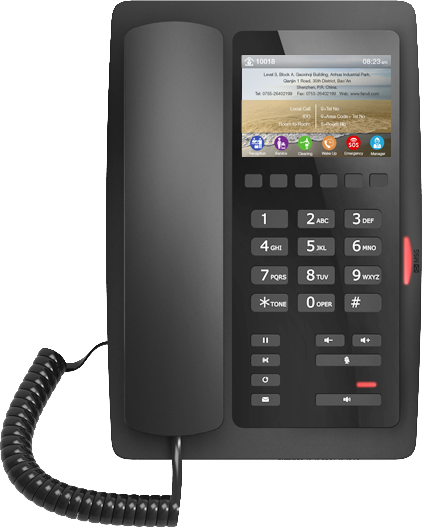
Fanvil H5 Elegant High-end Color Display Hotel Phone Black
Frequently Asked Questions
The ‘No Service’ message almost always means the phone cannot reach the SIP server or the account credentials are not yet accepted. Verify the Ethernet cable is connected to the correct port (not the PC passthrough) and that the phone is receiving PoE or external power. Then confirm the SIP server address, username, and password in the phone’s web interface match exactly what your hosted provider or on-site PBX supplied.
Upload your logo through the phone’s web interface under the display or branding settings section, using the image format and dimensions specified by Fanvil (typically a small bitmap or JPEG file). The phone does not accept arbitrary image sizes, so prepare the file ahead of time ensuring it meets the recommended resolution. Once applied, the logo appears on the idle screen alongside any custom text you have entered.
First, confirm the phone is receiving adequate power. If you are using PoE, try a different known-good switch port or a short patch cable; a failing PoE negotiation can cause a dim or flickering display. If you are using an external power adapter, ensure it supplies the correct voltage and current rating for this model.
The H5 has a 10/100 Mbps Ethernet switch, so the passthrough port will cap at 100 Mbps. For basic email and browsing this is usually fine, but streaming video or large downloads will be limited compared to a direct Gigabit connection. If your property provides high-speed wired access at the desk, consider a network drop that does not pass through the phone.
Soft keys are typically configured through the phone’s web interface under a function key or programmable key section. You supply the label (for example, ‘Housekeeping’) and the destination extension or feature code. If the keys are unresponsive, double-check that the provisioning template from your PBX has not overwritten your manual changes.
Choppy or one-way audio on a single-line IP phone often points to a network issue rather than a faulty handset. Start by moving the phone to a different switch port or a shorter cable run. Check for duplex mismatches on the switch port, and if SIP ALG is enabled on your router or firewall, try disabling it, as it can interfere with the RTP audio stream. If the problem persists, a Toronto-based VoIP support provider can usually resolve this remotely after a quick packet capture.
A factory reset clears all configuration and should be treated as a last resort after confirming the cause of the issue. If the phone was provisioned by a service provider or property management system, contact them first; they may be able to push a clean configuration or supply the password without a destructive wipe. Unauthorized resets can leave the phone non-functional on your network.
IP Phones
Fanvil H5 Elegant High-end Color Display Hotel Phone Black
* The Fanvil H5 is a high-end IP Phone designed for hotel professionals, featuring 1-SIP line and customizable 3.5-inch color display. * The phone has a contemporary appearance that fits into any modern space, providing great voice quality and integration with various communications platforms. * Key features include: + Programmable soft keys for housekeeping, food & beverage, and other services + Support for fast Ethernet-10/100 Mbps network port + Compatible with major platforms: 3CX, Broadsoft, Elastix, Asterisk, Xorcom + PoE power supply option * The phone's display can be branded with the hotel's logo, address, and extensions to provide a personalized touch. * Available in White and black colors.
About This Product
The Fanvil H5 is built for hotel and guest-room environments where a discreet, fixed-function VoIP endpoint matters more than a multi-line office phone. It belongs at the bedside or on a lobby desk, delivering one high-quality SIP line through a familiar handset layout. The standout is its customizable 3.5-inch colour screen: properties can brand it with a logo, property address, and internal extensions, turning a utility device into a subtle guest-services touchpoint. This is not a phone for power users or receptionists juggling multiple calls; it is purpose-fit for environments where simplicity, aesthetics, and light customisation carry the day.
In a typical deployment, the H5 pairs naturally with hospitality-oriented PBX platforms—Broadsoft, 3CX, or Asterisk-based systems—and benefits from PoE so a single network cable handles both connectivity and power. The 10/100 Mbps port is sufficient for voice traffic and light data passthrough, but integrators should note it is not a Gigabit switch: daisy-chaining a high-bandwidth device through the phone’s pass-through port may bottleneck throughput. For a guest-room phone that does not double as a network hub, this is rarely a practical concern.
From a Canadian hospitality perspective, the device fits well with property management system integrations commonly used in Toronto, Vancouver, and other major markets, provided the platform supports the Fanvil provisioning workflow. The programmable soft keys—housekeeping, room service, front desk—match the operational rhythm of a hotel, reducing the need for printed tent cards or separate speed-dial lists. It is not, however, a cordless DECT handset or a video endpoint, so it will not replace a bathroom phone or a door-entry intercom; it occupies the wired, feature-display phone slot.
Small boutique hotels and motels that need fewer than a dozen endpoints will find the H5 cost-effective and easy to brand, while large properties should weigh the provisioning toolchain against their incumbent vendor’s zero-touch options. The phone is overkill for a back-office break room that only needs a basic dial tone, and it is underpowered for a front-desk manager who requires multiple line appearances, busy lamp fields, or a sidecar.
In a typical deployment, the H5 pairs naturally with hospitality-oriented PBX platforms—Broadsoft, 3CX, or Asterisk-based systems—and benefits from PoE so a single network cable handles both connectivity and power. The 10/100 Mbps port is sufficient for voice traffic and light data passthrough, but integrators should note it is not a Gigabit switch: daisy-chaining a high-bandwidth device through the phone’s pass-through port may bottleneck throughput. For a guest-room phone that does not double as a network hub, this is rarely a practical concern.
From a Canadian hospitality perspective, the device fits well with property management system integrations commonly used in Toronto, Vancouver, and other major markets, provided the platform supports the Fanvil provisioning workflow. The programmable soft keys—housekeeping, room service, front desk—match the operational rhythm of a hotel, reducing the need for printed tent cards or separate speed-dial lists. It is not, however, a cordless DECT handset or a video endpoint, so it will not replace a bathroom phone or a door-entry intercom; it occupies the wired, feature-display phone slot.
Small boutique hotels and motels that need fewer than a dozen endpoints will find the H5 cost-effective and easy to brand, while large properties should weigh the provisioning toolchain against their incumbent vendor’s zero-touch options. The phone is overkill for a back-office break room that only needs a basic dial tone, and it is underpowered for a front-desk manager who requires multiple line appearances, busy lamp fields, or a sidecar.
Services We Provide
- Professional Installation & Configuration
- Ongoing Maintenance & Support
- Troubleshooting & Repairs
- System Upgrades & Updates



