
Fanvil H5 Hotel IP Phone White | 3.5" Color Screen, PoE, USB Charging, 6 DSS Keys

Frequently Asked Questions

First, confirm the Ethernet cable is firmly connected to both the phone's WAN port and a PoE-enabled switch port that can supply 802.3af power. Try a different known-good cable and port; if the switch has per-port power budgeting, verify that the port is not disabled. If your network doesn't provide PoE, you will need to use a compatible PoE injector – the H5 does not include an AC adapter.
Start by checking that the phone has a valid IP address from your network; navigate to the phone's status screen to confirm. Then review the SIP server address, extension username, and password under the account settings. A simple reboot of the phone can often clear a stuck registration attempt. If the problem persists, a Toronto-based VoIP support provider can usually resolve this remotely by verifying server reachability and credentials.
The most common cause is that the phone hasn’t registered with your SIP server. Check the registration indicator on the display; if it shows unregistered, troubleshoot the account settings as above. Also try plugging the handset into a different port on the phone base, and restart the device. Make sure the phone is not locked or in a restricted mode from the provisioning template.
Echo and choppy audio are usually network-related rather than a phone fault. First, reboot the phone and test with a different Ethernet cable and switch port. If the issue continues, check that your network has Quality of Service (QoS) prioritization for voice traffic and that jitter is within acceptable limits. The H5’s built-in acoustic echo canceller works best when the handset or speakerphone is used as intended – heavy background noise can still degrade the experience.
The USB port draws power from the PoE supply, so first make sure the phone is receiving adequate power (some legacy PoE switches provide only minimal power per port). Try a different USB cable and device to rule out a cable or device fault. If the problem is consistent across multiple cables and the phone itself is working fine, the USB port may have been inadvertently disabled via provisioning – check the configuration template.
Verify that the DSS key assignments are correctly configured in the phone’s web interface or have been pushed through your provisioning server. Re-provision the phone via HTTPS or TR-069 to ensure the latest template is applied. If you are manually setting them, double-check that you saved the configuration and rebooted the phone after changes. A mismatch in the function type (e.g., speed dial vs. BLF) can cause the key to behave unexpectedly.
Intermittent reboots often point to unstable PoE power or a flaky Ethernet link. Swap the cable and try a different PoE port. If you have manageable switches, review the port’s PoE power consumption and error counters. It’s also worth checking that the phone’s firmware is up to date, since early firmware revisions can exhibit sporadic connectivity issues. A Toronto-based VoIP support provider can help analyze switch logs and firmware versions if needed.
The H5 supports TR-069, HTTPS, and SIP PnP auto-provisioning. Prepare a provisioning server with the appropriate configuration files (typically XML), set your DHCP option 66 or 43 to point to the server, and configure the phones to fetch their profiles on boot. For large deployments, TR-069 is especially efficient as it allows centralized management of firmware and settings.
Yes, it’s designed for high interoperability with major platforms including 3CX, Asterisk, Broadsoft, and many others. You can auto-provision it using the platform’s built-in template or manually enter the SIP credentials. The phone uses standard SIP and will work right out of the box when the account details are correctly set.
Absolutely. Each of the six DSS keys can be set to speed dial, BLF, or other features via the phone’s web interface or your provisioning server. Use the management template to assign functions such as ‘Front Desk’ or ‘Housekeeping’ to specific keys, then distribute the updated configuration to all phones at once.
IP Phones

Fanvil H5 Hotel IP Phone White | 3.5" Color Screen, PoE, USB Charging, 6 DSS Keys
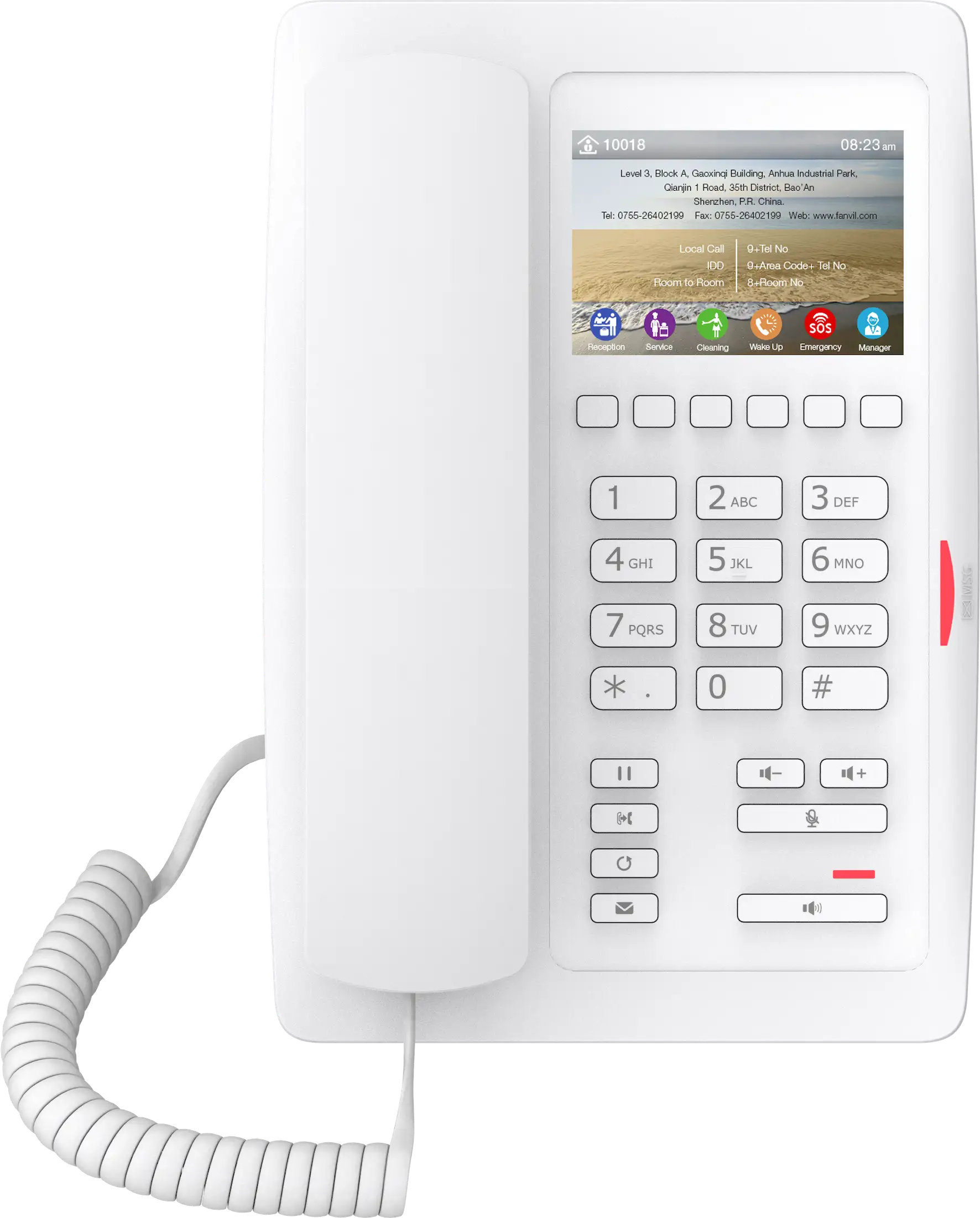
The Fanvil H5 White is a high-performance hotel IP phone that delivers a blend of elegant design and modern features. Key Features: • 3.5-inch color LCD screen • Concise, fashionable appearance in a clean white finish • Wideband HD audio with G.722 CODEC and full-duplex hands-free speakerphone with 96ms acoustic echo canceller (AEC) • Programmable DSS keys for instant access to hotel services • Power Over Ethernet (PoE) enabled for simplified installation • Auto-provisioning via TR069, HTTP/HTTPS, and SIP PNP for effortless mass deployment The phone is built to accelerate guest service and support staff communication. It includes a dedicated USB charging port, making it easy for guests to power their devices without needing a separate outlet. Key Features: • 6 programmable DSS keys • Wideband HD audio with G.722 CODEC and full-duplex hands-free speakerphone with 96ms acoustic echo canceller (AEC) • High interoperability with major platforms: 3CX, Broadsoft, Elastix, Asterisk, Xorcom, etc. • Power Over Ethernet (PoE) enabled for simplified installation • Auto-provisioning via TR069, HTTP/HTTPS, and SIP PNP for effortless mass deployment The phone comes with a desk stand, an Ethernet cable (1.5M Cat5), and a quick start guide. For a full list of specifications, please refer to the Fanvil H5 White Hotel IP Phone Datasheet.

About This Product

The Fanvil H5 is purpose-built for hospitality environments where a clean aesthetic and easy guest access are priorities. Its white housing, 3.5-inch color screen, and USB charging port make it a natural fit for hotel guest rooms, boutique properties, and assisted-living suites. The phone integrates into property management systems through standard SIP and supports hands-free speakerphone with wideband audio, so guests can converse clearly while using the room phone like a traditional handset.

For hotel IT managers, the H5’s auto-provisioning over TR-069, HTTPS, and SIP PnP simplifies bulk deployment across dozens or hundreds of rooms. It pairs well with popular PBX platforms such as 3CX, Broadsoft, and Asterisk, and the six programmable DSS keys can be mapped to services like front desk, concierge, or wake-up call shortcuts. The dedicated USB charging port is a practical addition, reducing the need for guests to hunt for spare outlets.

As an entry-level hotel phone, the H5 trades away some bells and whistles: there is no Wi-Fi or Bluetooth connectivity, the display is not touch-enabled, and the phone relies entirely on PoE for power – no AC adapter is included in the box. Buyers should verify that their network switches supply 802.3af power; otherwise a third-party PoE injector will be necessary. Audio quality is generally strong for a device in this class, but it will not satisfy users who need full conference-room coverage or high-end noise cancellation.

In a Canadian hospitality context, the H5 is a solid match for mid-scale hotels in the GTA or urban Alberta that already run centralized VoIP infrastructure. It is overkill for a small office or retail counter that just needs a basic SIP endpoint, and it would be underpowered for a front desk or concierge station where more programmable keys, a backlit display, or a corded headset connection are required.
Services We Provide
  • Professional Installation & Configuration
  • Ongoing Maintenance & Support
  • Troubleshooting & Repairs
  • System Upgrades & Updates



