
Fanvil H5W WiFi Hotel Phone in White
Frequently Asked Questions
First, confirm the phone is connected to your Wi-Fi network by checking the Wi-Fi status icon in the display. Then verify your SIP server address, username, and password are entered correctly in the phone's account settings. If the credentials are correct but registration still fails, try pinging the server address from a computer on the same network to rule out a firewall or routing issue. A Toronto-based VoIP support provider can usually resolve this remotely.
Make sure you are selecting the correct 2.4 GHz SSID—the H5W does not support 5 GHz networks. Check that your router's DHCP server is enabled and has available IP addresses. If the network uses a captive portal (common in hotels), the phone may need to have the portal URL entered manually in its web interface.
First, check that the handset cord is fully inserted into both the phone and the handset. Then verify the phone's microphone is not muted—look for a mute icon on the display. If the issue persists, try a different handset or a headset to rule out a hardware fault. If using Wi-Fi, poor signal can also cause one-way audio; move the phone closer to the access point as a test.
Access the phone's web interface by entering its IP address in a browser, then log in with the admin credentials. Navigate to the 'Function Keys' or 'DSS Keys' section, select a key, and set its type to 'Speed Dial.' Enter the extension or phone number you want to dial. Save and reboot the phone for the changes to take effect.
Intermittent Wi-Fi disconnects are usually a signal strength or interference issue, not a phone defect. Check the Wi-Fi signal indicator on the display—if it shows one bar or less, move the phone closer to the access point or reduce obstacles between them. Also ensure the phone's firmware is up to date, as older versions may have Wi-Fi stability improvements.
Yes, the H5W has dual network ports and supports PoE, so you can power it through an Ethernet cable connected to a PoE switch or injector. However, if you are using the Wi-Fi feature, you do not need to connect the Ethernet port for network access; PoE can still be used just for power if a wired connection is available nearby.
'No Service' typically means the phone cannot register with your SIP server, even though it is connected to Wi-Fi. Double-check that your SIP account settings (server, username, password) are correct and that the server is reachable from your network. Try temporarily connecting the phone via Ethernet to see if registration succeeds, which would point to a Wi-Fi configuration issue.
Most PBX platforms like 3CX or Broadsoft support auto-provisioning by providing a provisioning URL. On the H5W, go to the web interface's 'Auto Provision' section, enter the URL, and set the update interval. The phone will then download its configuration on reboot. For a small Canadian office, a manual setup via the web interface is often simpler if you have fewer than 10 phones.
First, clean the screen gently with a soft, dry cloth to remove any dirt or moisture. If the issue continues, try rebooting the phone by unplugging it from power for 10 seconds. If the screen remains unresponsive after a reboot, the touchscreen may have a hardware fault and should be inspected by a technician.
IP Phones
Fanvil H5W WiFi Hotel Phone in White
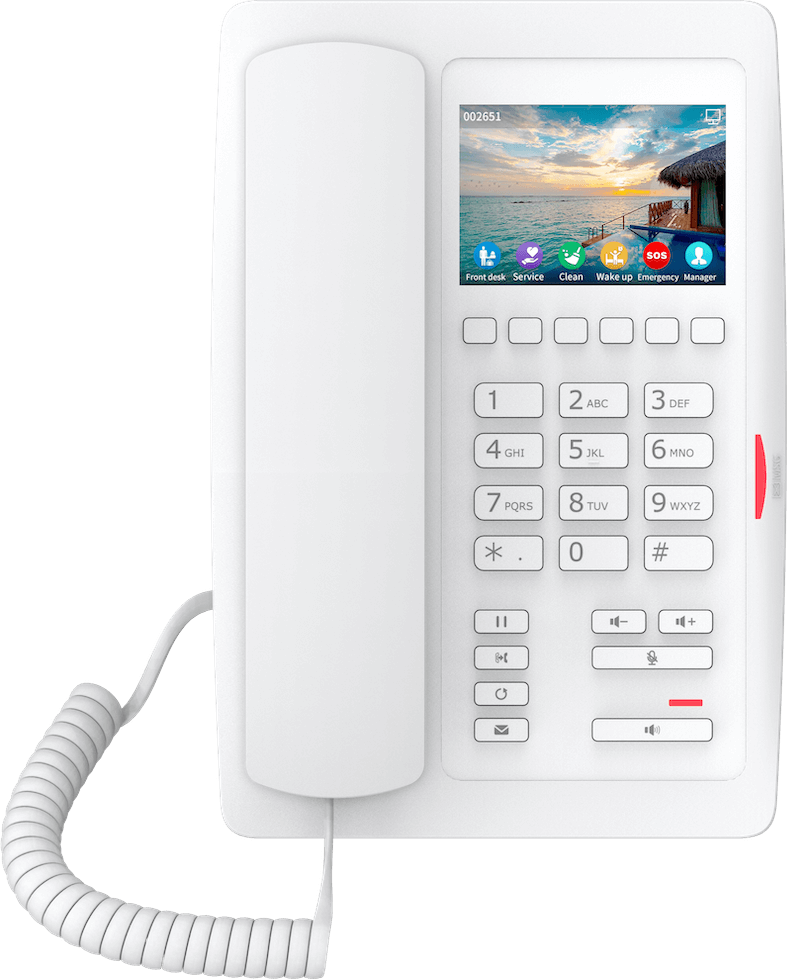
• High-quality and high-performing phone for various environments • Supports up to 2-SIP lines and serves as a SIP hotspot • Features: • 3.5-inch 480x320 color display • Supports Opus codec • Built-in 2.4G Wi-Fi for IEEE 802.11b/g/n • Dual network ports with integrated PoE • 1 USB Port for Phone Charging • 6 Programmable Keys for Speed Dial Functions • Optional External Power Supply • Compatible with major platforms: Asterisk, Broadsoft, 3CX, Metaswitch, Elastix, Avaya • Ideal for hotels, shopping malls, hospitals, and supermarkets
About This Product
The Fanvil H5W is a Wi-Fi hotel phone designed for environments where running Ethernet cable to every room is impractical or expensive. Its built-in 2.4 GHz Wi-Fi means it can be placed on a nightstand or desk without a wired network drop, making it a strong fit for hotel guest rooms, hospital patient rooms, or retail staff areas. The 3.5-inch color display and 6 programmable keys are well-suited for quick access to front desk, housekeeping, or directory services, and the USB port can serve as a convenient charging point for a guest's phone.
Because it relies on 2.4 GHz Wi-Fi, the H5W works best in locations with good wireless coverage and minimal interference. In a dense hotel or office building with many overlapping access points, performance may vary. It supports two SIP lines and the Opus codec, which helps maintain call quality over variable wireless connections. The dual network ports allow a wired device like a laptop to share the phone's network connection, though the phone itself still connects wirelessly.
For a small Canadian hotel or medical clinic in the GTA, this phone can be a cost-effective way to add VoIP service without pulling cable. It pairs well with cloud-hosted PBX platforms like 3CX or Broadsoft. However, if your deployment already has wired Ethernet jacks in every room, a standard PoE desk phone may offer more reliable connectivity at a lower unit cost. Conversely, in a large enterprise with mission-critical voice, the wireless-only design may be underpowered compared to a wired phone with redundant connectivity.
Because it relies on 2.4 GHz Wi-Fi, the H5W works best in locations with good wireless coverage and minimal interference. In a dense hotel or office building with many overlapping access points, performance may vary. It supports two SIP lines and the Opus codec, which helps maintain call quality over variable wireless connections. The dual network ports allow a wired device like a laptop to share the phone's network connection, though the phone itself still connects wirelessly.
For a small Canadian hotel or medical clinic in the GTA, this phone can be a cost-effective way to add VoIP service without pulling cable. It pairs well with cloud-hosted PBX platforms like 3CX or Broadsoft. However, if your deployment already has wired Ethernet jacks in every room, a standard PoE desk phone may offer more reliable connectivity at a lower unit cost. Conversely, in a large enterprise with mission-critical voice, the wireless-only design may be underpowered compared to a wired phone with redundant connectivity.
Services We Provide
- Professional Installation & Configuration
- Ongoing Maintenance & Support
- Troubleshooting & Repairs
- System Upgrades & Updates



