
Fanvil V61G Entry Level PoE IP Phone

Frequently Asked Questions

First, check that the Ethernet cable is securely connected to the Internet port (not the PC port) and that the link lights are active. Then confirm the SIP server address, username, and password entered in the phone's account settings exactly match what your provider supplied. A simple power cycle can also clear a stuck registration attempt. If the issue persists, your VoIP provider can verify the account status and network reachability.
Ensure the network cable is plugged into the LAN/Internet port and that the switch port provides PoE (802.3af or 802.3at). Try a different known-good PoE port and cable to rule out a faulty connection. If your switch has PoE power management, verify the port hasn't been disabled or exceeded its power budget. If the phone still won't start, test with an optional external power supply to isolate the issue.
Start by lowering the handset or speaker volume slightly—excessive volume can cause acoustic echo. Make sure the handset cord isn't tangled and the microphone isn't covered or pointing toward the speaker. If using a headset, try a different one to rule out a hardware fault. The phone's built-in acoustic echo canceller handles most scenarios, so a simple reboot often resolves transient echo problems.
Confirm the handset cord is firmly seated at both ends and that you haven't accidentally activated hands-free or headset mode. Check the screen for any error messages like 'No Service' or 'Registration Failed'. If the phone isn't registered, you won't get a dial tone; verify your SIP account settings and network connectivity. A quick power cycle can restore normal operation if the audio path hung.
Log into the phone's web interface by entering its IP address in a browser. Navigate to the Account settings, enable the account, and fill in the SIP server address, username, password, and domain provided by your service. Save the configuration and watch the registration status on the phone's screen. Most Canadian hosted PBX providers can auto-provision Fanvil phones if you give them the MAC address, which is the easiest method.
Yes. Access the phone's web interface or the on-screen menu, go to the DSS Key settings, and choose the key you want to program. Select 'Speed Dial' as the type, enter the target number, and optionally a label. Save the changes and the key will dial that number when pressed. You can also set some keys as line keys to monitor other extensions if your system supports BLF.
First, check that the phone is receiving power correctly—PoE or external adapter. If the screen is completely dark but buttons light up, the contrast or brightness might be set too low; navigate blindly to the settings menu to adjust. A loose internal connection is rare but possible; gently reseating the power can help. If the problem continues, contact your support team for a possible hardware replacement.
The phone has dedicated keys for headset and speakerphone. Press the headset button to route audio to a connected headset, or the speaker button for hands-free mode. Picking up the handset automatically switches to handset mode. If a headset doesn't work, ensure it's plugged into the correct port (usually the RJ9 jack on the side) and that the headset key is lit.
Don't attempt a factory reset right away. First, power cycle the phone and let it attempt to boot normally. If it comes up but behaves oddly, re-download the firmware file from Fanvil's official site and perform the update again via the web interface, ensuring a stable network connection. If the phone is stuck in a boot loop, contact your support provider; they can guide you through recovery without wiping your configuration.
IP Phones

Fanvil V61G Entry Level PoE IP Phone
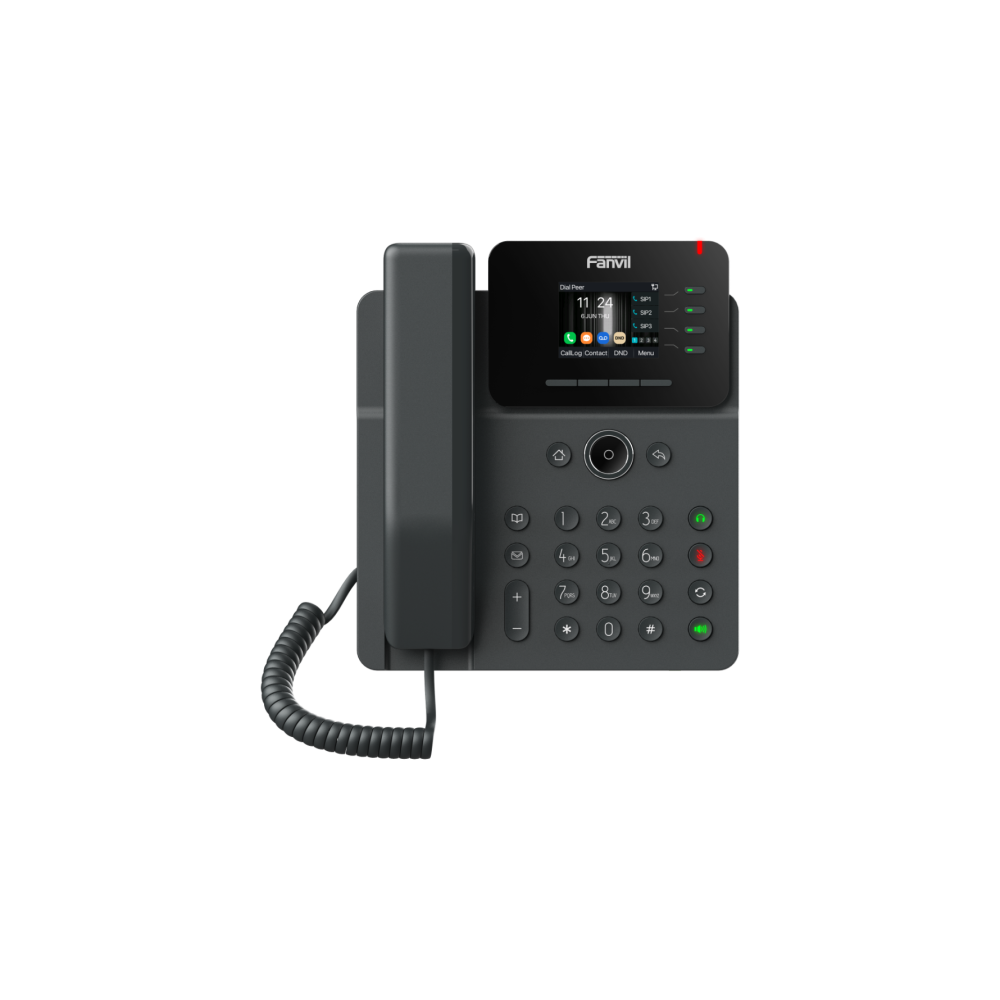
The V61G is a stylish and user-friendly entry-level Gigabit color screen SIP phone that offers exceptional performance. It supports 4 SIP lines and a 6-way audio conference, featuring a 2.4-inch 320x240 pixel color screen. Key features: • Dual Gigabit ports with PoE enabled • HD voice quality with Opus audio codec • Intelligent DSS keys for hands-free operations • Handset / hands-free / headset mode • Desktop Stand and Wall-mounted options available Optional features: • External power supply (optional) • Hall switch in handset • HD Voice Microphone/Speaker with 0 ~ 7KHz frequency response • HAC handset • Full-duplex Acoustic Echo Canceller (AEC) For a full list of specifications, please refer to the product datasheet.

About This Product

The Fanvil V61G is a practical choice for small to mid-sized Canadian businesses that need a reliable, no-fuss desk phone with modern essentials. It fits naturally on the desk of a receptionist, team lead, or remote worker who handles a moderate call volume and appreciates a colour screen for quick caller ID glances. With dual Gigabit ports and Power over Ethernet, it integrates cleanly into the structured cabling of a downtown Toronto office or a home setup without extra power bricks.

Its four SIP lines and six-way conferencing cover the typical needs of a growing team, while Opus support ensures clear audio even on bandwidth-constrained connections common in rural or hybrid deployments. Pair it with a hosted PBX from a Canadian provider, and you get a straightforward endpoint that doesn't demand advanced IT skills to deploy. The intelligent DSS keys let you program speed dials or line appearances, reducing the learning curve for staff who just want to pick up and call.

Buyers should understand this is an entry-level model, not a receptionist console. It lacks expansion modules, so a busy attendant managing many lines would quickly outgrow it. The 2.4-inch screen is crisp but compact; users who rely heavily on visual call management or directory browsing might find it limiting. For a single-line user or a lobby phone, it's slightly over-specified, while a power user juggling multiple simultaneous calls and BLF monitoring would be better served by a higher-tier model.

On the plus side, the V61G includes acoustic echo cancellation and supports wideband audio, so everyday conversations sound natural. Wall-mounting is possible for break rooms or common areas. Just note that the external power supply is optional—if your network lacks PoE, you'll need to budget for that separately. Overall, it's a well-rounded entry phone that delivers the core VoIP experience without unnecessary complexity.
Services We Provide
  • Professional Installation & Configuration
  • Ongoing Maintenance & Support
  • Troubleshooting & Repairs
  • System Upgrades & Updates



