
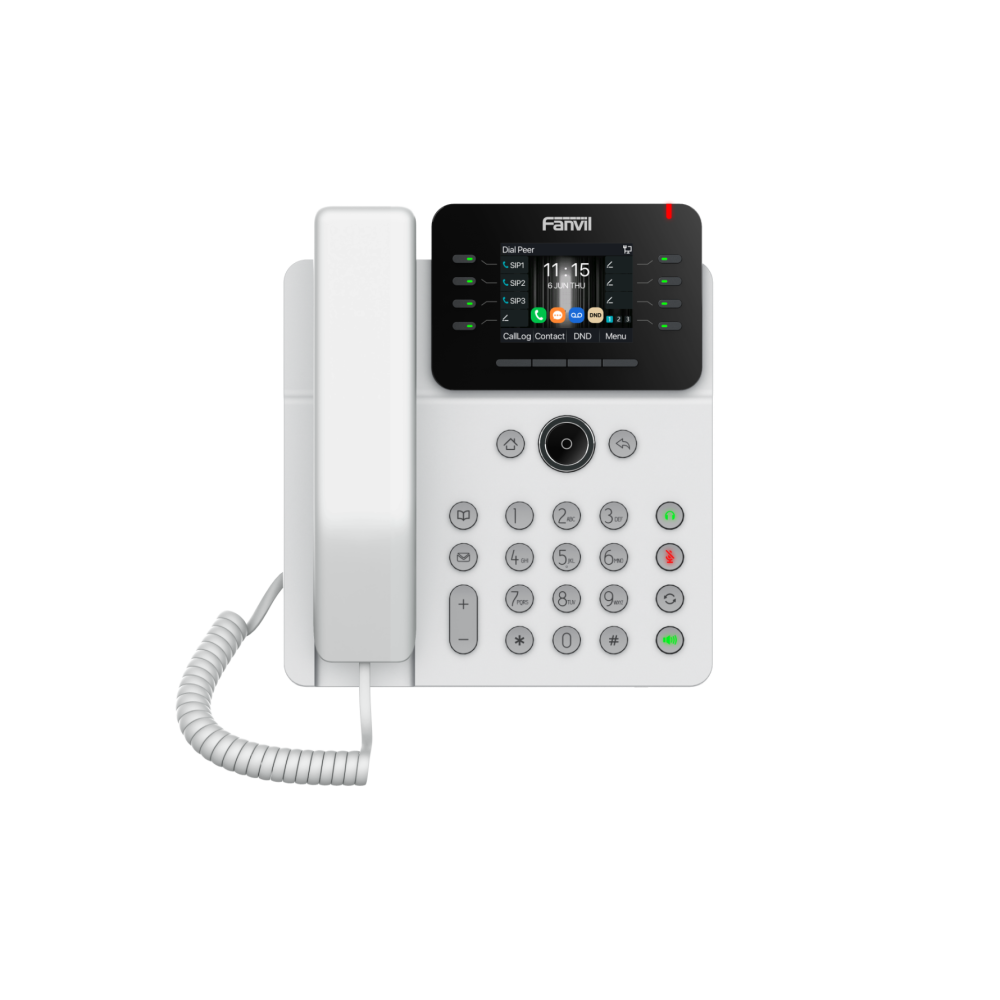
Fanvil V62G Prime Business PoE IP Phone - White
Frequently Asked Questions
First, double-check that the SIP server address, username, and password are entered correctly in the phone's account settings. Make sure the phone has a valid IP address from your network and can reach the internet—try pinging the server address from the phone's network diagnostics menu if available. If the issue persists, confirm that your firewall or router isn't blocking SIP traffic; a Toronto-based VoIP support provider can usually resolve this remotely.
Verify that your network switch provides Power over Ethernet (PoE) and that the port is PoE-enabled. Try a different Ethernet cable or connect the phone to a known working PoE port. If the phone still doesn't power on, test with the optional power adapter (sold separately) to rule out a PoE issue.
Check the handset and headset volume settings by pressing the volume keys during a call. Ensure the phone's microphone is not obstructed and that you're speaking near the handset's mouthpiece. In the phone's audio settings, confirm that the correct codec (G.722 or Opus) is selected and that no gain adjustments are set too low.
Make sure the headset is in pairing mode and that the phone's Bluetooth is enabled (look for the Bluetooth icon on the display). Go to the phone's Bluetooth menu and scan for devices; if the headset appears, select it to pair. If it fails, remove any previously paired devices and try again. Keep the headset within one meter of the phone during pairing.
Check the phone's settings under 'Basic Settings' or 'LED' to ensure the LED features are enabled. Some LEDs are tied to specific functions like message waiting or line status—verify that the feature you expect (e.g., BLF) is configured. If the LEDs still don't light, try a power cycle by unplugging the Ethernet cable for 30 seconds.
From the phone's menu, go to 'Settings' > 'Account' and select an unused line number. Enter your SIP credentials for each line provided by your VoIP service. You can assign each line to a physical line key by programming a DSS key as a 'Line' key. Up to 12 lines are supported, but you'll need to configure each one individually.
Yes. Program a DSS key as 'BLF' and enter the extension number you want to monitor. The LED next to the key will show the status (green for idle, red for busy, flashing for ringing). Ensure your PBX supports BLF and that the phone is registered to the same system as the monitored extensions.
First, confirm that your VoIP service allows three-way or six-way conferencing and that you have not reached your account's conference limit. On the phone, initiate the conference by pressing the 'Conf' soft key during an active call, then dial the next participant. If the call drops, check your network bandwidth—conferencing uses more data than a regular call.
HD audio is typically enabled by default when the codec is supported on both your phone and the other party's device. To verify, go to 'Settings' > 'Audio' > 'Codec' and ensure G.722 or Opus is listed and prioritized. Note that HD audio only works if your network and VoIP provider also support the same codec.
This usually indicates the phone tried to load configuration from a provisioning server but failed. Check that the provisioning server URL is correct in the phone's auto-provision settings (under 'Settings' > 'Auto Provision'). Ensure the phone has network access to that server and that the server is reachable. If you're not using auto-provisioning, disable it in the settings to clear the error.
IP Phones
Fanvil V62G Prime Business PoE IP Phone - White
The Fanvil V62G Prime Business Phone in White features a 2.8-inch high-definition color display (320x240) and supports up to 12 SIP lines, enabling a 6-way audio conference with HD audio quality. Key Features: • Supports audio codec G.722 and Opus • Dual Gigabit ports with Power over Ethernet (PoE) for reliable connectivity • Integrated security features with customizable solutions • Up to 21 DSS keys, adjustable as Line/BLF/Speed Dial Keys • Hall-effect sensor switch for hands-free operation • HAC functionality for hearing aid accessibility • LED lighting effects • Easy deployment and intelligent management through FDMS • Built-in Bluetooth 5.4 • HD Voice
About This Product
The Fanvil V62G Prime is a solid mid-range SIP desk phone designed for business users who need reliable multi-line performance without the premium price tag of high-end models. With support for up to 12 SIP lines and a six-way audio conference, it fits well in small to medium-sized offices, front desks, or call centers where agents handle multiple calls simultaneously. The 2.8-inch color display is compact but readable for call information and menu navigation, making it a practical choice for users who don't require a large touchscreen. It pairs naturally with any standards-based IP PBX or hosted VoIP service, including those commonly used in Canadian business environments such as 3CX, FreePBX, or carrier-provided platforms from Bell, Rogers, or Telus.
Deployment is straightforward thanks to Power over Ethernet (PoE) support, which eliminates the need for a separate power adapter and simplifies cabling—a real advantage in dense office setups around the Greater Toronto Area. The built-in Bluetooth 5.4 allows wireless headset pairing, and the hall-effect sensor enables hands-free operation by simply lifting the handset. With up to 21 programmable DSS keys (for line, BLF, or speed dial), users can customize their workflow, though the keys are physical rather than on-screen, which some may prefer for tactile feedback. The phone also includes HD audio with G.722 and Opus codecs, ensuring clear voice quality on supported networks.
While the V62G is feature-rich for its price point, it does have practical limits. The display is not touch-enabled and is smaller than the 4.3-inch or larger screens found on executive models, so it may feel cramped for users who rely heavily on visual call queues or directory browsing. It lacks Wi-Fi connectivity, so it must be wired via Ethernet—acceptable in most offices but a constraint in spaces where cabling is difficult. The phone is overkill for a single-line user who only needs basic call handling, but underpowered for a power user who requires a large touch interface, sidecar expansion, or advanced video capabilities. For most general business telephony needs in Canada, however, it strikes a strong balance between cost and capability.
Deployment is straightforward thanks to Power over Ethernet (PoE) support, which eliminates the need for a separate power adapter and simplifies cabling—a real advantage in dense office setups around the Greater Toronto Area. The built-in Bluetooth 5.4 allows wireless headset pairing, and the hall-effect sensor enables hands-free operation by simply lifting the handset. With up to 21 programmable DSS keys (for line, BLF, or speed dial), users can customize their workflow, though the keys are physical rather than on-screen, which some may prefer for tactile feedback. The phone also includes HD audio with G.722 and Opus codecs, ensuring clear voice quality on supported networks.
While the V62G is feature-rich for its price point, it does have practical limits. The display is not touch-enabled and is smaller than the 4.3-inch or larger screens found on executive models, so it may feel cramped for users who rely heavily on visual call queues or directory browsing. It lacks Wi-Fi connectivity, so it must be wired via Ethernet—acceptable in most offices but a constraint in spaces where cabling is difficult. The phone is overkill for a single-line user who only needs basic call handling, but underpowered for a power user who requires a large touch interface, sidecar expansion, or advanced video capabilities. For most general business telephony needs in Canada, however, it strikes a strong balance between cost and capability.
Services We Provide
- Professional Installation & Configuration
- Ongoing Maintenance & Support
- Troubleshooting & Repairs
- System Upgrades & Updates



