
Fanvil V63 Entry-Level Phone
Frequently Asked Questions
Start by confirming the phone is on the network: check the Ethernet cable, verify it has a valid IP address (press the menu or status key), and ensure it can reach your SIP server. Then log into the web interface and double-check the account registration details – server address, username, and password – for any typos. If you're using a hostname, try entering the server's IP address instead to rule out DNS trouble.
First, test the Ethernet cable with a known working device or try a different port on the switch, as the port might not be configured to deliver power or the cable could be damaged. If your switch has PoE budget limits, verify it isn't exhausted. As a safe fallback, connect the optional DC power adapter to see if the phone boots normally – that quickly isolates whether the issue is with the PoE supply or the phone itself.
One-way audio often points to a NAT or firewall issue between your network and the SIP provider. Log into your router and disable any SIP ALG or SIP helper features; these can incorrectly modify the audio ports. Also confirm the phone's NAT settings (STUN server and keep-alive interval) are entered correctly if you're behind a NAT, and check that the phone's RTP port range isn't being blocked.
Begin with physical connections – reseat both ends of the Ethernet cable and try a different switch port to eliminate a loose or flaky link. Check your DHCP server's lease time; a very short lease can cause brief network dropouts that disrupt calls. Also review the switch's error counters for the port the phone uses, and if the problem happens at regular intervals, it may be a router SIP session timeout that your provider can help adjust.
First ensure that no participant is muted on their endpoint and that you haven't exceeded the 6-party limit for a single conference. Network bandwidth on your internet connection can also cause problems – if upload speed is congested, remote participants may lose audio. Try a test with only two or three parties while monitoring your network usage to isolate the bottleneck.
Confirm the phone is receiving power; if PoE, check the switch port for power delivery, and if using a PSU, verify the adapter is properly attached. With power present, press any key to rule out the idle screen dimming feature – the display may have timed out to dark. If still blank, access the web interface from a browser and check the backlight or brightness settings under phone preferences, then gradually increase them.
Open the phone's web interface and navigate to the DSS Key or Function Key settings page. For a speed dial, choose the key number, set the type to Speed Dial, and enter the target number. For Busy Lamp Field (BLF), select BLF as the type, input the extension number you want to monitor, and fill in the pickup code if required. Save the changes and the keys will update immediately.
Yes, the USB Type A port supports compatible USB headsets. Plug the headset into the phone's USB port, then go to the phone's web interface or on-screen menu and set the audio output and input devices to USB headset. For best results, check Fanvil's compatibility list to ensure your specific headset model is supported; if it doesn't appear, a standard USB HID-compliant headset may still work but may lack call control buttons.
Contact your service provider to obtain the provisioning server URL – they often provide a ready-to-use address for NetSapiens deployments. In the phone's web interface, go to the Management or Provisioning tab, enter that URL in the server path field, and set the update mode to check on boot or at scheduled intervals. After saving, reboot the phone; it should fetch its configuration and line assignments automatically.
First, purchase the optional wall mount bracket designed for the V63 (sold separately). Disconnect all cables, attach the bracket to the wall securely using appropriate anchors for your wall type, then hook the phone onto the bracket following the directions in the installation guide. Route the Ethernet and power cables through the bracket's channels so they don't pull on the connectors, and test the phone before tidying up the cabling entirely.
IP Phones
Fanvil V63 Entry-Level Phone
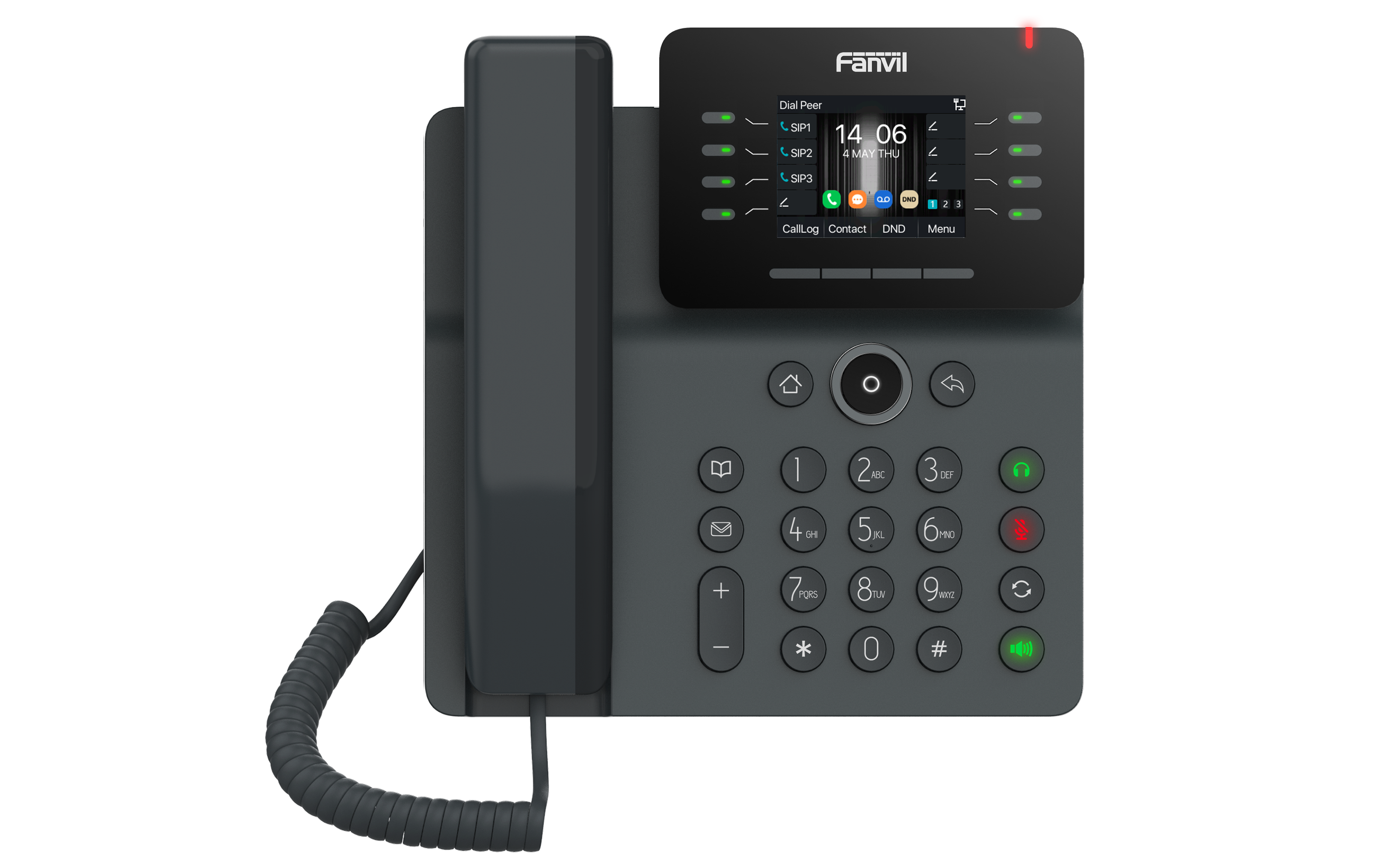
• Fanvil V63 is an entry-level phone featuring HD Voice, PoE and 8 intelligent DSS keys. Now certified with NetSapiens! Key Features: • 2.8” 320x240 Color LCD Screen • Linux-based Operating System • Up to 6 SIP Lines • 8 Intelligent DSS Keys for increased productivity • HD Audio with G.722 Opus, Full-duplex Acoustic Echo Canceller (AEC), Noise Reduction technologies • 6-party Audio Conference for seamless collaboration • Fast network connectivity via 10/100/1000 Mbps • USB Type A interface for connecting headsets and USB disks • PoE/PSU power supply options • Desktop stand/wall mountable installation (optional) • Available in Gun Grey color
About This Product
The Fanvil V63 is a practical entry-level IP phone built for small businesses, home offices, and front desk duties where basic call handling and clear audio matter more than advanced telephony features. Its Linux-based platform brings a reliable, low-maintenance experience that fits well into everyday voice environments, especially where IT resources are lean.
Certified for the NetSapiens platform, the V63 pairs naturally with Canadian service providers running that ecosystem, though it's equally at home on any standard SIP-based PBX. With six SIP lines and eight intelligent DSS keys, it covers the needs of a single user handling moderate call volumes, like a branch office manager or a small retail location in the GTA. The gigabit Ethernet pass-through also allows you to connect a desktop PC without losing network speed, a small but appreciated detail in a busy office.
Where you'll feel the entry-level boundaries: six lines might be tight if you manage multiple departments simultaneously, and the eight DSS keys won't replace the BLF panel a receptionist relies on. There's no Bluetooth, so your headset choices are limited to USB or wired models. If you're outfitting a call center ring group or an executive desk that demands a large colour touchscreen, the V63 is underpowered – but for the lone worker or small team that just needs a dependable desk phone, it's a well-priced, straightforward option.
Certified for the NetSapiens platform, the V63 pairs naturally with Canadian service providers running that ecosystem, though it's equally at home on any standard SIP-based PBX. With six SIP lines and eight intelligent DSS keys, it covers the needs of a single user handling moderate call volumes, like a branch office manager or a small retail location in the GTA. The gigabit Ethernet pass-through also allows you to connect a desktop PC without losing network speed, a small but appreciated detail in a busy office.
Where you'll feel the entry-level boundaries: six lines might be tight if you manage multiple departments simultaneously, and the eight DSS keys won't replace the BLF panel a receptionist relies on. There's no Bluetooth, so your headset choices are limited to USB or wired models. If you're outfitting a call center ring group or an executive desk that demands a large colour touchscreen, the V63 is underpowered – but for the lone worker or small team that just needs a dependable desk phone, it's a well-priced, straightforward option.
Services We Provide
- Professional Installation & Configuration
- Ongoing Maintenance & Support
- Troubleshooting & Repairs
- System Upgrades & Updates



