
Fanvil V64 Enterprise Phone

Frequently Asked Questions

First, double-check that your SIP account credentials (username, password, and server address) are entered correctly in the phone's web interface or on-screen menu. A common issue is a simple typo in the server address or password. If the credentials are correct, verify that your network allows SIP traffic and that your router or firewall isn't blocking the required ports (usually 5060 for SIP). If the issue persists, a Toronto-based VoIP support provider can usually resolve this remotely.
Start by ensuring the phone is receiving power and is connected to the network. If you're using Power over Ethernet (PoE), verify that your switch is providing PoE and that the Ethernet cable is securely plugged in at both ends. If you're using the optional power supply, make sure it's plugged in and working. Then, check that the line is physically registered by pressing the line key and looking for a registration status message on the screen.
This is often a network quality issue. Try connecting the phone directly to your router or switch with a known-good Ethernet cable to rule out cable problems. Check your network for high bandwidth usage, such as large file downloads or streaming, which can cause jitter and packet loss. You can also try reducing the audio codec priority in the phone's settings to use a more bandwidth-friendly codec like G.711.
The V64 supports EHS (Electronic Hookswitch) for compatible Bluetooth or DECT wireless headsets. First, pair your headset with the phone according to the headset's instructions. Then, on the phone, go to the Settings menu, find the Bluetooth or Headset settings, and enable the EHS function. Once paired, you can answer and end calls using the headset's button.
A frequent cause of this is an unstable PoE power source. If you're using PoE, ensure your switch provides enough power (the V64 requires PoE 802.3af). Try using the optional external power supply to see if the issue stops. If the problem persists, it could be a faulty unit or a corrupted configuration file, so contact your VoIP provider for further diagnosis before attempting a factory reset.
The V64 is compatible with major platforms like Asterisk, 3CX, and BroadSoft, which many providers use. However, compatibility with specific providers like RingCentral or Vonage depends on their SIP implementation and whether they allow third-party phones. You should check with your provider to see if they support the Fanvil V64 and if they can provide the correct SIP settings. Some providers may also require a specific firmware version.
You can program the DSS keys through the phone's web interface. Log into the phone's IP address in a browser, navigate to the DSS Key or Feature Key settings, and assign a function like speed dial, BLF (Busy Lamp Field), or call park to each key. The V64 has 8 physical DSS keys on the main display, and you can access up to 21 total by using the page key.
First, try making a call to a simple number like 611 or a test number from your provider to see if the issue is with outbound calls only. If you can't receive calls, check that your phone's Do Not Disturb (DND) feature is not enabled. Also, verify that your VoIP provider's call routing is correctly set up to send calls to your phone's extension. A quick power cycle of the phone can also resolve temporary glitches.
Check the phone's display settings in the menu. Look for a brightness or contrast setting and adjust it to a higher level. If the screen is still difficult to read, it may be a hardware issue. Try connecting the phone to a different power source to rule out a power fluctuation causing the backlight to dim.
Firmware updates should be obtained from your VoIP provider or the Fanvil support website. To update, log into the phone's web interface, go to the Firmware Update section, and provide the URL to the firmware file or upload it directly. Always ensure you are using the correct firmware version for your specific phone model to avoid bricking the device. If you are unsure, contact your provider for guidance.
IP Phones

Fanvil V64 Enterprise Phone
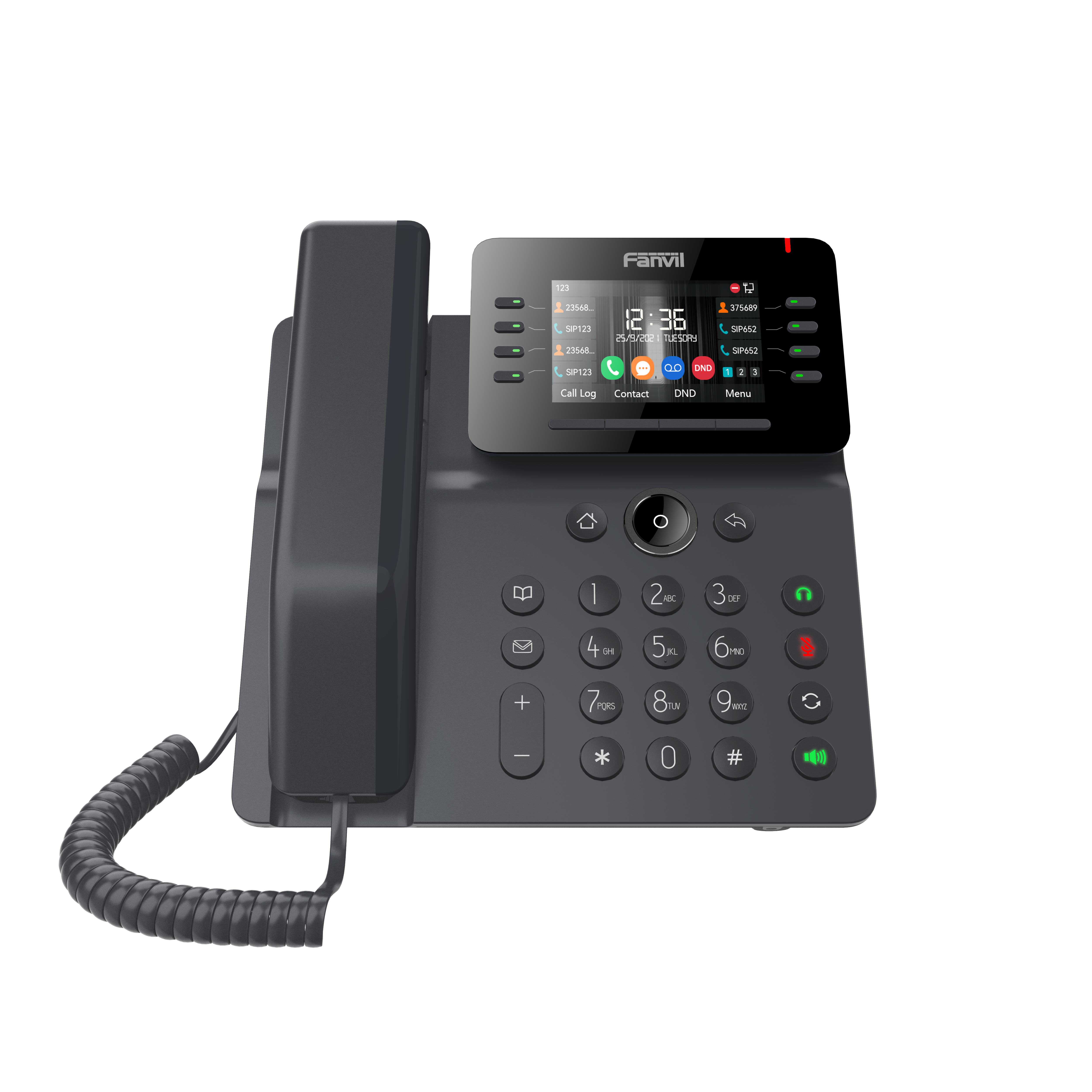
• The V64 IP Phone combines quality, comfort, and performance into a reliable deskphone that enhances communication. It supports up to 12 lines and features intelligent DSS keys. • Key Features: • HD audio on speakerphone and handset • Support for 6-party local conference • 8 DSS keys on the main display (7 DSS keys and 1 page key), up to 21 DSS keys • Support for EHS/Bluetooth wireless headset • Dual Gigabit ports, integrated PoE • Adjustable stand with two angles of 40 and 45 degrees • Compatible with major platforms: Asterisk, Broadsoft, 3CX, Metaswitch, Elastix, Avaya • Optional external power supply • Certified with NetSapiens • For a full list of specifications, please refer to the product datasheet.

About This Product

The Fanvil V64 is a solid choice for a busy professional who needs more than a basic desk phone but doesn't require a top-of-the-line executive model. It's well-suited for a manager's office, a reception desk, or a power user in a small-to-medium business environment in the GTA, where reliability and multi-line support are key. The 12-line capacity and programmable DSS keys make it a natural fit for someone who handles a high volume of calls or needs to monitor multiple extensions. It pairs well with hosted VoIP services from major Canadian carriers and platforms like 3CX or BroadSoft, and its integrated PoE keeps the desk tidy by eliminating one power cable. A practical tradeoff to consider is that the adjustable stand only offers two angles (40 and 45 degrees), which may not suit every desk setup or user preference. For most office deployments, the V64 provides a good balance of features and cost, but it might be overkill for someone who only needs a single-line phone, and it may feel underpowered compared to a top-tier model with a larger color touchscreen or more advanced call-handling features.
Services We Provide
  • Professional Installation & Configuration
  • Ongoing Maintenance & Support
  • Troubleshooting & Repairs
  • System Upgrades & Updates



