
Fanvil V65 Premium IP Phone

Frequently Asked Questions

First, check that the network cable is firmly seated in the Internet port and the link lights are active. Then verify the SIP server address, username, and password in the account settings—an extra space or capital letter can block registration. If you can reach the server from a computer on the same network, try power cycling the phone; if the issue persists, double-check that your firewall isn’t blocking SIP or RTP traffic.
Confirm the handset cord is fully plugged into the handset port, not the headset jack. Also verify in the phone’s settings that the audio output is set to handset and not to a paired Bluetooth headset. If you still get silence, test via the speakerphone to narrow down whether the issue is with the handset itself or the line registration.
The V65 can be powered by PoE or an optional external adapter. If using PoE, make sure the Ethernet cable is connected to the port labelled ‘Internet’ and that the switch delivers 802.3af/at power. If you’re using an external supply, check that its output matches the phone’s voltage rating and that the barrel connector is fully inserted. Testing with a different known-good cable and switch port often reveals a simple cabling fault.
On the phone, go to Menu > Settings > Wi-Fi and enable the wireless function. Select your office SSID and enter the encryption key. For best reliability on a Canadian business network, connect to the 5 GHz band if available and position the phone away from large metal objects. Once connected, the V65 can also act as a soft access point for a laptop, though voice priority will always go to the phone’s own calls.
Move the headset and phone closer together and check for interference from other 2.4 GHz devices like microwaves or thick walls. Try unpairing, restarting both devices, and pairing again. If the problem occurs only on Wi-Fi calls, the shared antenna could be causing congestion—switching the phone to a wired connection can isolate whether Bluetooth performance improves.
First, check that the DSS key type is set correctly—for example, ‘BLF’ for monitoring a colleague and ‘Speed Dial’ for quick outbound calls. Also verify that the extension number you programmed is exactly the same as the one registered on the server, including any required prefix. If you’re using multi-page DSS, swipe to the correct page and confirm the keys are not inadvertently locked through the phone’s security settings.
Swap the handset cord for a known-good one; a damaged cord is a common source of audio artefacts. Confirm that the Opus codec is enabled in the account’s codec list and that you aren’t accidentally forcing a low-bitrate codec. If you hear the problem only on the speakerphone, remove any objects directly in front of the speaker grille that could be reflecting sound.
Yes, the V65 is compatible with any carrier that offers standard SIP credentials. Most Canadian business VoIP services—whether from national carriers or Toronto-based cloud PBX providers—will work as long as you can input the server address and login details. It’s a good idea to confirm with the provider that they support third-party SIP phones, as a few managed services require proprietary handsets.
IP Phones

Fanvil V65 Premium IP Phone
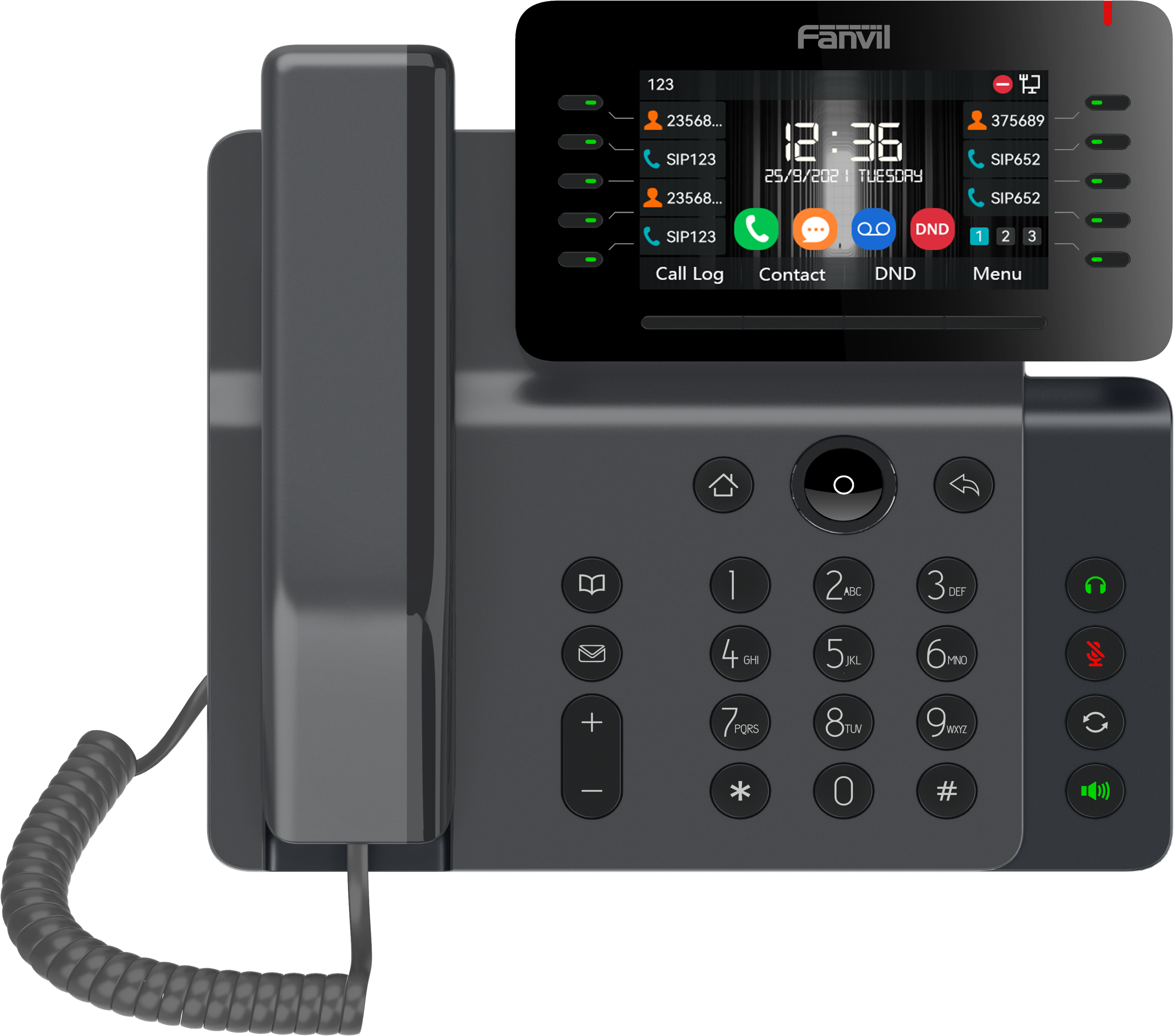
The V65 IP Phone is a 20-line device that supports Opus Codec. It features a 4.3-inch LCD color screen with an adjustable angle of 0 to 40 degrees. Key Features: • Multicast support • SIP hotspot • Built-in WiFi and Bluetooth at a competitive price point • 6-party local conference support • HD audio on speakerphone and handset • 10 DSS keys on the main display, up to 45 DSS keys with dual-colored physical keys for up to 5 pages • Support for EHS/Bluetooth wireless headset • Dual Gigabit ports with integrated PoE • Adjustable LCD screen ranging from 0°to 40° • Compatible with major platforms: Asterisk, Broadsoft, 3CX, Metaswitch, Elastix, Avaya etc. • Optional external power supply • Now certified with NetSapiens For a full list of specifications, please refer to the product datasheet.

About This Product

The Fanvil V65 is built for busy professionals who split their day between handling a high volume of calls and staying connected across multiple platforms. With its 20-line capacity and up to 45 dual-colour DSS keys, it naturally suits reception areas, executive assistants, and tier-one support roles within mid-sized firms. In a Canadian office setting—particularly around Toronto—the built-in WiFi and Bluetooth mean it can drop onto a wireless desk layout or pair with a cordless headset without extra dongles, simplifying an otherwise cable-heavy setup.

It’s a strong match for businesses that already run a capable on-premise PBX or a platform like 3CX or Asterisk and want a desk phone that feels more like a communications terminal than a simple dialler. The broad platform certification list, including recent NetSapiens certification, makes it a safe pick for organisations with a multi-tenant or hosted environment, where compatibility surprises can derail a rollout. The 4.3-inch colour screen and adjustable angle are genuinely helpful for navigating call queues and line appearances at a glance, though this is not a touch interface—buyers expecting a tablet-like experience will be disappointed.

A practical limit to keep in mind is that the V65 is a workhorse handset, not a video collaboration endpoint. It has no built-in camera, and the screen size is modest for rich visual content. It pairs best with a softphone or separate conferencing camera if video is a daily need. Similarly, the 6-party local conference feature is a useful convenience for small huddles, but it won’t replace a dedicated conference bridge for larger or externally hosted calls.

Deployments where each seat only needs a basic line and a few speed dials will find this phone over-specified; a simpler Fanvil model would reduce cost without loss of function. On the other hand, a contact centre supervisor who needs a fully expanded attendant console with dozens of busy lamp fields may find 45 DSS keys limiting and would be better served by a phone that supports sidecar expansion modules. The V65 hits a sweet spot for the knowledge worker who regularly juggles multiple calls, contacts, and platforms without needing the complexity of a full operator station.
Services We Provide
  • Professional Installation & Configuration
  • Ongoing Maintenance & Support
  • Troubleshooting & Repairs
  • System Upgrades & Updates



