
Fanvil V66 Premium PoE IP Phone

Frequently Asked Questions

Start by confirming that the SIP server address, username, and password entered in the phone's account settings exactly match what your provider gave you. Also verify that the phone has a valid IP address and can reach the internet; if it's on Wi-Fi, try connecting via Ethernet to rule out wireless issues. If the problem persists, a Toronto-based VoIP support provider can usually help trace the registration failure.
Check that the Ethernet cable is securely plugged into both the phone and a PoE‑enabled switch or PoE injector. If your switch supports PoE+, ensure it's delivering adequate power. You can also try a known‑working power adapter (sold separately) to confirm whether the PoE source or the cable is the issue.
Press the menu key, go to Settings > Network > Wi‑Fi, and enable Wi‑Fi. The phone will scan for networks; select yours and enter the password. Note that the V66 supports 2.4 GHz and 5 GHz bands. For best performance, use 5 GHz if your network supports it, but be aware that Wi‑Fi can introduce latency compared to wired Ethernet.
First, ensure that the handset and speaker are not covered or obstructed. Go to the phone's audio settings and confirm that the correct codec (G.722 or Opus) is prioritized. If you're using the speakerphone, try the handset or a headset to isolate the issue. Poor network conditions, especially on Wi‑Fi, can also cause audio problems; test with a wired connection.
Make sure your VoIP provider supports video calling and that you have a compatible video codec (H.264) selected in the phone's account settings. The phone's camera may need to be enabled in Settings > Video. Also check that both callers have working cameras and that the network has enough bandwidth for video.
Verify that each DSS key is configured with the correct extension number and that your PBX supports BLF (Busy Lamp Field). The phone may need to subscribe to presence from the server; check in the account settings under 'Subscribe for MWI/BLF'. Restarting the phone after configuration changes often helps.
From the home screen, go to Settings > Bluetooth and enable Bluetooth. Put your headset into pairing mode and make sure it's discoverable. The V66 supports Bluetooth 5.4, so it should find nearby devices quickly. If pairing fails, try resetting the headset or moving it closer to the phone. Interference from other wireless devices can also affect pairing.
If your PBX provides auto-provisioning, you'll need to obtain the provisioning server URL and credentials. On the phone, go to Settings > Auto Provision and enter the server URL. The phone can fetch config files over HTTP/HTTPS. For zero-touch deployment, you can provision via DHCP option 66. Check with your system administrator for the exact server details.
First, clean the screen with a soft, dry cloth to remove any dirt or moisture that might interfere with touch sensitivity. If that doesn't help, power cycle the phone by unplugging it for 30 seconds. If the issue persists, the screen may need calibration or service; contact your supplier before attempting any reset.
Go to Settings > System > Firmware Update. If your phone is set to auto-update, it will check the server periodically. For manual updates, you can download the latest firmware from Fanvil's website and serve it via TFTP, HTTP, or HTTPS. Make sure the phone is powered and connected to a stable network during the update—do not interrupt the process.
IP Phones

Fanvil V66 Premium PoE IP Phone
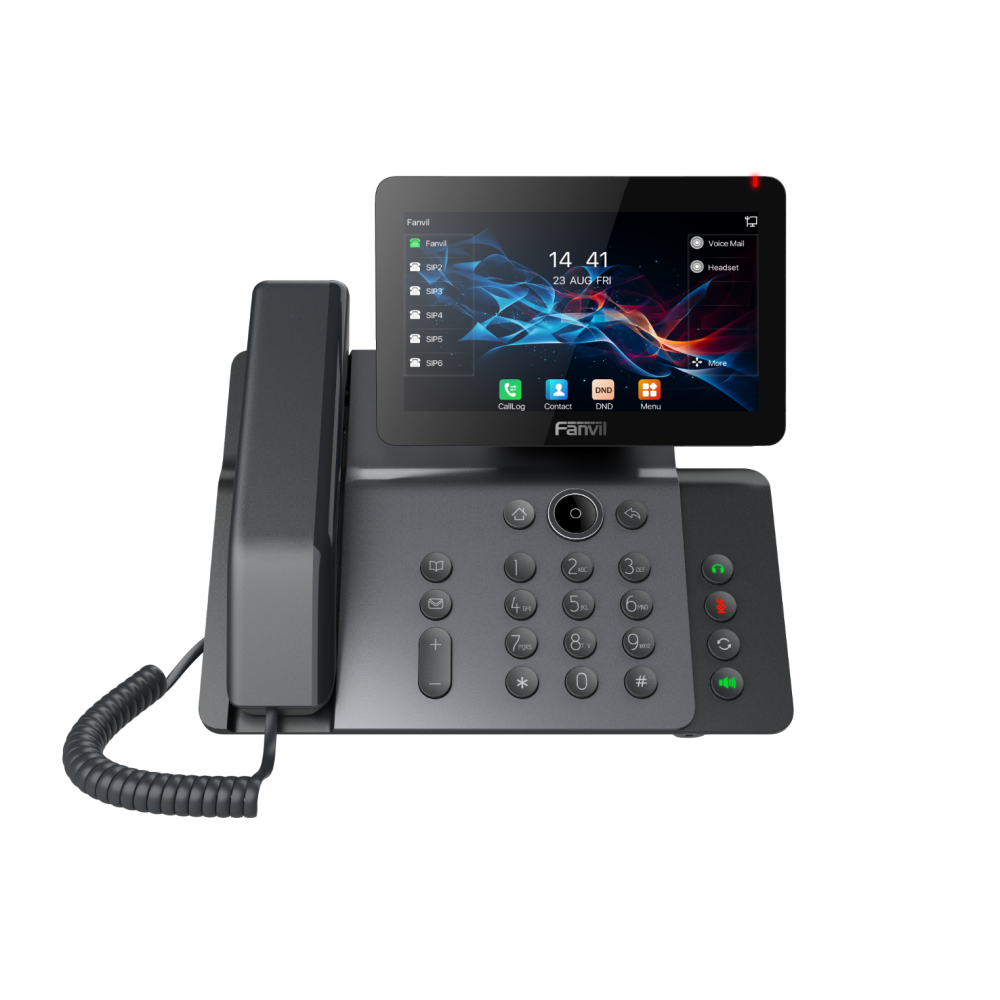
V66 is a color-screen prime business phone designed for advanced users who focus on efficient communication. Its original aesthetic design features a 7-inch high-definition color "floating smart screen" and ultra-high-definition gorgeous sound quality. The phone boasts built-in Bluetooth 5.4 and 2.4G/5G dual-band Wi-Fi, supporting Wi-Fi 6 for an excellent interaction experience. Key Features: • Antibacterial material on the handset and keypad surface to inhibit over 99.5% of bacteria growth. • 7” adjustable screen (0° to 40°) for different lighting environments. • Supports video calls with H.264 video codec. • Compatible with security products, allowing easy customization into various security solutions. • Audio codec support: G.722 and Opus, HD audio on speakerphone and handset. • Support for 6-way Audio Conference. • Built-in 2.4G/5G dual-band WiFi, Wi-Fi 6, and Bluetooth 5.4 for flexible connectivity. • Two installation methods: desktop stand and wall mountable. • Up to 116 DSS keys, every key can be set as Line/BLF/ Speed Dial Key. For a full list of specifications, please refer to the product datasheet.

About This Product

The Fanvil V66 is a premium business phone aimed at professionals who need more than just voice calls. Its large 7-inch adjustable colour display and built-in video support make it a strong fit for executive offices, reception desks, or conference rooms where video calling and a rich user interface add value. Paired with a compatible SIP-based PBX or hosted VoIP service, it can also integrate with Fanvil security products to serve as a video intercom or security station, making it versatile beyond a standard desk phone. The inclusion of Wi-Fi 6 and Bluetooth 5.4 means you can place it without a wired network drop, though for consistent call quality a wired Ethernet connection with PoE is recommended. At this price point, the V66 is overkill if you only need a simple extension for taking calls—it’s designed for users who will actively use its screen, DSS keys, and video capabilities. It also fits well in Canadian office deployments, as it works with major SIP carriers and the antibacterial materials on the handset and keypad offer a practical advantage in shared or high-traffic environments.
Services We Provide
  • Professional Installation & Configuration
  • Ongoing Maintenance & Support
  • Troubleshooting & Repairs
  • System Upgrades & Updates



