
Fanvil V66 Pro Premium PoE IP Phone Wireless Handset
Frequently Asked Questions
First, double-check that the SIP server address, username, and password in the phone's account settings exactly match what your provider gave you. A common mistake is a typo in the server URL or a case-sensitive password. If those are correct, ensure the phone has a valid IP address and can reach the internet — try pinging the SIP server from the phone's network menu. If the issue persists, a Toronto-based VoIP support provider can usually resolve this remotely.
Start by verifying that the power source is working. If you're using Power over Ethernet (PoE), confirm that your switch or injector is PoE-compatible and that the Ethernet cable is firmly connected at both ends. If you're using the AC adapter, try a different wall outlet and make sure the adapter is the correct one for the phone. A simple cable reseat or power cycle often fixes this.
Make sure the handset is charged and within range of the base — typically within 10 metres. On the handset, go to the Bluetooth settings and look for the base unit, then select it to pair. If it's already paired but drops, try unpairing and pairing again. Interference from other Bluetooth devices or Wi-Fi networks can also cause issues, so move the handset closer to the base and away from other electronics.
You'll need to enter your SIP account details in the phone's web interface or through the on-screen menu. Typically, you go to Settings > Account > SIP Account and fill in the server address, port, username, and password from your provider. Many hosted PBX services offer auto-provisioning — check with your provider for a provisioning URL you can enter to have the phone configure itself automatically.
First, check that you're using a good quality network connection. If you're on Wi-Fi, try switching to a wired Ethernet connection to rule out wireless interference. Also, make sure the phone's volume settings aren't turned up too high, and that the handset or speakerphone isn't blocked. If the issue is on the other party's end, ask them to check their own equipment.
Intermittent call drops are often a network problem. Start by checking your internet connection stability — run a ping test to a reliable server and look for packet loss. If you're on Wi-Fi, move the phone closer to the router or use a wired connection. Also, confirm that your router's QoS settings are prioritizing VoIP traffic. If the problem only happens during specific calls, it may be an issue with the remote party's network.
Yes, the V66 Pro is a standard SIP phone, so it should work with any Canadian carrier that offers SIP trunking or hosted PBX services, including Rogers, Bell, and many regional providers. You'll just need to enter the correct SIP settings from your provider. For business use in the GTA, most carriers support this model, but it's always a good idea to confirm compatibility with your specific provider before purchasing.
You can update the firmware through the phone's web interface. Log in to the phone's IP address in a browser, go to the Maintenance or Upgrade section, and upload the firmware file from Fanvil's support site. Alternatively, if your provider offers auto-provisioning, they may push firmware updates automatically. Always back up your settings before updating, as a firmware change can sometimes reset configurations.
Try a simple power cycle: unplug the phone from power (or PoE) for about 30 seconds, then plug it back in. This will restart the system without changing any settings. If the screen remains frozen after that, check that the phone isn't overheating and that it's running the latest firmware. If the issue continues, contact support for further diagnosis.
This is usually a one-way audio issue. First, check that your network's firewall or router isn't blocking the RTP ports used for audio. You can test by temporarily disabling the firewall — if that fixes it, you'll need to configure port forwarding or SIP ALG settings. Also, make sure the phone's volume is turned up and not muted. If you're using a headset, check the connection and try the handset instead.
IP Phones
Fanvil V66 Pro Premium PoE IP Phone Wireless Handset
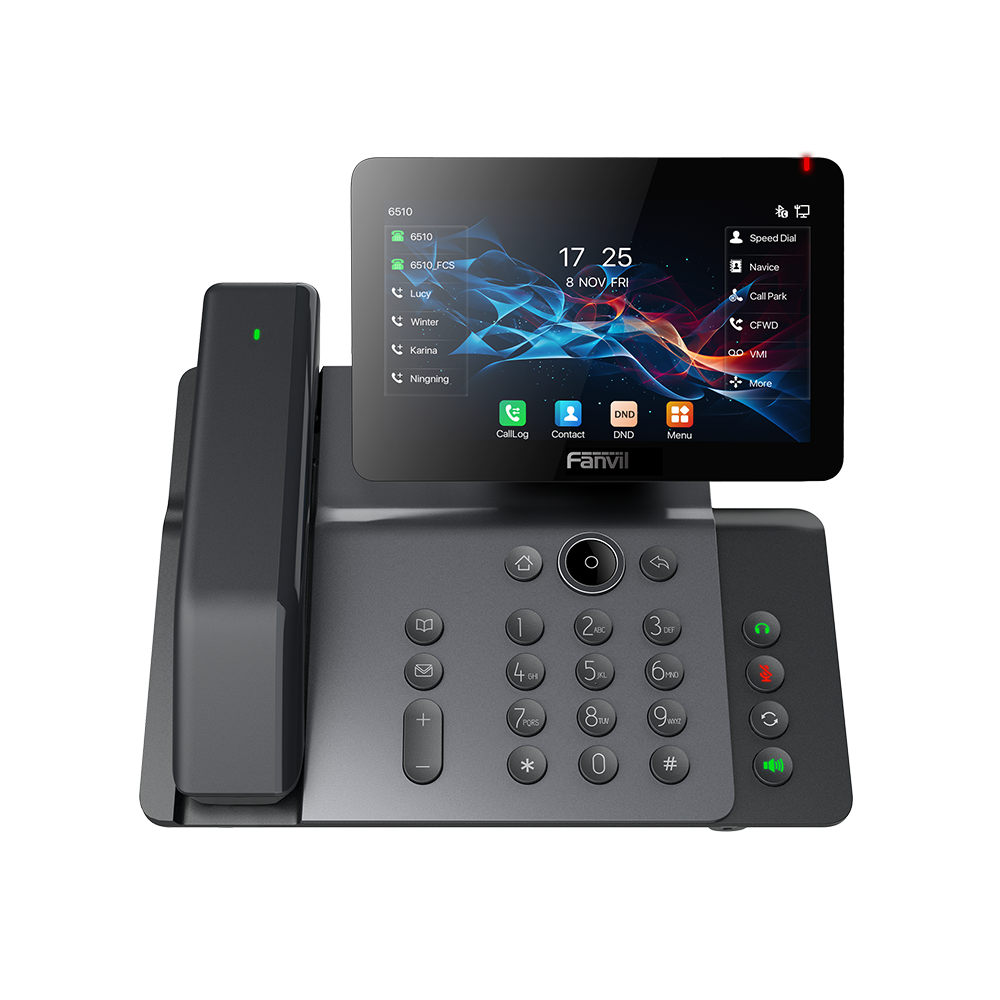
The V66 Pro is a high-performance business phone designed for advanced users seeking efficient communication. Its distinctive aesthetic design features a 7-inch high-definition "floating smart screen" delivering ultra-HD sound quality. Key features include: • Bluetooth 5.4 and dual-band 2.4G/5G Wi-Fi with Wi-Fi 6 compatibility • Support for H.264 video codec and audio codecs (G.722 and Opus) for HD audio • 6-way audio conference support and built-in dual-band Wi-Fi • Bluetooth wireless handset for audio • Desktop and wall-mount installation options • Customizable settings on up to 116 DSS keys A full list of specifications can be found in the product datasheet.
About This Product
The Fanvil V66 Pro is a premium desk phone aimed at power users who need more than basic calling. Its standout feature is the 7-inch "floating smart screen," which gives you a large, clear interface for managing calls, contacts, and settings. This phone is a strong fit for a busy executive, a receptionist, or a team leader in a Toronto office who juggles multiple lines and needs quick access to dozens of contacts or speed-dials. The included Bluetooth wireless handset adds flexibility, letting you move around your desk or a small meeting space while on a call. The V66 Pro also supports Wi-Fi 6 and Bluetooth 5.4, which can simplify cabling in a modern open-plan office or a home office where running Ethernet is impractical.
That said, the V66 Pro is overkill for a simple desk phone used for just one or two lines, and its advanced features may be wasted on a user who only needs basic call handling. On the other hand, it may be underpowered if you need a full video-conferencing endpoint for a large room, as its video capabilities are limited to a codec standard rather than a built-in camera. It pairs well with a hosted PBX service that supports provisioning across many keys, and it can replace an older multi-line desk phone where screen size and wireless handset freedom are priorities. For a GTA deployment, the V66 Pro is compatible with most SIP-based Canadian carriers, but you should confirm that your provider supports the advanced features like 6-way conferencing and the high number of DSS keys you plan to use.
A practical tradeoff: the V66 Pro's large screen and wireless handset mean it draws more power than a basic desk phone, so make sure your PoE switch can deliver adequate power. If you're using the Wi-Fi instead of wired Ethernet, be aware that call quality will depend on your local network conditions, especially in a dense office with many devices. For most users, the wired connection will be more reliable for voice, but the Wi-Fi 6 support gives you a solid wireless option when needed.
That said, the V66 Pro is overkill for a simple desk phone used for just one or two lines, and its advanced features may be wasted on a user who only needs basic call handling. On the other hand, it may be underpowered if you need a full video-conferencing endpoint for a large room, as its video capabilities are limited to a codec standard rather than a built-in camera. It pairs well with a hosted PBX service that supports provisioning across many keys, and it can replace an older multi-line desk phone where screen size and wireless handset freedom are priorities. For a GTA deployment, the V66 Pro is compatible with most SIP-based Canadian carriers, but you should confirm that your provider supports the advanced features like 6-way conferencing and the high number of DSS keys you plan to use.
A practical tradeoff: the V66 Pro's large screen and wireless handset mean it draws more power than a basic desk phone, so make sure your PoE switch can deliver adequate power. If you're using the Wi-Fi instead of wired Ethernet, be aware that call quality will depend on your local network conditions, especially in a dense office with many devices. For most users, the wired connection will be more reliable for voice, but the Wi-Fi 6 support gives you a solid wireless option when needed.
Services We Provide
- Professional Installation & Configuration
- Ongoing Maintenance & Support
- Troubleshooting & Repairs
- System Upgrades & Updates



