
Fanvil V67 Android Video IP Phone

Frequently Asked Questions

Start by checking the Wi-Fi signal strength indicator on the phone’s screen; a weak signal during high-bandwidth 1080p video is a common cause. If possible, move the phone closer to the access point or switch to the 5 GHz band, which is typically less congested in Canadian office environments. If the issue persists, temporarily connect the phone via Ethernet to confirm whether the problem is specific to the wireless connection.
First, gently clean the screen with a dry microfiber cloth to remove any residue that may interfere with the capacitive touch layer. Next, power-cycle the phone by disconnecting and reconnecting the PoE cable or power supply, and observe whether the screen responds correctly during the boot sequence. If the problem continues, check whether it occurs only within a specific Android application or across the entire interface.
Verify that the SIP server address, username, and password are entered exactly as provided by your VoIP provider, paying close attention to case sensitivity and any special characters. Ensure the phone’s date and time are set correctly, because a significant time skew can cause TLS certificate failures or authentication rejections. As a safe next step, confirm that the SIP registration port and transport protocol (UDP, TCP, or TLS) match what your provider expects.
Through the phone’s web interface or the on-screen Android settings, navigate to the DSS key configuration page and assign each key a BLF (Busy Lamp Field) type, then enter the extension number you want to monitor. You can also label each key so the colleague’s name appears on the touch screen. The V67 supports 112 on-screen keys, so you can organize them across multiple pages to group departments or teams.
Confirm that both the V67 and the remote party’s device support 1080p and that the call has negotiated HD video; the phone’s call screen usually indicates the active resolution. Check your network for packet loss or jitter by running a brief test from a computer on the same switch port, as video quality degrades quickly on a congested link. If you are using Wi-Fi, try a wired Gigabit connection to rule out wireless interference as the cause.
The V67 runs Android 9.0 and allows sideloading of compatible APK files, though it does not ship with the Google Play Store. You should only install applications that your organization has approved and that are known to work on this specific hardware. Because the device is optimized as a phone first, graphics-intensive applications may not perform as they would on a modern tablet.
Check that the Ethernet cable is delivering PoE by testing the same cable and switch port with another PoE device, or try the optional external power supply if you have one available. Adjust the screen tilt gently through its 0° to 40° range while watching for any flicker, which could indicate a loose internal connection. If the screen remains dark, try a power cycle and listen for the boot-up light effect to confirm the phone is starting.
Enable Bluetooth 5.0 from the Android settings menu on the phone and put your headset into pairing mode. Once the headset appears in the list of available devices, tap it to pair, and the phone will typically route audio to the headset automatically during calls. If audio does not switch, check the call audio path setting during an active call to confirm the headset is selected.
First, confirm that the volume is turned up using the physical volume keys during a call. Test with both the handset and speakerphone to see if the problem is limited to one audio path. If neither produces sound, reboot the phone and, if the issue persists, a Toronto-based VoIP support provider can usually resolve this remotely by checking the device’s audio codec settings and firmware status.
IP Phones

Fanvil V67 Android Video IP Phone
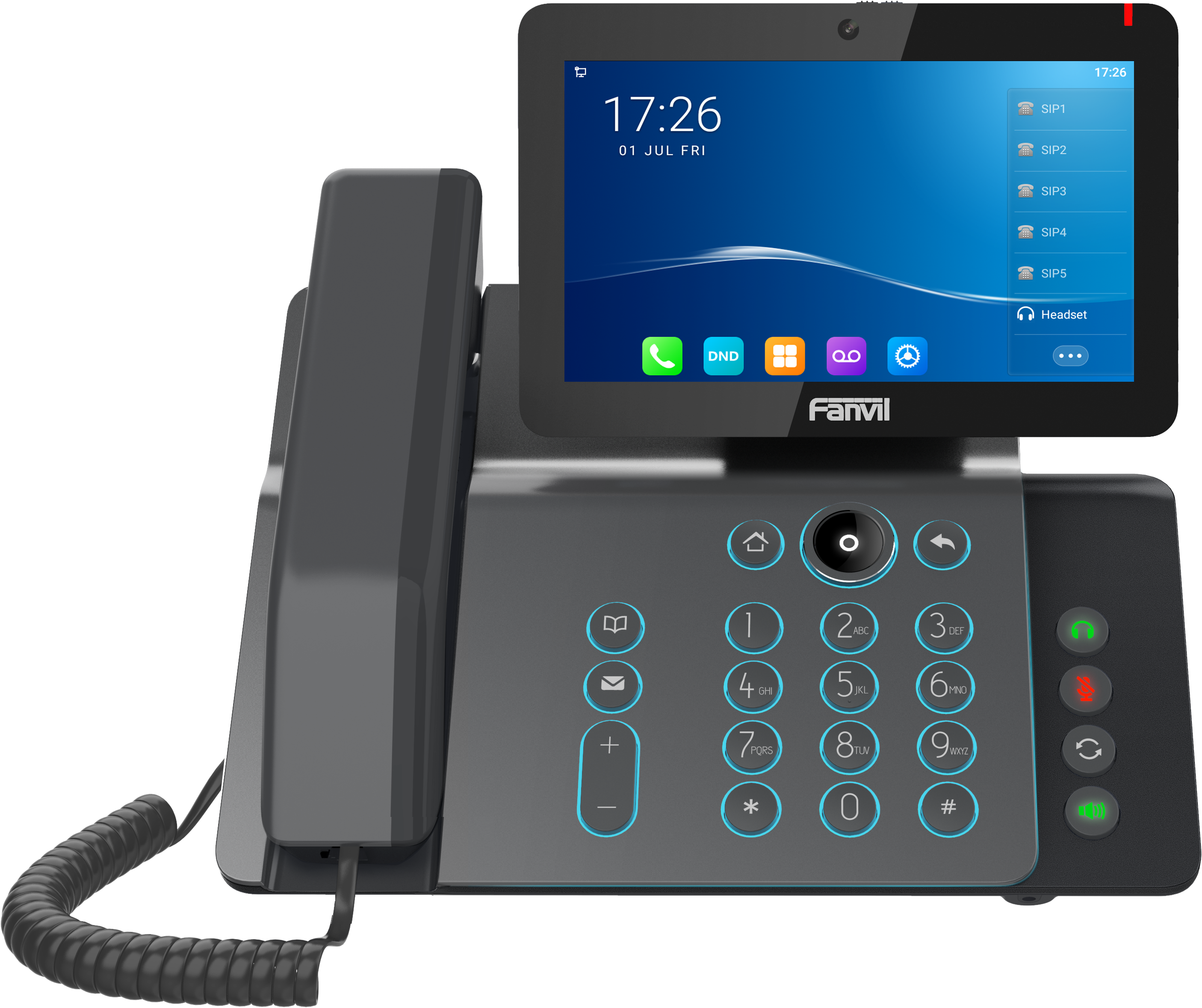
• The V67 Video Phone is powered by Android 9.0 OS and features built-in applications, including File and Calendar. • Key features: • 20 SIP lines and SIP Hotspot • HD audio and HD video (1080P@30fps) for life-like video conferencing • Three-way video conferencing • 112 one-touch DSS keys on a 7” capacity color touch screen • Adjustable touch screen with a range of 0° to 40° • Built-in Bluetooth 5.0 and 2.4G/5G Wi-Fi • Dual Gigabit ports, integrated PoE • Colorful Light Effect for specific scenarios (boot-up/ringing/MWI/etc.) • Up to 10-party audio conferencing • Compatible with major platforms: Asterisk, Broadsoft, Metaswitch, Elastix, Avaya, etc. • Optional External Power Supply • Now certified with NetSapiens For a full list of specifications, please refer to the Fanvil V67 Android Video IP Phone product datasheet.

About This Product

The Fanvil V67 sits at the intersection of a desktop video terminal and a full Android workstation. It is built for knowledge workers and executives who spend significant time on face-to-face internal calls and need quick access to SIP line appearances without a sidecar. The 20-line capacity and 112 on-screen DSS keys suit receptionists, executive assistants, and team leads managing multiple extensions or ring groups in a mid-sized Toronto professional office. Because it runs Android 9.0, the phone can host lightweight business applications, which makes it interesting for organizations that want a single device for video calls, calendaring, and basic file review at a hot desk or private office. It is not a conference-room appliance—the 7-inch screen and three-way video limit position it squarely as a personal endpoint rather than a room system.

The built-in Bluetooth 5.0 and dual-band Wi-Fi give the V67 genuine flexibility in open-plan or heritage office spaces where Ethernet drops are scarce. That said, for sustained 1080p video at 30 frames per second, a wired Gigabit connection with PoE remains the more predictable choice. The adjustable screen angle (0° to 40°) is a practical touch for glare reduction near windows, a common consideration in glass-heavy GTA office towers. Pairing the V67 with a cloud PBX or an on-premise platform like Asterisk or Broadsoft is straightforward, and the recent NetSapiens certification broadens its fit for Canadian service providers hosting multi-tenant environments.

A buyer should understand the tradeoff: this is an Android 9.0 device, not a current-generation mobile OS. The built-in applications are utilitarian and will not match the responsiveness of a modern tablet. The phone excels as a video-capable SIP terminal with a large DSS footprint; the Android layer is a convenience, not a replacement for a desktop computer. Organizations evaluating the V67 should confirm that any third-party Android applications they intend to deploy are compatible with the OS version and the device’s processor. Power is typically delivered via PoE, but an external power supply is optional if the switch does not provide it, which is worth factoring into per-desk budgeting.

In a Canadian context, the V67 fits well where a business wants a premium desk phone that covers both video calling and high-volume call handling without adding a separate expansion module. It is overkill for a lobby phone, a common-area device, or any user who only needs two or three line keys and rarely uses video. For call centers with headsets and no video requirement, a simpler HD audio phone will deliver the same voice quality at a lower cost. The V67 earns its place when video presence and one-touch line management are daily requirements.
Services We Provide
  • Professional Installation & Configuration
  • Ongoing Maintenance & Support
  • Troubleshooting & Repairs
  • System Upgrades & Updates



