
Fanvil X303 2 Wire IP Phone

Frequently Asked Questions

Ensure the phone is connected to a Fanvil 2-wire PoE switch and that the switch is powered and has network connectivity. Verify the SIP account credentials (username, password, server address) in the phone's settings. If using auto-provisioning, confirm the provisioning URL is correct. If the issue persists, a Toronto-based VoIP support provider can usually resolve this remotely.
Check that the RJ11 cable is securely inserted into both the phone's Line port and the switch's port. Power cycle the switch by unplugging it for 10 seconds. If that doesn't work, test with a different known-good cable or another X303 phone to rule out a defective unit. The phone does not have an external power adapter option, so the 2-wire connection is the only power source.
First, ensure all cabling is properly seated and not near sources of electrical interference. Try a different 2-wire cable. On the phone, verify the speaker volume is not set too high, which can cause echo. If using a headset, test with the handset to isolate the issue. For persistent problems, check the network for high packet loss or jitter, as 2-wire technology may be more susceptible to line noise.
Check the link LED on the Fanvil 2-wire switch for the port the phone is connected to – a blinking or absent light indicates an unstable connection. Try reseating the RJ11 cable at both ends. Ensure the switch firmware is up to date. If the issue occurs during heavy network usage, the cable length may be exceeding the recommended limit for 2-wire transmission; consult the switch's spec for maximum distance.
Check that the handset cord is firmly plugged into the phone. Test by pressing the speakerphone button to see if audio comes through the speaker. If speaker works but handset doesn't, the handset or its cable may be faulty. Also, ensure the phone is not muted (check the mute LED indicator). If only incoming audio fails, the issue may be with the network's SIP media path; verify your router/firewall is not blocking RTP.
Power cycle the phone by disconnecting the RJ11 cable for 30 seconds and reconnecting. If that does not resolve, contact your VoIP support provider before attempting a factory reset. A blank display after power cycling may indicate a hardware issue that requires replacement.
Connect an RJ11 cable from the phone's Line port to any 2-wire port on the Fanvil PoE switch. The phone will receive power and network automatically via DHCP. Configure the SIP account through the phone's menu (Settings > Accounts) or use auto-provisioning. For a GTA office, ensure your switch's DHCP server assigns IP addresses on the correct subnet.
Yes, the X303 supports wall mounting. You will need a wall mount bracket (sold separately or included with some models). The phone has mounting slots on the back. Secure the bracket to the wall, then attach the phone. Note that the RJ11 cable must reach, and the phone's orientation can be adjusted for multi-angle desktop installation as well.
The X303 is a standard SIP phone and should work with any SIP-based VoIP provider, including Canadian providers. You will need the SIP server address, account credentials, and possibly codec preferences. The phone supports common codecs like G.711 and G.729. For Rogers Business Phone or Bell VoIP, you may need to adjust the SIP port or NAT settings; a local VoIP support provider can assist.
While on an active call, press the Conference soft key, then dial the second party. Once the second party answers, press the Conference key again to join all parties. The X303 supports up to 6-party conferencing. For best audio quality, use a speakerphone or headset in a quiet room.
IP Phones

Fanvil X303 2 Wire IP Phone
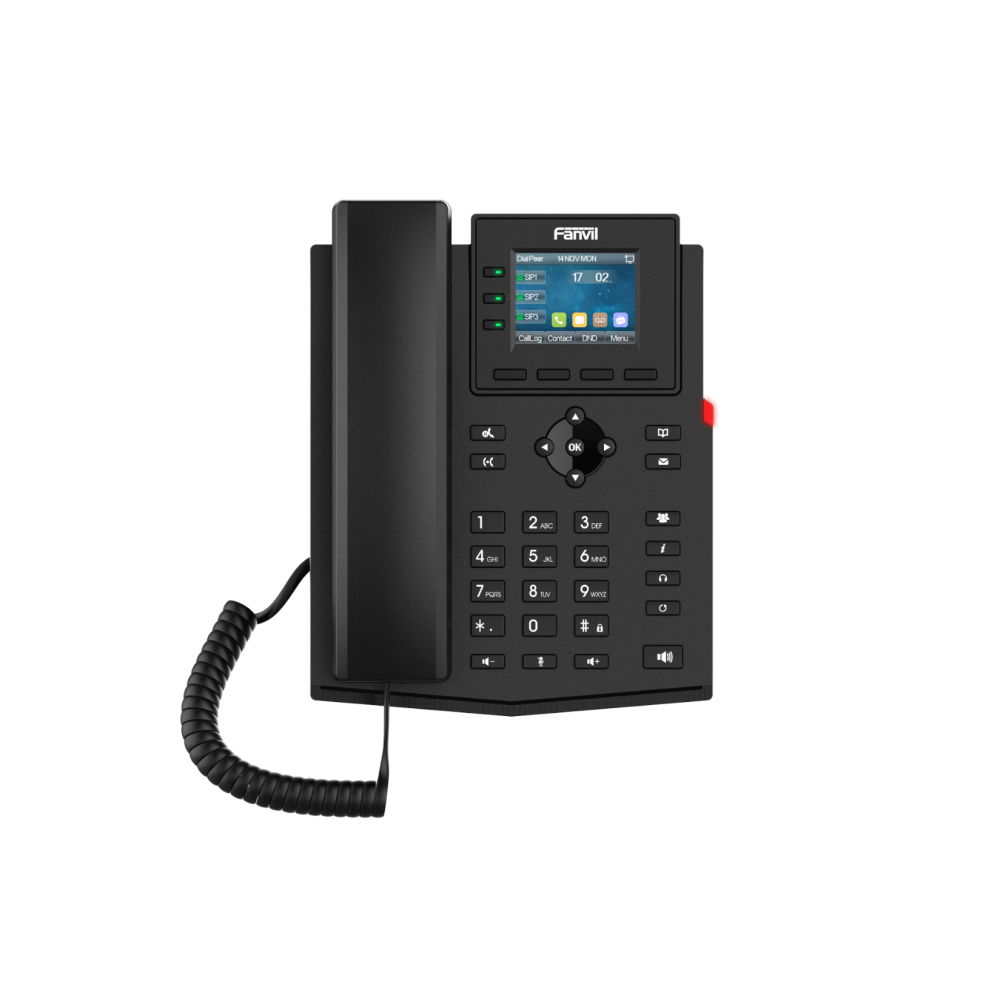
The Fanvil X303-2 Wire IP Phone is an upgraded version of the original IP phone, featuring a brand-new power and network supply method using a 2-wire connection. This allows for complete reuse of old wiring while offering high-definition voice, a 2.4-inch color display, support for 4 SIP accounts, 2-wire power and network supply, multi-party conferencing, and other rich features. Key Features: • Integrates with Fanvil 2-wire PoE switches for streamlined network configuration • Connects via an RJ11 interface and utilizes 2-wire power and network supply • 2.4-inch color display catering to diverse application requirements • High-definition voice ensuring clearer calls • Supports 6-party conferencing • Allows for multi-angle desktop installation and wall mounting • Four soft keys and nine function keys with LED indicator light • Supports external EHS wireless headsets For a full list of specifications, please refer to the Fanvil X303 2-wire datasheet.

About This Product

The Fanvil X303 2-wire IP phone is designed for environments where existing telephone wiring can be repurposed for VoIP. Instead of requiring new Ethernet cabling, it connects via an RJ11 interface and receives both power and network from a compatible Fanvil 2-wire PoE switch. This makes it an excellent choice for older office buildings in the GTA where pulling new cables is impractical or expensive. The phone itself is a full-featured SIP device with a 2.4-inch colour display, support for four SIP accounts, and high-definition voice – suitable for desktop use in small to medium businesses.

From a deployment perspective, the X303 2-wire works best as a replacement for analog phones in facilities that already have structured telephone wiring. The trade-off is that it depends entirely on a Fanvil 2-wire switch; it will not work with standard PoE switches or standalone power adapters. For businesses without existing wiring, a standard Ethernet-based IP phone would be simpler and often cheaper. The phone is well-suited for front desks, meeting rooms, or individual workstations where basic call handling and multi-party conferencing (up to 6 parties) are needed. It is overkill for users who rarely make calls and underpowered for high-volume call centres that require advanced CRM integration or dozens of programmable keys.

Installation is straightforward if the supporting switch is in place, but note that cable length limitations for 2-wire transmission may restrict placement – check the Fanvil datasheet for distances. The phone also supports wall mounting and external EHS wireless headsets, adding flexibility for tight office layouts. For Canadian businesses, the X303 2-wire works with standard SIP trunk providers, and its use of existing wiring can significantly lower renovation costs.
Services We Provide
  • Professional Installation & Configuration
  • Ongoing Maintenance & Support
  • Troubleshooting & Repairs
  • System Upgrades & Updates



