
Fanvil X303W Wi-Fi Phone

Frequently Asked Questions

First, double-check that your SIP server address, username, and password are entered correctly in the phone's web interface or provisioning profile. Also, confirm that the phone's network settings allow outbound SIP traffic on ports 5060/5061—many office firewalls block these by default. If the issue persists, a Toronto-based VoIP support provider can usually resolve this remotely.
Start by moving the phone closer to the Wi-Fi access point to rule out weak signal. Also verify that the phone is connected to a 5GHz network instead of 2.4GHz if your environment has heavy interference (like many neighboring offices). A simple power cycle of both the phone and the access point often clears up temporary connectivity drops.
Choppy audio usually points to Wi-Fi bandwidth issues. Check that your network isn't overloaded—pause large downloads or streaming on other devices while on a call. Also confirm the phone is using an HD audio codec like G.722 or Opus; you can set a preferred codec in the phone's web interface. If the problem only happens on long calls, try resetting your router.
The X303W supports automatic provisioning via a URL or TFTP/HTTP server. Enter your provisioning server address in the phone's web interface under 'Auto Provision' settings. Make sure your config files are formatted correctly for Fanvil (they usually use XML). Many Canadian SMBs use a free PBX like 3CX or FreePBX—both integrate well with Fanvil provisioning templates.
This is often a one-way audio issue caused by a firewall or NAT misconfiguration. Verify that your SIP ALG (Application Layer Gateway) is disabled on your office router. Then check that the phone's NAT settings are set to 'STUN' or that a static route is configured. If your provider uses a media server behind a separate IP, ensure the phone's RTP ports are open.
First check the power adapter—the X303W ships with a 5V DC adapter, not PoE. Make sure the adapter is firmly plugged into the phone and a working outlet. If the phone still shows nothing, try a different USB‑C cable if you're using that (though the included adapter is the standard). A blank screen can also result from a failed firmware update; hold down the 'OK' button while powering on to see if the display recovers.
Yes, the X303W is a standard SIP phone that works with any SIP‑compatible PBX, including 3CX, FreePBX, and many hosted Canadian providers. However, it is not a Teams‑certified phone, so you'll need a SIP trunk or a third‑party bridge for Microsoft Teams integration. For a pure SIP setup, it pairs perfectly with most Canadian VoIP carriers.
Random reboots are often power-related—try a different outlet or a high‑quality USB power supply if using a third‑party adapter. Also check that the phone's firmware is up to date; older versions had a bug where Wi-Fi disconnects could trigger a reboot. Update the firmware via the web interface or your provisioning server.
You can start a six‑party local conference right from the handset. While on an active call, press the 'Conf' button, then dial the next participant and press 'Conf' again to merge. Repeat for up to six parties. This works independently of your PBX—it's a built‑in feature of the X303W. If the 'Conf' button isn't visible, check your screen layout or assign it as a soft key in the web interface.
The X303W has built‑in Acoustic Echo Cancellation, but it relies on proper placement. Make sure the phone's microphone isn't covered and that you're at least a foot away from it. Also check if 'Speakerphone Gain' is set too high in the audio settings—reduce it slightly. If echoes persist, try enabling or disabling 'Noise Reduction' under Audio > Advanced.
IP Phones

Fanvil X303W Wi-Fi Phone
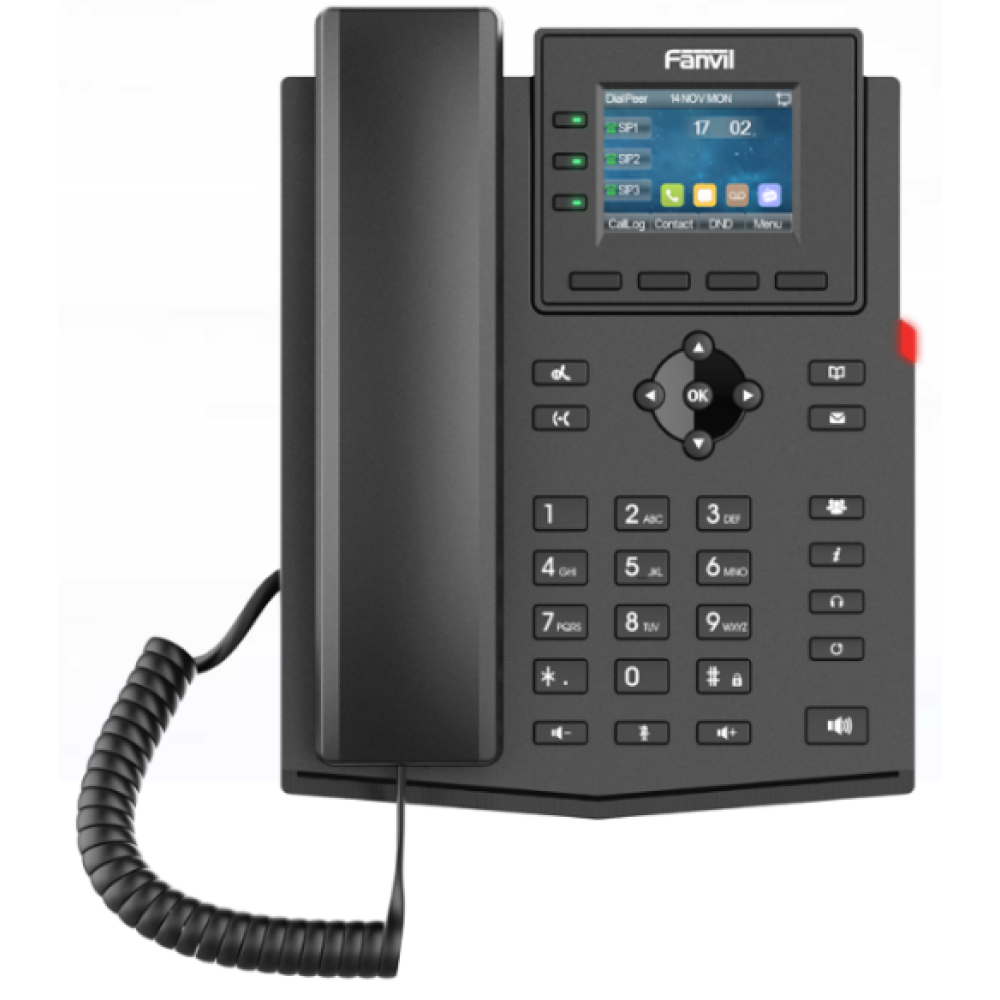
The Fanvil X303W Wi-Fi Phone is an elegantly designed phone that features a 2.4-inch 320x240 pixel color screen, supporting 4 SIP lines and local 6-party conferencing to render a user-friendly experience. The X303W has rich functions such as HD audio and built-in 2.4GHz & 5GHz Wi-Fi, providing an efficient and high-quality business communication experience for enterprises. • High-definition display with 320x240 pixel resolution • Supports 4 SIP lines and local 6-party conferencing • Built-in 2.4GHz & 5GHz Wi-Fi for seamless connectivity • Advanced audio features: HD audio, G.722, and Opus coding for stable voice quality • Full-duplex Acoustic Echo Cancellation (AEC) and Noise Reduction for clear call experiences For a full list of specifications, please refer to the product datasheet.

About This Product

The Fanvil X303W is a sensible choice for businesses that need a desk phone but don't have an Ethernet drop at every workstation. Its built-in dual-band Wi-Fi (2.4GHz and 5GHz) lets you place the phone wherever your workspace flows, making it a natural fit for small offices, coworking spaces, or remote employees who want a more reliable experience than a softphone. Think of it as a wired-quality handset that relies on your existing wireless network—a trade-off that works well when your Wi-Fi is strong and centrally managed. For a GTA office with a decent Ubiquiti or Cisco Wi-Fi setup, this phone can replace a traditional wired deskphone without extra cabling costs. However, if you're running a call center with dozens of concurrent calls, the X303W's reliance on Wi-Fi (and its single 2.4-inch screen) may feel underpowered compared to a wired multi-line phone with a larger display. Conversely, for a front desk or a single executive line, its four SIP lines and six-party conferencing are plenty capable. Just be aware that sustained high-bandwidth Wi-Fi congestion can affect voice quality, so reserve this model for environments where the network is stable and not overloaded with video or large file transfers.
Services We Provide
  • Professional Installation & Configuration
  • Ongoing Maintenance & Support
  • Troubleshooting & Repairs
  • System Upgrades & Updates



