
Fanvil X305 Big Button IP Phone

Frequently Asked Questions

First, confirm the phone is on the network by checking for a valid IP address on the display or in the web interface. Then double-check that the SIP server address, username, and password are typed exactly as provided by your carrier—a single typo will prevent registration. A simple reboot often clears temporary glitches. If the issue persists, a Toronto-based VoIP support provider can usually resolve this remotely.
Make sure the handset cord is fully inserted, or if using a headset, that it's connected and selected as the audio device. During a test call, confirm the volume is not muted or set too low. Also verify that your VoIP provider supports the audio codec the phone is trying to use—Opus or G.722 typically work in most Canadian setups. A quick power cycle can reset the audio paths.
The pendant remote communicates via 433 MHz, so first check that the pendant battery is fresh and the phone’s receiver is plugged into the designated port. Go to the phone’s settings to re-pair the pendant by pressing and holding its button while the phone searches. If it still fails, the pendant may be out of range—try bringing it within a few meters of the phone.
On the phone’s screen, look for the Wi-Fi signal indicator—if it’s low, try moving the phone closer to the access point or removing obstacles. Log into the web interface and verify the Wi-Fi network’s security settings match exactly. Temporarily switching to a wired connection can isolate whether the issue is with the Wi-Fi environment, not the phone itself.
Use a known working Ethernet cable and plug the phone into a PoE switch port that is successfully powering another device. Check the switch’s management interface to see if the port is providing power and that the total PoE budget isn’t exceeded. If the phone remains dark, try a different port or a PoE injector as a test. Never perform a factory reset before confirming the power source is good.
Choppy audio often points to network congestion or packet loss. Try connecting the phone directly to your main switch bypassing any in-room hubs. In the phone’s advanced audio settings, ensure Acoustic Echo Cancellation (AEC) is enabled. If your setup uses Wi-Fi, switching to a wired Ethernet connection is the most reliable fix. If the issue persists, a Toronto-based VoIP support provider can usually resolve this remotely.
Log into the phone’s web interface and navigate to the ‘Photo Speed Dial’ section. Upload small JPEG images for each button and assign the corresponding SIP account and destination number. On the phone, pressing a photo speed dial will then automatically dial that contact. The images should be cropped to a square aspect ratio for best display.
Yes, the Fanvil X305 uses open SIP standards, so it works with virtually any hosted VoIP service such as RingCentral, 3CX, or local Canadian providers. You’ll need the provider’s SIP server address, username, and password to configure the account either via the web interface or auto-provisioning. The dual-band Wi-Fi also makes it easy to connect without running cables to every room.
The X305 supports standard auto-provisioning via HTTP/TFTP/FTP. You can create a configuration template with extensions, photo speed dials, and network settings, then push it out by setting the provisioning URL in the phone’s settings or via DHCP option 66. For multi-site GTA care homes, cloud-based provisioning servers simplify managing dozens of devices at once.
HD audio relies on the phone using the G.722 or Opus codec, which is usually enabled by default. In the account settings, verify that these codecs are at the top of the allowed list. You’ll also need a stable network with low latency, so if calls sound narrowband, check the codec negotiation in the call statistics during a test call.
IP Phones

Fanvil X305 Big Button IP Phone
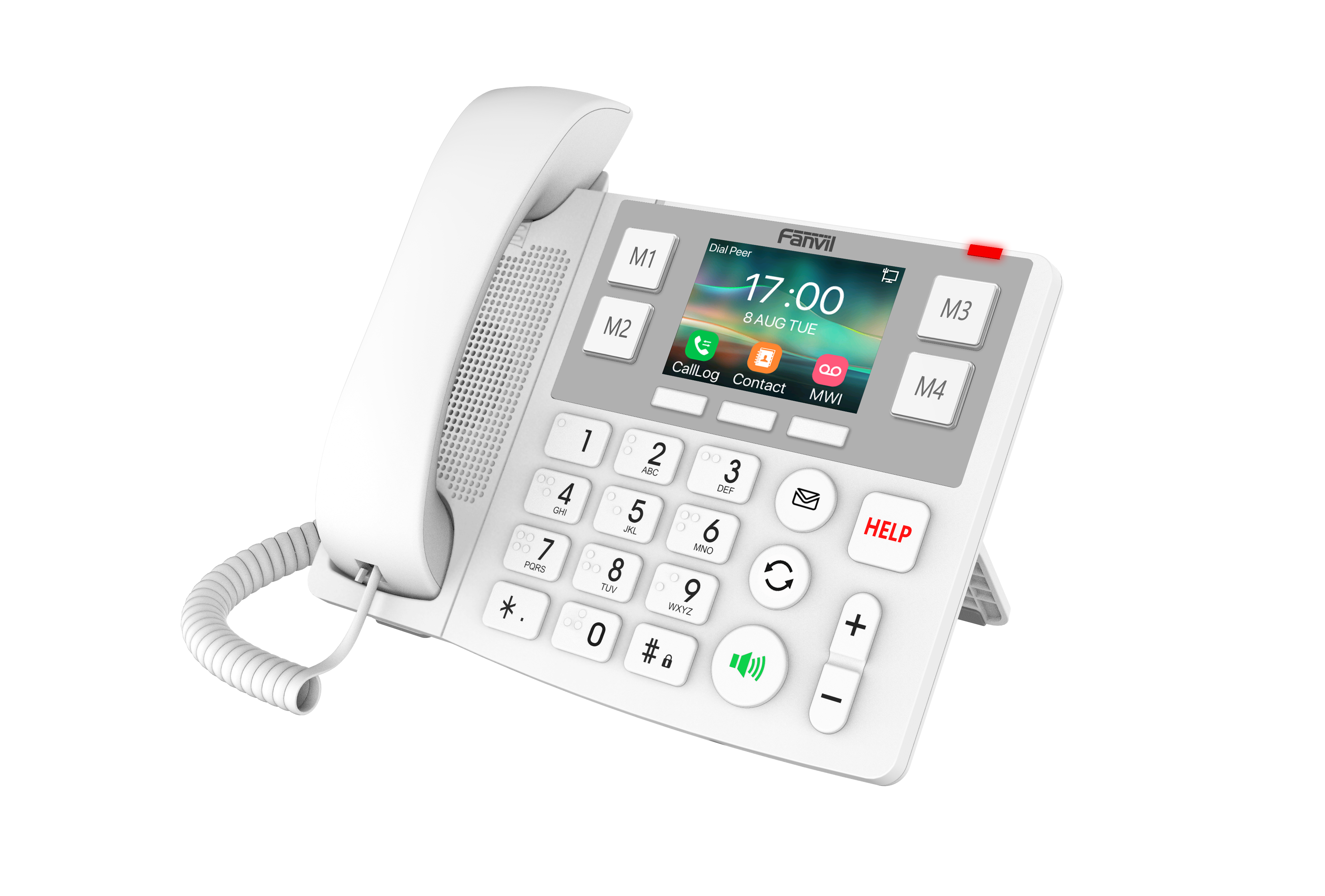
• The Fanvil X305 is a dedicated communication solution for nursing homes and hospitals, featuring a 3.5-inch color screen, large buttons, and support for 2 SIP lines with PoE. • Key features: • 3.5" 320 x 240-pixel color display • Linux-based operating system • 2 SIP lines with PoE support • Photo speed dial: 4 • HD audio with G.722, Opus Full-duplex Acoustic Echo Cancellation (AEC) technology • Big button, numeric keypad with Braille dots for user-friendly operation • Local audio conference: 6-party audio conferencing • Wi-Fi: 2.4GHz & 5GHz dual-band support • Network: 2 * 10/100/1000 Mbps Ethernet ports • Wireless pendant key support via 433MHz remote control • Power supply mode: DC5V_ 2A / PoE compatibility • White color finish

About This Product

The Fanvil X305 is a phone purpose-built for environments where accessibility and simplicity are non-negotiable, such as long-term care homes, hospital wards, and rehabilitation centres. Its oversized buttons include tactile Braille dots, and the option to pair a wireless pendant key gives residents a way to call for help even when they can't reach the phone. A 3.5-inch color screen and photo speed dials make the device intuitive for users with limited technical experience, reducing the need for staff intervention on every call.

Deployment fits naturally into SIP-based VoIP infrastructures. With dual Gigabit Ethernet ports and dual-band Wi-Fi, the phone can be wired at a nurse station or placed wirelessly in a patient room where cabling is impractical. Power over Ethernet support simplifies installation, especially in older buildings where bedside power outlets are scarce. It pairs well with hosted PBX services, nurse call systems, and facility management platforms that rely on standard SIP.

That said, the X305 is not a general-purpose business phone. Its two SIP lines are enough for a resident or a care aide who handles occasional calls, but not for a busy reception desk. The large physical footprint and specialized keypad are essential for accessibility but would feel cumbersome on a typical office desk. For high-volume call handling or environments that require integration with desktop softphone clients, a conventional desk phone is a better fit.

In a Canadian context, the phone works with any SIP-compatible provider—including Telus, Rogers, and VoIP.ms—and its PoE capability aligns with the structured cabling common in Ontario healthcare facilities. For a Toronto-area nursing home transitioning from an older analog system, the X305 offers a straightforward path that respects the needs of residents while giving staff modern management features.
Services We Provide
  • Professional Installation & Configuration
  • Ongoing Maintenance & Support
  • Troubleshooting & Repairs
  • System Upgrades & Updates



