
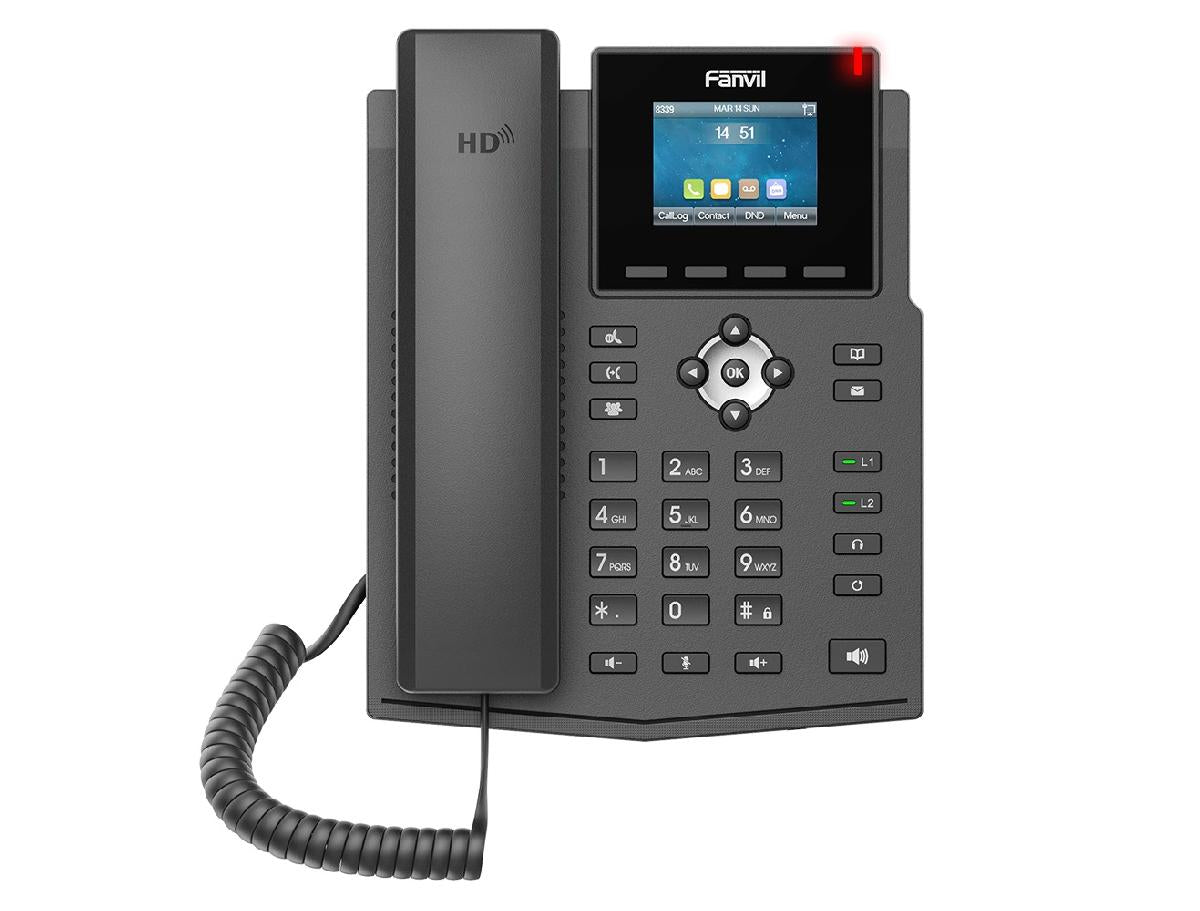
Fanvil X3SP 2 lines Entry Level Color Display Phone with HD, POE
Frequently Asked Questions
First, verify the switch port actually supplies PoE—some budget switches only provide it on a subset of ports. Try a different port and a known-good CAT5e or better cable. If the phone still won’t start, power-cycle the switch and phone; if you have a PoE injector, test with that to rule out a switch issue.
Double-check that the phone’s IP address, subnet mask, and default gateway are correct and that your network’s firewall isn’t blocking SIP port 5060. Also confirm the server address, proxy, and the extension credentials exactly as provided by your VoIP service. A simple reboot can sometimes force a fresh DHCP lease if the phone lost network connectivity.
Jitter and packet loss often cause this. Make sure the phone isn’t connected through a small, unmanaged switch that’s overloaded. Try using a different VLAN for voice if your network supports it, and check that QoS settings prioritize SIP and RTP traffic. A quick test is to temporarily move the phone to a port on the main switch to see if the audio clears up.
The X3SP has an RJ9 headset port and supports EHS, but only for wired headsets that connect via RJ9 and are compatible with the phone’s EHS protocol. It has no built-in Bluetooth, so wireless headsets that rely on a USB dongle or native Bluetooth won’t work unless you use a separate base station connected to the RJ9 port—check the headset’s compatibility with Fanvil EHS before purchasing.
Intermittent reboots can point to an unstable power source. If using PoE, test with a different switch or a known stable PoE injector. If using a power adapter, ensure it meets the device’s voltage and current requirements (sold separately). A faulty Ethernet cable can sometimes trigger resets, so swapping the patch cable is a safe first step before considering deeper issues.
Check the phone’s IP address by pressing the menu key on the phone itself, then confirm your computer is on the same subnet. Disable any VPN or proxy that might interfere. If the interface still won’t load, try using an incognito browser window or clearing cache, and ensure you’re using the correct port (default is 80 or 443 for HTTPS, if enabled).
The X3SP supports common provisioning methods. For 3CX, you’ll typically generate a provisioning link from the PBX and enter it in the phone’s web interface under the provisioning tab, or you can use DHCP option 66 to point the phone to the provisioning server. After saving, reboot the phone—it should pull its configuration automatically. Always confirm your PBX’s IP whitelist and that the phone’s MAC address is authorized in the system.
Open the phone’s account settings and confirm both accounts are enabled and show as registered. If the second account shows ‘failed’ or ‘rejected’, re-enter the SIP credentials and server details carefully—typos in the authentication username or password are common. Also check that your VoIP provider allows multiple registrations from the same IP or MAC; some restrict this by default.
IP Phones
Fanvil X3SP 2 lines Entry Level Color Display Phone with HD, POE
Fanvil X3S IP phone features a 2.4 inch (320x240) color display with a smart and friendly user interface, making it easy to install and configure. With high interoperability, the Fanvil X3S is compatible with major platforms such as 3CX, Broadsoft, Elastix, Asterisk, Xorcom, and more. Key features include: • High-definition voice and full duplex speaker • PoE enabled for easy installation • EHS support for headsets • RJ9 headset port • Desktop and wall mount installation options available • Economical and environmentally friendly package • CE/FCC industrial standard certifications Note: Power supply is sold separately. For a full list of specifications, please refer to the product datasheet.
About This Product
The Fanvil X3SP is a straightforward, wired desk phone designed for individual users who need reliable two-line voice communication without complexity. It fits well in small offices, retail counters, and modest workstations across the Greater Toronto Area where a clean, uncluttered desk matters—the color display is clear enough for call handling without distracting the user. Its PoE support means a single cable can power both network and phone, simplifying installation in structured cabling environments common in Canadian commercial spaces.
As an entry-level model, the X3SP trades advanced features for affordability and simplicity. It lacks Bluetooth or Wi‑Fi, so it stays tethered to a wired LAN port, and its two-line capacity makes it ideal for users with moderate call volume, not for receptionists juggling multiple incoming queues. It’s a sensible direct replacement for aging two-line analog phones where the organization has moved to SIP trunking, particularly with platforms like 3CX or Asterisk that many Canadian VoIP providers support.
Potential buyers should note the power adapter is sold separately, so if PoE isn’t available, they’ll need to budget for one. The integrated EHS and RJ9 headset jack mean you can connect a corded headset easily, but it won’t drive USB or wireless headsets. For a busy executive needing many line keys or a colour touchscreen, this phone would be underpowered; conversely, for a home office or a boutique shop where calls are light and clarity matters, it’s a cost-effective choice that doesn’t overcomplicate things.
As an entry-level model, the X3SP trades advanced features for affordability and simplicity. It lacks Bluetooth or Wi‑Fi, so it stays tethered to a wired LAN port, and its two-line capacity makes it ideal for users with moderate call volume, not for receptionists juggling multiple incoming queues. It’s a sensible direct replacement for aging two-line analog phones where the organization has moved to SIP trunking, particularly with platforms like 3CX or Asterisk that many Canadian VoIP providers support.
Potential buyers should note the power adapter is sold separately, so if PoE isn’t available, they’ll need to budget for one. The integrated EHS and RJ9 headset jack mean you can connect a corded headset easily, but it won’t drive USB or wireless headsets. For a busy executive needing many line keys or a colour touchscreen, this phone would be underpowered; conversely, for a home office or a boutique shop where calls are light and clarity matters, it’s a cost-effective choice that doesn’t overcomplicate things.
Services We Provide
- Professional Installation & Configuration
- Ongoing Maintenance & Support
- Troubleshooting & Repairs
- System Upgrades & Updates



