
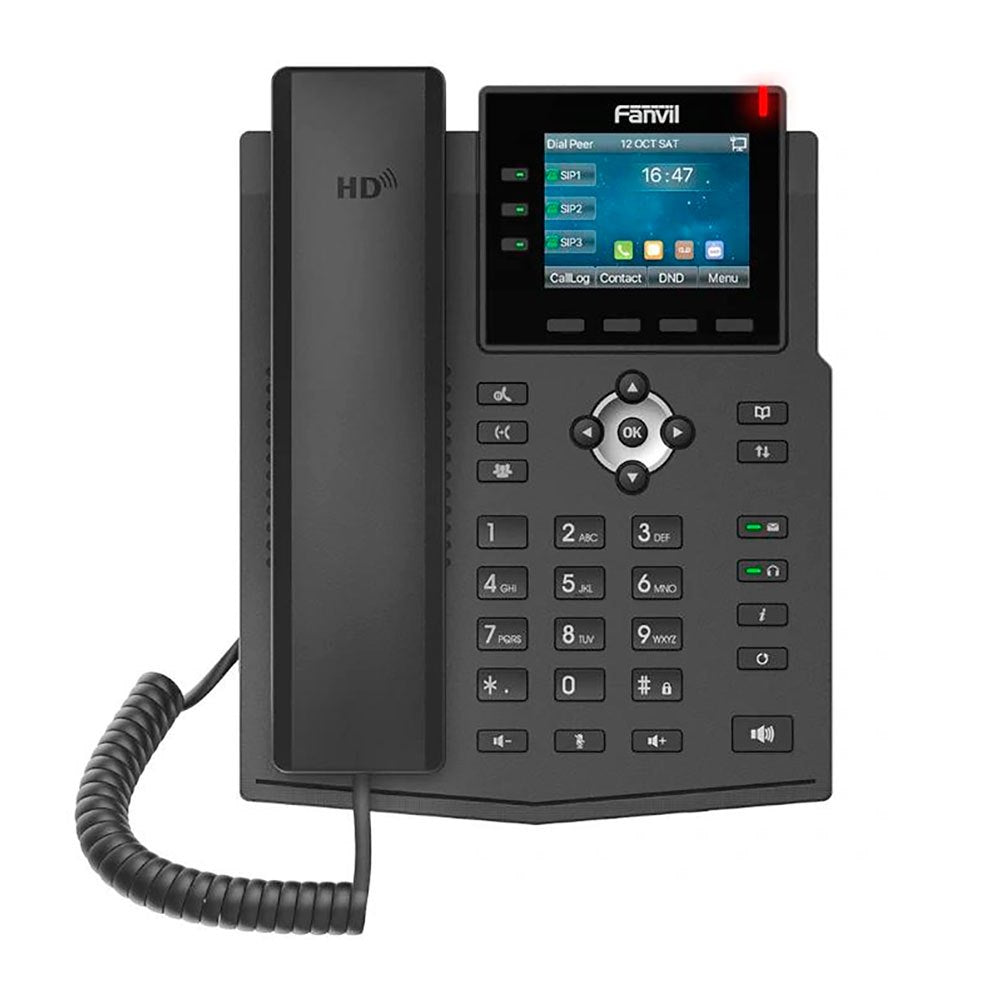
Fanvil X3U Pro IP Phone
Frequently Asked Questions
First, double-check that the SIP server address, username, and password entered in the phoneâs web interface match exactly what your provider supplied. Also confirm that the phoneâs IP address is on the same subnet as your router and can reach the internetâtry pinging the SIP server from a computer on the same network. If the account is correct but still failing, a quick power cycle of the phone and network switch often clears a stuck registration.
The X3U Pro relies on Power over Ethernet (PoE), so first ensure the cable is connected to a PoE-enabled switch port or a PoE injector that meets the 802.3af standard. Try a different Ethernet cable and a different switch portâsometimes a single port can fail. If the switch shows no power being drawn, test with a known-good PoE device to rule out a switch issue.
Start with the handset: unplug and firmly reseat the coiled cord at both ends. If youâre using a headset, confirm itâs properly connected and the EHS cable is seated. Next, press the volume up key during a call to rule out a muted speaker. Also verify that the correct audio device (handset, speaker, or headset) is selected on the screen.
Echo is often caused by volume levels or acoustic feedback. Lower the speaker volume slightly and ask the other party to do the same. If youâre using a speakerphone, try moving the phone away from walls or other hard surfaces. In some cases, your VoIP provider can adjust echo cancellation settings on their sideâcontact them if the problem persists.
Check if the phone is actually fully bootedâsometimes a blank screen means itâs stuck during startup. Disconnect the Ethernet cable, wait 10 seconds, and reconnect to force a fresh boot. If the screen remains dark but you hear dial tone when lifting the handset, the screen brightness may be set to zero; use the web interface to adjust display settings.
Yes, the X3U Pro supports Electronic Hook Switch (EHS) for compatible wireless headsets. Connect the EHS cable from the headset base to the phoneâs EHS port, then enable EHS in the phoneâs web interface under the headset settings. After that, you should be able to answer and end calls using the headsetâs button. If it doesnât work, verify the headset model is on Fanvilâs compatibility list.
Swap the Ethernet cable for a known-working one and move the phone to a different switch port. Look at the network port LEDs: a solid link light should be present. If youâre using a PC passthrough, unplug the computer temporarily to see if the phone stabilizes. A faulty cable or a switch port with intermittent PoE is the most common cause.
Press the phonebook soft key on the idle screen, then navigate to the local contacts and choose âAddâ. Enter the name and number using the keypad. You can also import a CSV file through the web interface under the phonebook section, which is faster for bulk entries. The phone holds up to 1000 local contacts.
The X3U Pro supports up to a 6-way conference, but you need to initiate it correctly. During an active call, press the conference soft key, dial the next party, and once they answer, press conference again to merge. Repeat for additional participants. If it stops at three, check that your SIP provider allows more than three parties on a single callâsome plans limit this.
By default, the phone uses DHCP. Confirm that your routerâs DHCP server is active and has available leases. You can view the phoneâs current network status on the screen or via the web interface. If DHCP fails, try assigning a static IP in the phoneâs network settings as a temporary test, making sure it matches your subnet. If the issue persists, a Toronto-based VoIP support provider can usually resolve this remotely.
IP Phones
Fanvil X3U Pro IP Phone
• Entry-level Gigabit IP Phone with 6 SIP lines and 3 line keys on the main display • 2.8inch Color Screen • HD Voice, Harman Speaker • IPV6, HAC, EHS • Linux system • Opus Support • PoE Additional Information: • Weight: 9.5kg • Dimensions: 169 x 186.3 x 174.5mm • Brand: Fanvil Technical Specifications: • Main screen: 2.8´´ 320 x 240 color screen • Lines: 6 • Line keys: 3 • Local phone book: 1000 • Call log: 600 • Audio conference: 6-way conference • IPv6 • Audio high definition • Broadband codec: G.722, Opus • PoE • Network: 10/100/1000Mbps • EHS headset • Foot support: 45° and 5°
About This Product
The Fanvil X3U Pro is a practical choice for small businesses or branch offices that need a straightforward, no-nonsense desk phone with modern connectivity. It sits comfortably in reception areas, open-plan workstations, or any setting where a handful of SIP lines and clear audio matter more than a large touchscreen. With Gigabit Ethernet and Power over Ethernet, it plugs neatly into current office networks without extra cabling, and the Harman speaker delivers HD voice that holds up well in everyday calls.
This model makes sense for users migrating from older 10/100 phones who want faster network throughput for their PC passthrough, or for greenfield deployments where Opus codec support and IPv6 readiness are on the checklist. Itâs not a call-center workhorseâthree line keys keep it focused on light to moderate call handlingâbut for a desk that handles a few concurrent conversations and values audio quality, it hits a sweet spot. The 2.8-inch colour screen is crisp enough for caller ID and menu navigation without overwhelming the user.
In a Canadian business context, the X3U Pro fits well with hosted VoIP services widely available in the GTA and beyond, and its EHS support means wireless headset users can answer and end calls away from the desk. The 45° and 5° foot stands offer a bit of flexibility for different desk layouts. Itâs overkill for a home office that only ever uses a softphone, and underpowered for an executive assistant managing a dozen lines, but for the majority of small-team environments, it covers the essentials reliably.
This model makes sense for users migrating from older 10/100 phones who want faster network throughput for their PC passthrough, or for greenfield deployments where Opus codec support and IPv6 readiness are on the checklist. Itâs not a call-center workhorseâthree line keys keep it focused on light to moderate call handlingâbut for a desk that handles a few concurrent conversations and values audio quality, it hits a sweet spot. The 2.8-inch colour screen is crisp enough for caller ID and menu navigation without overwhelming the user.
In a Canadian business context, the X3U Pro fits well with hosted VoIP services widely available in the GTA and beyond, and its EHS support means wireless headset users can answer and end calls away from the desk. The 45° and 5° foot stands offer a bit of flexibility for different desk layouts. Itâs overkill for a home office that only ever uses a softphone, and underpowered for an executive assistant managing a dozen lines, but for the majority of small-team environments, it covers the essentials reliably.
Services We Provide
- Professional Installation & Configuration
- Ongoing Maintenance & Support
- Troubleshooting & Repairs
- System Upgrades & Updates



