
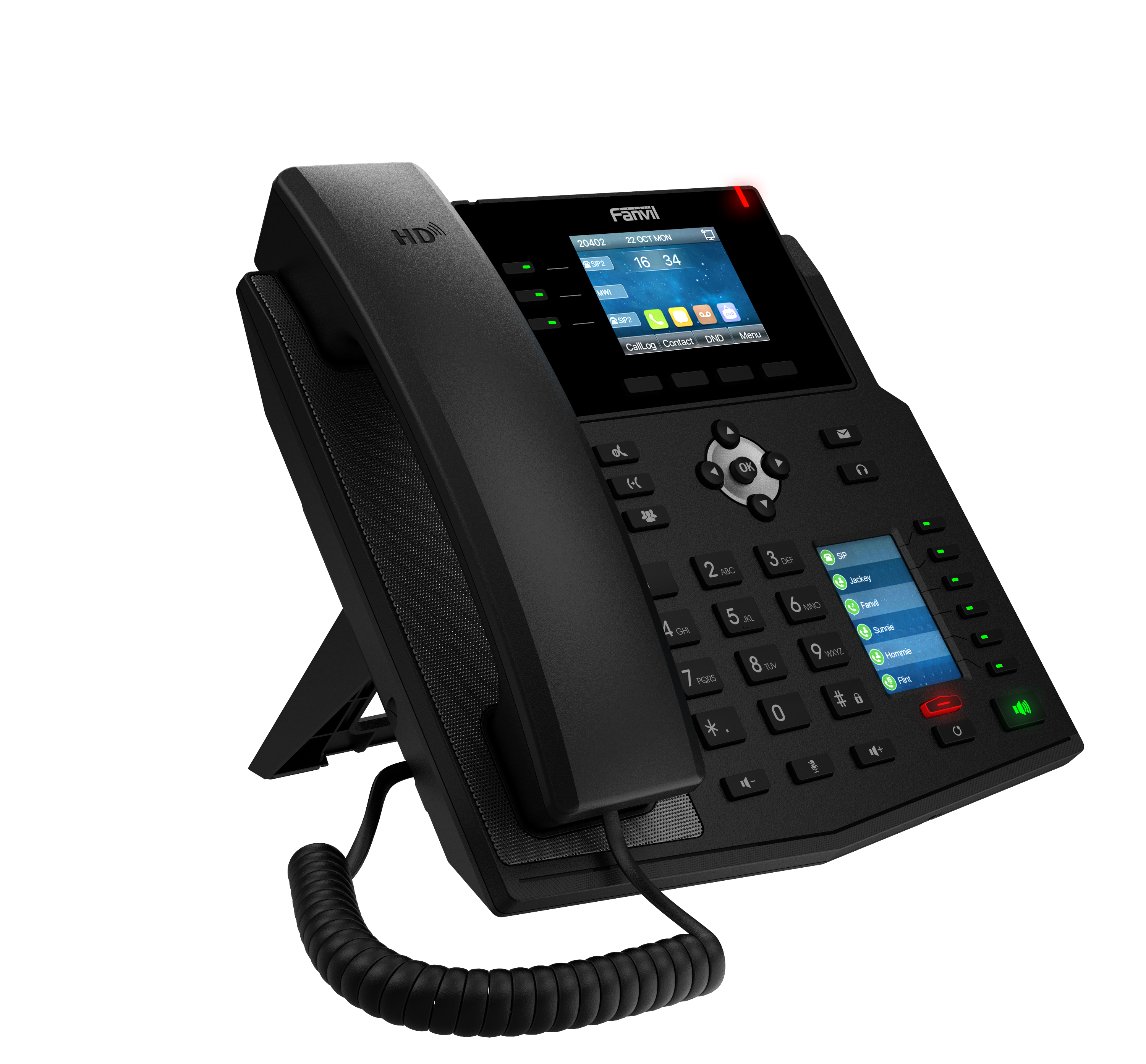
Fanvil X4U-V2 12-Line Mid-level IP Phone
Frequently Asked Questions
First, confirm the phone has a valid IP address and can ping the server address. Then double-check your SIP credentials (username and password) in the account settings under Menu > Settings > Accounts. If credentials are correct but registration still fails, verify the server port and domain—a simple typo is a common cause.
The X4U-V2 requires a Bluetooth dongle (sold separately) plugged into the USB port. Once connected, go to Menu > Settings > Bluetooth and enable it, then pair your headset. For a DECT headset, use the EHS port with a compatible adapter—the phone does not have built-in Bluetooth.
Ensure the handset is clicked into the base correctly and the line cord is seated firmly. Then verify your SIP account shows as registered under Status > Account. If it says not registered, re-enter your SIP credentials. If registered but no dial tone, try a soft reboot by unplugging power for 10 seconds.
Yes, you can use a compatible WiFi dongle (not included). However, for reliable call quality in an office environment, wired Gigabit Ethernet with PoE is strongly recommended to avoid packet loss and interference. If you must use WiFi, ensure the dongle supports 5 GHz and place the phone near the access point.
Start by checking the Ethernet cable—reseat it at both the phone and the switch. If using PoE, confirm the switch provides adequate power (802.3af/at). Try a different cable to rule out a physical fault. If the issue persists, a Toronto-based VoIP support provider can usually diagnose network problems remotely.
Verify the phone is using a wideband codec like G.722 or Opus—check under Menu > Settings > Audio > Codec. If not, ask your provider to enable it on your account. Also test with a wired headset to isolate handset or speaker issues. Ensure your network has sufficient bandwidth and low jitter for VoIP.
The side display shows DSS keys only when they are configured. Go to Menu > DSS Keys and assign functions to empty slots. If keys are set but still blank, try a power cycle. If that doesn't help, your provisioning file may not be pushing the correct layout—contact your phone system administrator.
During an active call, press the Transfer soft key. Dial the extension number and wait for the recipient to answer or let it ring. Press Transfer again to complete the transfer. For an attended transfer, announce the caller before pressing Transfer the second time.
Check the handset volume by pressing the + key during a call. If that doesn't help, unplug the handset cord and reconnect it firmly. Test a different handset if available—a coiled cord can sometimes become damaged over time and cause audio loss.
Confirm the Ethernet switch port is PoE-enabled—check the switch’s LED indicator or documentation. Try a different known-working PoE port or use a PoE injector between the wall and the phone. If the phone still doesn't power on, a Toronto-based VoIP support provider can usually resolve this remotely.
IP Phones
Fanvil X4U-V2 12-Line Mid-level IP Phone
• The Fanvil X4U-V2 supports 12 SIP lines with 3 line keys on the main display, featuring three-way conference and dual Gigabit ports. • Key features include: • HD audio with Harman speaker and wideband codec G.722 and Opus • 2.8-inch 320x240-pixel color display and a 2.4-inch 320x240-pixel color side display • 30 DSS keys, 3 line keys with LED light • Dual Gigabit port with PoE integrated • Support for EHS wireless headset and Bluetooth via Bluetooth dongle • Support for WiFi via WiFi dongle and IPv4/IPv6 protocol For a full list of specifications, please refer to the product datasheet.
About This Product
The Fanvil X4U-V2 is a mid-level IP phone designed for desk workers who need to manage multiple calls and extensions efficiently. With 30 programmable DSS keys and a dual-display setup, it suits roles like receptionists, team leaders, or anyone handling high call volumes in a small to medium-sized office. The main 2.8-inch screen provides clear call info, while the side display makes it easy to monitor line status or speed-dial contacts at a glance.
This phone works well with most hosted PBX platforms or on-premises SIP servers, including common Canadian providers. The built-in PoE support simplifies cabling—just one Ethernet cable handles both data and power, which is convenient for GTA office deployments with PoE switches. Audio quality benefits from the Harman speaker and wideband codecs, though the included handset is adequate for everyday use. Be aware that Bluetooth and WiFi require separately purchased dongles, so the device is not truly wireless out of the box.
For a busy front desk or a power user monitoring multiple queues, the X4U-V2 offers good value without stepping into premium territory. However, for users who only need a single line or minimal features, it may be overkill—a simpler model would suffice. On the other hand, it lacks the dedicated hard keys for lines that some call-center roles prefer, so evaluate whether the DSS keys meet your workflow. Overall, this is a solid choice for a mid-tier deployment where flexibility and multi-line handling are key.
This phone works well with most hosted PBX platforms or on-premises SIP servers, including common Canadian providers. The built-in PoE support simplifies cabling—just one Ethernet cable handles both data and power, which is convenient for GTA office deployments with PoE switches. Audio quality benefits from the Harman speaker and wideband codecs, though the included handset is adequate for everyday use. Be aware that Bluetooth and WiFi require separately purchased dongles, so the device is not truly wireless out of the box.
For a busy front desk or a power user monitoring multiple queues, the X4U-V2 offers good value without stepping into premium territory. However, for users who only need a single line or minimal features, it may be overkill—a simpler model would suffice. On the other hand, it lacks the dedicated hard keys for lines that some call-center roles prefer, so evaluate whether the DSS keys meet your workflow. Overall, this is a solid choice for a mid-tier deployment where flexibility and multi-line handling are key.
Services We Provide
- Professional Installation & Configuration
- Ongoing Maintenance & Support
- Troubleshooting & Repairs
- System Upgrades & Updates



