
Fanvil X5U Red-V2 16-Line Mid-level IP Phone

Frequently Asked Questions

First, verify that the network cable is securely connected and that the phone has obtained an IP address (check via the phone’s network settings). Then double-check the SIP credentials—username, password, and server address—entered in the account settings. If the issue persists, a Toronto-based VoIP support provider can usually resolve this remotely.
If you're using Power over Ethernet (PoE), ensure your switch or injector supplies at least 802.3af PoE. If using the optional power adapter, confirm it's plugged into a working outlet and the phone’s power port. Try a different Ethernet cable to rule out a faulty connection.
Go to the phone's settings menu, select Bluetooth, and enable it. Put your headset into pairing mode, then choose it from the list of available devices on the phone. Once paired, you can select the headset as the audio path for calls.
First, check your network connection: a wired Gigabit link is preferred. Reduce network congestion by ensuring other devices aren't saturating the same switch port. Also, try adjusting the audio codec priority in the phone’s settings to prioritize Opus or G.711 for clearer voice.
Yes, the X5U Red-V2 supports an optional USB Wi-Fi dongle (sold separately). Plug it into the USB port, then enable Wi-Fi in the network settings and connect to your network. For best call quality, a wired connection is still recommended, especially in busy environments.
This usually means the phone cannot reach the provisioning server or the configuration file is invalid. Check that the server URL is correct in the phone's auto-provision settings and that the phone has internet access. If you're using a local provisioning server, ensure it's reachable on the same subnet.
In the phone's web interface or menu, go to Account settings and add each SIP line with its own credentials. The phone supports up to 16 lines, and you can assign them to the physical line keys or the DSS keys for quick access. The side screen will show the status of each line.
First, ensure the side screen is enabled in the phone's display settings. If it's on but blank, try restarting the phone. If the problem continues, check for any physical damage or loose connection—contact support before attempting any disassembly.
Yes, the Fanvil X5U Red-V2 is a standard SIP phone and should work with any SIP-based provider in Canada, including Rogers Business Voice, Bell VoIP, and many hosted PBX services. You'll need to enter the correct SIP server and credentials provided by your carrier.
Download the latest firmware from Fanvil's support site, then upload it via the phone's web interface under System > Firmware Update. Alternatively, set up an auto-provisioning server to push updates. Always ensure the phone is on a stable network during the update to avoid corruption.
IP Phones

Fanvil X5U Red-V2 16-Line Mid-level IP Phone
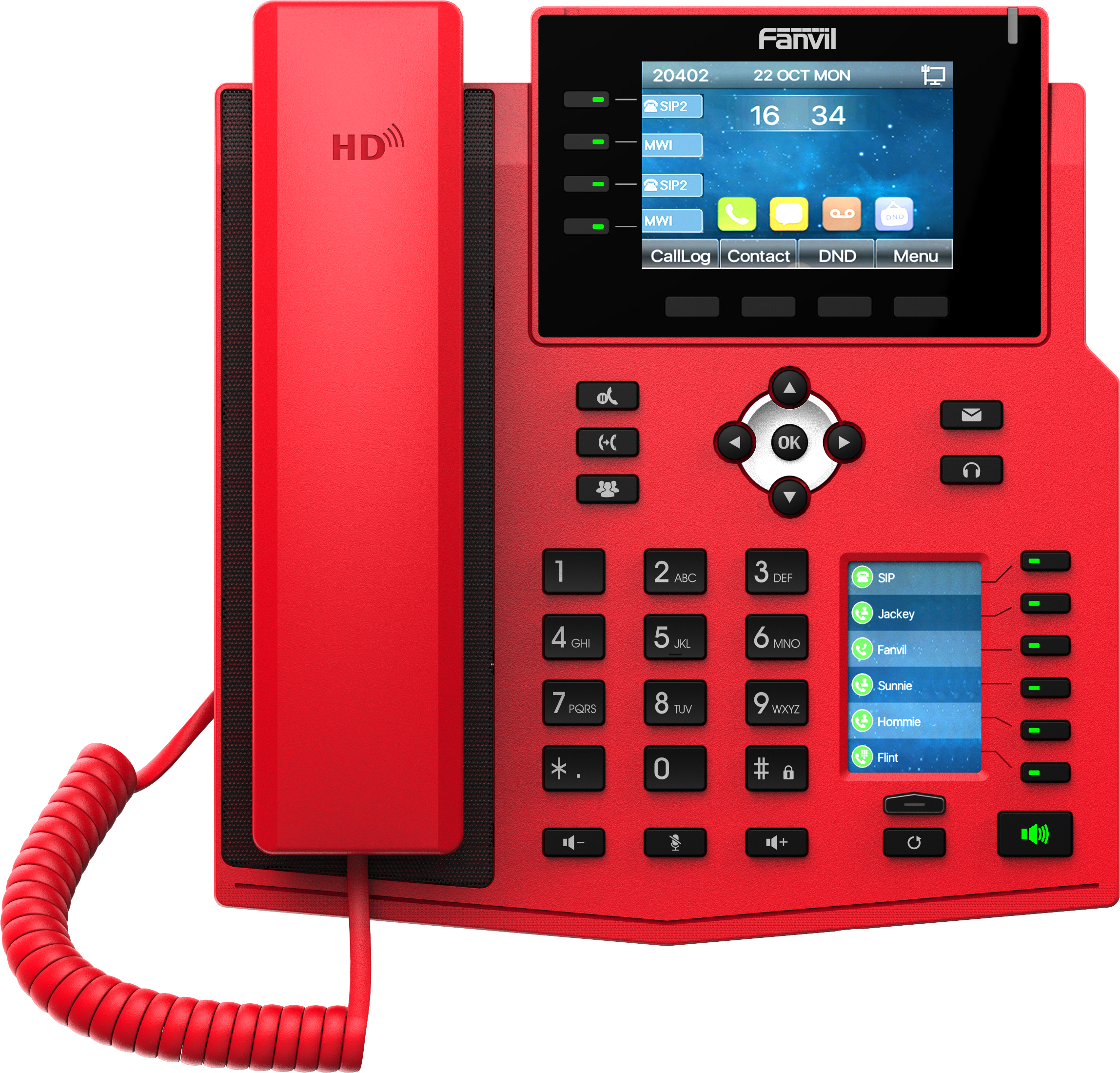
• The Fanvil X5U-Red V2 is a specially designed phone for deployment scenarios where visibility is crucial, ideal for hospitals, fire stations, and government agencies. • 16-line mid-level IP Phone with two screens: a large 3.5-inch color screen and a second 2.4-inch side color screen for added convenience. • Key features: ‣ Harman speaker for great audio quality ‣ Built-in Bluetooth for connecting Bluetooth headsets ‣ Option to add Wi-Fi dongle for internet connectivity ‣ 16 SIP Lines, perfect for businesses with multiple extensions ‣ PoE and Gigabit support for reliable networking ‣ Opus support and IPV6 compatibility for clear voice calls ‣ DSS keys and 4-line keys for easy navigation ‣ WiFi hotspot for remote connectivity • For a full list of specifications, please refer to the product datasheet.

About This Product

The Fanvil X5U Red-V2 is a purpose-built IP phone for environments where visibility and instant recognition matter. Its bold red housing makes it ideal for hospitals, fire stations, or government offices where a phone must be quickly located during emergencies. With two screens—a 3.5-inch color display and a secondary 2.4-inch side screen—it offers at-a-glance line status and call information without cluttering the interface. This phone fits well in mid-size deployments where staff manage multiple extensions, such as nursing stations, dispatch desks, or administrative offices within a larger VoIP system. It pairs naturally with hosted PBX or on-premises systems that support up to 16 SIP lines, and the built-in Bluetooth allows users to work hands-free with a headset while moving around a workspace. The optional Wi-Fi dongle adds flexibility for locations where running Ethernet is impractical, though for best reliability a wired Gigabit connection with PoE is recommended. For a Toronto-area office, this phone is a solid choice for roles that need reliable multi-line handling and clear audio—thanks to the Harman speaker and Opus codec support—but it may be overkill for a single-line user or underpowered for a high-volume call center that requires dozens of programmable keys. Its strengths are in focused, high-stakes communication rather than mass call handling.
Services We Provide
  • Professional Installation & Configuration
  • Ongoing Maintenance & Support
  • Troubleshooting & Repairs
  • System Upgrades & Updates



