
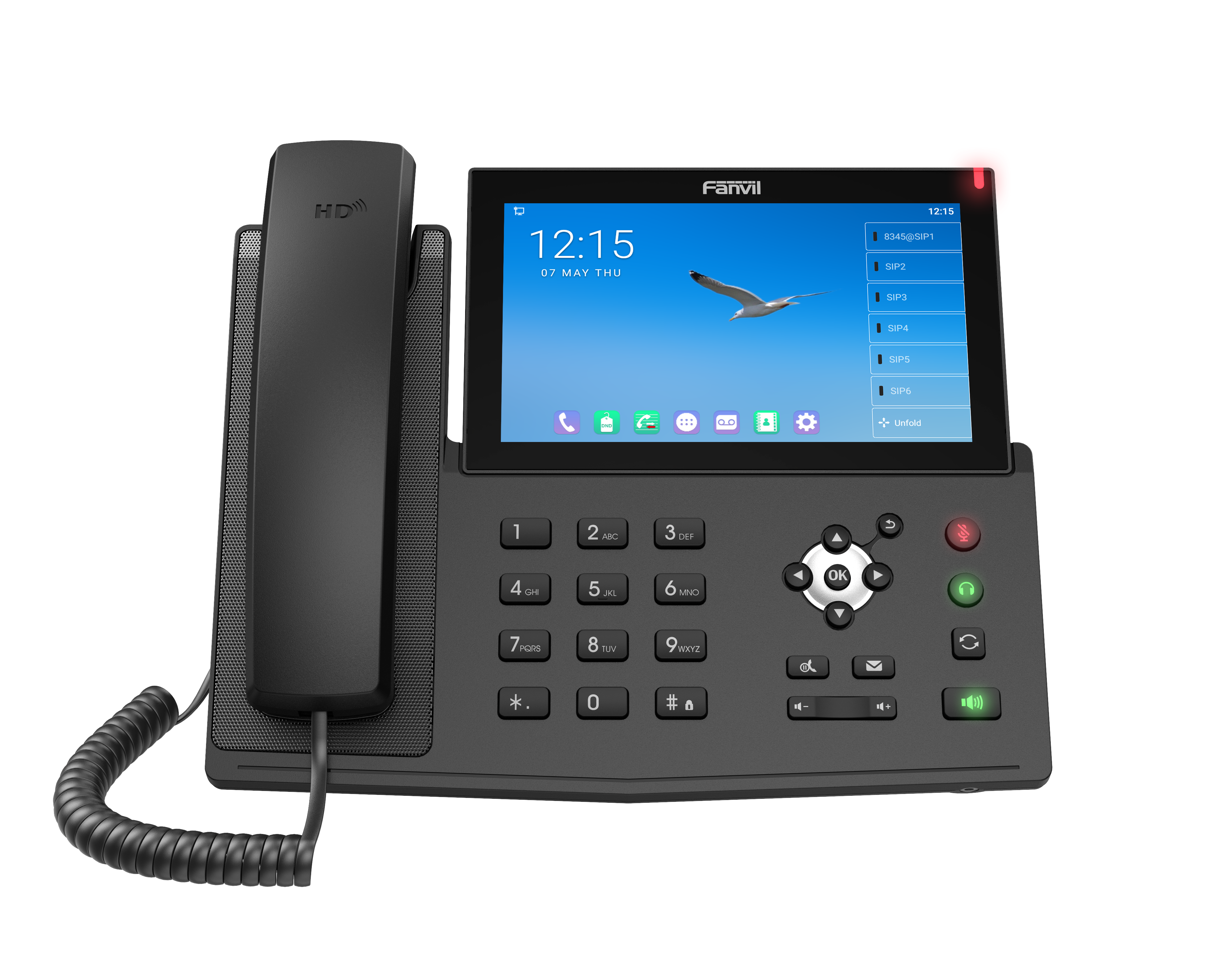
Fanvil X7A Android Phone
Frequently Asked Questions
First, verify that the SIP server address, username, and password entered in the phone's account settings are exactly as provided by your provider. Check that the phone has a valid IP address and can reach the internet—try pinging the SIP server from the phone's network settings if possible. If the issue persists, a Toronto-based VoIP support provider can usually resolve this remotely.
Ensure the power cable or PoE connection is secure and that the power source is working. Try a different Ethernet cable or PoE switch port to rule out a faulty connection. If the screen remains blank, the issue may be with the display hardware, and you should contact your vendor for support.
On the phone, go to Settings > Account and enter the SIP credentials provided by your 3CX administrator. Ensure the phone is on the same network as the 3CX server. For automatic provisioning, you can use the 3CX management console to generate a provisioning link and enter it in the phone's auto-provisioning settings.
Check that the handset cord is fully plugged into both the phone and the handset. If using the speakerphone, ensure the microphone hole is not blocked. Also, verify that the phone's audio settings are not muted and that the correct audio device (handset, speaker, or headset) is selected during the call.
Yes, the Fanvil X7A is a SIP-based phone and can be used with any VoIP provider that supports SIP, including those that offer service over Rogers or Bell internet connections. You will need to configure the phone with the SIP credentials from your VoIP provider, not directly from the ISP.
First, check that the Ethernet cable is securely connected and not damaged. If using Wi-Fi, ensure the signal strength is strong and the phone is within range of the router. Try rebooting the phone and your network switch or router. If the problem continues, test with a different cable or wired connection to isolate the issue.
Go to the phone's DSS key settings, usually found under Features or Programmable Keys. Select an unused key, choose the type as 'Speed Dial' or 'BLF' (Busy Lamp Field), and enter the extension number. Save the setting, and the key will appear on the touchscreen for one-touch dialing.
Ensure that the caller is sending a compatible video stream and that your network has sufficient bandwidth for video. On the phone, verify that video is enabled in the account settings and that the phone's firmware is up to date. Also, confirm that your VoIP provider supports video calling on their platform.
Go to Settings > Device > Display and look for a touchscreen calibration option. If available, follow the on-screen prompts to recalibrate. If the option is not present, try a soft reboot by unplugging the power for 10 seconds. Persistent touch issues may indicate a hardware problem requiring replacement.
Yes, the phone supports Bluetooth 4.2 for headsets. Go to Settings > Bluetooth, enable it, and pair your headset by putting it in pairing mode. Once paired, you can select the headset as the audio device during calls. Note that call quality may vary depending on the headset and distance from the phone.
IP Phones
Fanvil X7A Android Phone
• The Fanvil X7A IP Phone features a built-in WiFi, 112 DSS keys, and a 1024*600 LCD screen. It runs on the Android 9.0 system. Key Features: • 20 SIP lines • 3-way conference with hotspot functionality • 7” capacity color touch-screen • HD voice with HD handset and speaker • Built-in Bluetooth 4.2 and Wi-Fi (2.4G/5G) • Up to 112 DSS keys available at the display • Video Codec H.264 for receiving video calls • Dual Gigabit ports, integrated PoE • Adjustable stand with 40 and 50 degrees angles of tilt • Compatible with major platforms: Asterisk, Broadsoft, 3CX, Metaswitch, Elastix, Avaya For a full list of specifications, please refer to the product datasheet.
About This Product
The Fanvil X7A is an Android-based IP phone designed for users who need a large touchscreen interface and extensive line key capacity. It is well-suited for receptionists, executives, or power users in a busy office environment where managing many calls and contacts is a daily task. The 7-inch color touchscreen and up to 112 DSS keys make it a practical choice for a front-desk or operations center, replacing a traditional multi-line phone with a more flexible, app-driven experience.
This phone pairs naturally with hosted PBX platforms like 3CX, BroadSoft, or Asterisk, and its Android 9.0 system allows for custom app integration, though it is not a full tablet replacement. The built-in Wi-Fi and Bluetooth 4.2 offer wireless flexibility, but for reliable call quality in a dense office, a wired Ethernet connection with PoE is recommended. The dual Gigabit ports allow for daisy-chaining a PC, which is convenient for desk setups.
A key tradeoff is that the Android interface, while powerful, may introduce a learning curve for users accustomed to simpler phone menus. The device is overkill for a basic user who only needs a handful of lines, and its price point reflects its advanced capabilities. For a GTA office deployment, it integrates well with Canadian-hosted VoIP providers, but ensure your network can support the bandwidth for video calls if using that feature. It is underpowered for a full-time video conferencing hub, as it is primarily a voice phone with video receive capability.
This phone pairs naturally with hosted PBX platforms like 3CX, BroadSoft, or Asterisk, and its Android 9.0 system allows for custom app integration, though it is not a full tablet replacement. The built-in Wi-Fi and Bluetooth 4.2 offer wireless flexibility, but for reliable call quality in a dense office, a wired Ethernet connection with PoE is recommended. The dual Gigabit ports allow for daisy-chaining a PC, which is convenient for desk setups.
A key tradeoff is that the Android interface, while powerful, may introduce a learning curve for users accustomed to simpler phone menus. The device is overkill for a basic user who only needs a handful of lines, and its price point reflects its advanced capabilities. For a GTA office deployment, it integrates well with Canadian-hosted VoIP providers, but ensure your network can support the bandwidth for video calls if using that feature. It is underpowered for a full-time video conferencing hub, as it is primarily a voice phone with video receive capability.
Services We Provide
- Professional Installation & Configuration
- Ongoing Maintenance & Support
- Troubleshooting & Repairs
- System Upgrades & Updates



