
Grandstream DP720 DECT Cordless HD Handset

Frequently Asked Questions

First, confirm the handset is within range and that the base station’s DECT radio is enabled. On the DP750 web interface, check that the subscription mode isn’t locked to a specific handset and that the maximum handset count hasn’t been reached. Also verify the handset’s battery is charged, then try registering again; if it still fails, power‑cycle the base station and ensure its firmware is current.
Choppiness usually points to packet loss or DECT interference. Move closer to the base station and away from thick walls, metal shelves, or other DECT devices like wireless headsets. On your network side, confirm the DP750 is connected to a switch port with QoS enabled and that there’s no heavy file‑sharing traffic saturating the link.
It may be a range or placement issue. Try relocating the base station higher, away from corners and metal cabinets. If you’re in a multi‑floor space, test performance on each level. Also, check that the DECT frequency band setting (US 1920–1930 MHz, which covers Canadian deployments) matches your region—an incorrect band setting can cause intermittent link drops.
Yes, a DP750 supports multiple handsets. Each handset registers with its own SIP account or the same account if you want shared line appearances. Configuration is done through the DP750’s web portal: assign account slots per handset, then subscribe each DP720 individually. The handsets don’t interfere with each other as long as the DECT channel capacity isn’t exceeded.
Check that the DP750’s provisioning path points to the correct URL and that the handset has access to that network. Ensure the XML config file uses proper DECT‑specific parameters—handset settings are typically nested under a <DP720> block. Test by downloading the file from a browser on the same subnet; if the server requires HTTP authentication, verify the credentials in the base station’s provisioning settings.
Press the volume keys on the left side of the handset during a call to adjust speaker and earpiece levels. If that doesn’t help, log into the DP750 and check the ‘Audio Settings’ for the registered handset—values like Tx gain might need a moderate bump. Also ensure the firmware is updated, as older releases had gain quirks on certain codecs.
Yes, the DP720 has a standard 3.5mm jack that accepts most CTIA‑compatible wired headsets. Plug in the headset, make a call, and press the ‘Headset’ key to activate it. The dedicated mute button works the same way in headset mode. If the headset isn’t detected, try a different brand; some headsets with older OMTP wiring may not be compatible.
During an active call, press the ‘Conf’ softkey to put the first party on hold. Dial the second number, wait for the answer, then press ‘Conf’ again to merge the calls. You can split and rejoin as needed. The feature must be enabled at the PBX or service provider level, so if the softkey is missing, check your SIP account configuration on the DP750.
Start by checking the battery contacts and making sure the handset seats properly in the charging cradle. If the screen stays constantly lit or the backlight timeout is set too long, adjust it in the handset’s settings menu. Also verify that the handset isn’t constantly searching for a DECT signal due to range problems; if it’s at the edge of coverage, move it closer to the base for a day and see if battery life improves.
Grandstream designs the DP720 specifically for the DP750 and other Grandstream DECT bases using their proprietary pairing protocol. It’s not a generic GAP‑compatible handset, so it won’t register with a non‑Grandstream base. If you need a cordless handset for a mixed‑vendor system, confirm compatibility before purchasing.
IP Phones

Grandstream DP720 DECT Cordless HD Handset
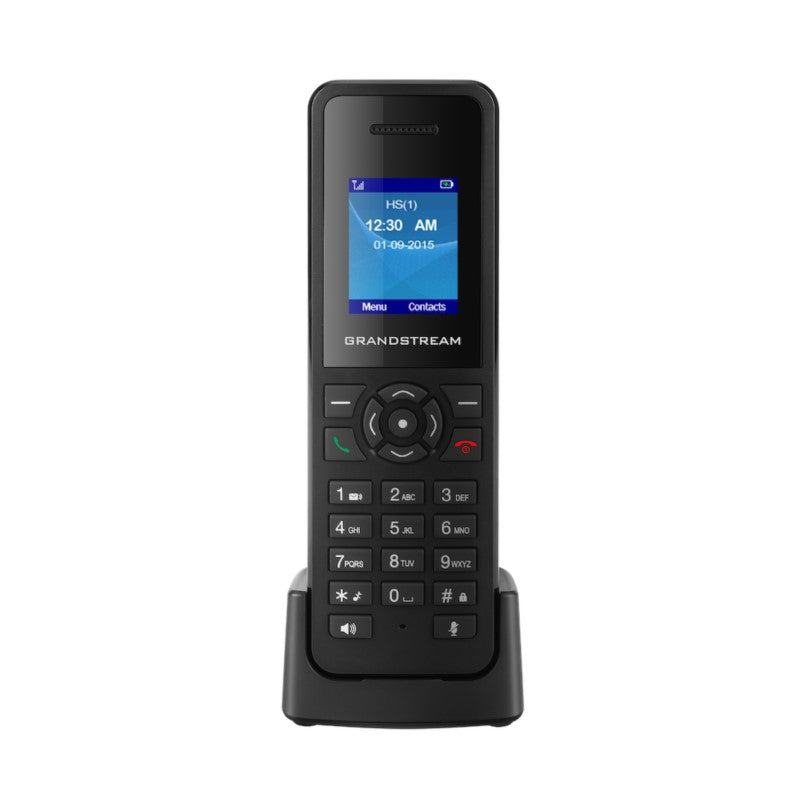
• The DP720 is a DECT cordless VoIP phone that allows users to mobilize their VoIP network throughout any business, warehouse, retail store and residential environment. It is supported by Grandstream’s DP750 DECT VoIP base station and delivers a combination of mobility and top-notch telephony performance. • Key features: • Supports up to 10 SIP accounts per handset • Full HD audio on both the speakerphone and handset • 3.5mm headset jack, 3-way voice conferencing • Automated provisioning options include TR-069 and XML config files • DECT authentication & encryption technology to protect calls and account • Additional information: • Weight: 1 lbs • Dimensions: 7 × 5 × 3 in • Brand: Grandstream • Phone Type: DECT • Technical Specifications: • Air Interface: Telephony standards: DECT, Frequency bands: 1880 – 1900 MHz (Europe), 1920 – 1930 MHz (US) • Number of Channels: up to 10 (Europe), 5 (US, Brazil or Japan), 3 (Korea), 8 (Taiwan) • Range: up to 300 meters outdoors and 50 meters indoors • Peripherals: 1.8 inch (128×160) color TFT LCD, 23 keys including soft keys, navigation/menu keys, dedicated function keys

About This Product

The Grandstream DP720 is a DECT handset designed to extend VoIP mobility across a single site—think of a warehouse floor, a retail showroom, or a professional office where staff need to stay reachable while moving. It’s not a standalone device; it requires a Grandstream DP750 base station (or compatible multi-cell setup) to connect calls. For businesses already using Grandstream’s UCM series PBXs or SIP trunks from Canadian providers, the DP720 slots in as a familiar, cost‑effective cordless option.

This handset makes the most sense in environments where one base station can cover the operational area. The 300‑meter outdoor and 50‑meter indoor range numbers are optimistic, real‑world use in steel‑framed buildings or high‑interference areas will cut that noticeably. If you need campus‑wide coverage, you’ll likely need multiple base stations and careful placement. Also worth noting: the handset supports up to 10 SIP accounts, but juggling many lines on a 1.8‑inch screen isn’t as practical as on a desk phone with sidecars.

For a small to mid‑sized Canadian business—like a GTA retailer or a medical clinic—the DP720 paired with a DP750 delivers clear, secure DECT calls without running cable to every desk. It handles three‑way conferencing and wired headsets, so it covers common front‑office tasks. Just don’t expect it to replace a Wi‑Fi handset if you need wide‑area roaming or integration with mobile device management platforms; it’s a purpose‑built DECT endpoint, not a smartphone substitute.
Services We Provide
  • Professional Installation & Configuration
  • Ongoing Maintenance & Support
  • Troubleshooting & Repairs
  • System Upgrades & Updates



