
Grandstream DP722 DECT Cordless HD Handset

Frequently Asked Questions

Make sure the base station is powered on and its DECT LED is solid or blinking as expected. On the handset, go to the registration menu and confirm the base is in subscription mode. If they still won't pair, move the handset closer to the base — thick walls or metal objects can block the signal even at short range.
This usually means the handset has lost its DECT link to the base. Walk the handset to within a few metres of the base station and see if the message clears. If it does, the issue is range or interference; if not, power-cycle the handset by removing and reinserting the battery, then try again.
First, check that the charging contacts on the handset and cradle are clean and making good contact — dust or residue can prevent a full charge. Also confirm the handset is seated properly; the screen should show a charging icon. If the problem continues, test with a known-good battery if available, but avoid third-party chargers that could damage the battery.
Choppy audio often points to network jitter or packet loss on the base station’s Ethernet connection. Try moving the base to a different switch port or using a wired connection instead of Wi-Fi for the base. On the handset, check that you're within the indoor range and not near large metal cabinets or microwave ovens.
The push-to-talk feature must be configured on the base station’s web interface under the DECT handset settings. Assign a multicast paging group to the configurable button and make sure the target handsets are in the same group. If it still doesn't work, confirm that the base firmware is up to date and supports PTT.
Over-the-air updates rely on the base station having internet access and the correct firmware server address configured. Log into the base’s web interface and verify the firmware URL and provisioning settings. If the handset starts the update but fails, try moving it closer to the base and removing any sources of 2.4 GHz interference.
No, the DP722 uses Grandstream’s proprietary DECT protocol and is designed to work exclusively with compatible Grandstream bases like the DP752. It will not register to generic DECT base stations or other brands.
The DP722 supports up to 10 SIP accounts and 10 lines, so you can have multiple active calls. However, the practical limit for call handling is three-way conferencing directly on the handset. If you need to juggle more simultaneous conversations, consider a desk phone with more physical line keys.
Confirm that the GDS door device and the DP722 are both registered to the same SIP server or peered directly, and that the door control button on the handset is configured with the correct extension or IP address of the GDS unit. Also check that the door strike wiring and power supply are intact, as the handset only sends the command — it doesn’t power the lock.
One-way audio is typically a firewall or NAT issue on the base station’s network. Ensure the base has the correct SIP ALG settings disabled on your router and that the RTP port range is forwarded or that a STUN server is configured. If you’re in a Canadian office with a managed firewall, your IT provider can help adjust these settings.
IP Phones

Grandstream DP722 DECT Cordless HD Handset
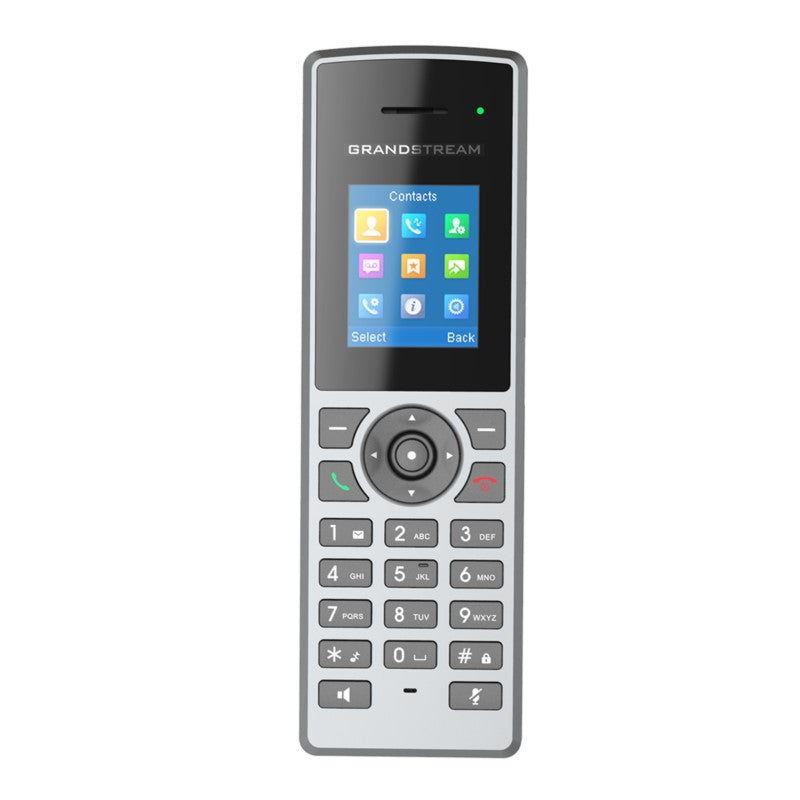
The DP722 is a cost-effective and affordable DECT cordless IP phone that allows users to mobilize their VoIP network throughout any business, warehouse, retail store, or residential environment. It supports up to five handsets on a single base station. Key features: • Supports a range of up to 350 meters outdoors (with DP752) and 50 meters indoors • Offers 20 hours talk time and 250 hours standby time • Supports up to 10 SIP accounts and 10 lines per handset as well as 3-way conferencing • Push-to-talk via a configurable button • Seamless 1-touch door control with Grandstream’s GDS series of Facility Access devices • HD audio on the speakerphone, handset, and headset jack • Software and firmware updates over-the-air Additional information: • Weight: 1 lbs • Dimensions: 7 × 5 × 3 in • Brand: Grandstream • Phone Type: DECT

About This Product

The Grandstream DP722 is a DECT handset built for small to mid-sized businesses that need wireless mobility without the cost of a full Wi-Fi phone deployment. It pairs with a Grandstream DECT base station (most commonly the DP752) and works well in single-floor offices, retail counters, small warehouses, and residential settings where running Ethernet to every desk isn't practical. Because each base supports up to five handsets, it's a natural fit for teams of a few people who share a common reception or sales line, or for a manager who roams between a desk and a back room.

This handset makes the most sense when you already use or plan to use other Grandstream gear. The seamless door control integration with the GDS series is a genuine differentiator — if your business has a front entrance with a Grandstream access device, the DP722 can act as a remote door release, which cuts out extra intercom hardware. For general VoIP use, it handles up to ten SIP accounts, so a single handset can cover multiple lines or ring groups, which is handy in a small office where one person wears several hats.

There are practical limits. Indoor range is rated at 50 metres, but that’s in open space; concrete walls, metal shelving, and electrical rooms will shrink coverage. In a multi-floor building or a large warehouse, you’ll likely need additional base stations, which adds cost and complexity. The handset also relies entirely on the base station for connectivity — if the base loses power or network, all handsets go down. For a larger team or a call centre where every second counts, a Wi-Fi phone with more scalability and roaming support might be a better long-term investment.

For Canadian businesses, the DP722 works with any standards-compliant SIP provider, including those commonly used in the GTA. The over-the-air firmware updates mean you can keep handsets current without USB cables, which simplifies support for a distributed or hybrid team. Just keep in mind that DECT frequencies are generally interference-free in North America, but if you're in a dense office tower with many wireless devices, a site survey is still wise before committing to a full deployment.
Services We Provide
  • Professional Installation & Configuration
  • Ongoing Maintenance & Support
  • Troubleshooting & Repairs
  • System Upgrades & Updates



