
Grandstream DP730 DECT Cordless HD Handset ( requires DP750/DP752 base station)

Frequently Asked Questions

First, confirm the handset is within range of the DP750 or DP752 base station—ideally within 50 meters indoors. Ensure the base station is powered on and has a network connection. If the handset still doesn't register, check that it hasn't been previously registered to another base; you may need to use the base's web interface to add the handset's IPEI number. If the issue persists, a Toronto-based VoIP support provider can usually resolve this remotely.
Verify the battery is correctly seated and try charging via the micro-USB port directly, which also powers the handset without a battery. If using the charging cradle, ensure the contacts are clean and the cradle is connected to power. If the handset still does not power on, the battery may need replacement; contact your supplier for a compatible battery.
Check the signal strength indicator on the handset; if it shows low signal, move closer to the base station to improve reliability. Ensure you are using a G.722-compatible codec for HD audio on both the handset and the VoIP service. Also verify that there are no obstructions or other DECT devices causing interference within 50 meters of the base.
Confirm that push-to-talk (PTT) has been enabled and configured on the base station's web interface, as it is not active by default. On the handset, ensure you are in the correct mode (not on an active call) when pressing the dedicated PTT button. If it still doesn't work, reboot the handset and base station to clear any temporary glitches.
From the base station's web interface, go to the DECT settings and add the handset's IPEI number (found on the handset sticker or under Settings > Status). On the handset, go to Menu > Settings > Registration and press OK. The handset will search for the base and confirm pairing. Ensure both devices are within 50 meters of each other during this process.
First, check for physical obstructions like metal shelves or thick walls between the handset and base, which can block the DECT signal. Move the base station to a more central, elevated location away from other electronic devices. If the problem continues, try changing the DECT channel on the base station's web interface to avoid interference from other cordless phones or Wi-Fi networks.
No, the DP730 is a DECT IP handset and requires a Grandstream DP750 or DP752 base station connected to a SIP-based VoIP service. It cannot be used with traditional analog phone lines or directly with a modem. For analog use, you would need an ATA (analog telephone adapter) configured with the VoIP service, but the DP730 itself is purely digital.
Firmware updates are delivered over-the-air through the base station. Ensure the base station is connected to the internet and has the latest firmware installed first. On the handset, go to Menu > Settings > Firmware Update, and select Check for Updates. The handset will download and apply any available update automatically if the base is properly configured.
Check that both the handset and the VoIP service support the G.722 codec for HD audio. If the service is using a narrowband codec, switch to a G.711 or G.726 codec in the handset's settings to maintain stable audio. Also, ensure you are within good signal range—low signal can cause audio artifacts even with HD codecs.
Caller ID is provided by your VoIP service, not the handset itself. First, test with another phone to confirm the service is transmitting caller ID correctly. On the DP730, ensure that Caller ID is enabled in the phone settings (Menu > Settings > Call Features > Caller ID). If the issue persists, contact your VoIP provider to verify they are sending the correct SIP headers.
IP Phones

Grandstream DP730 DECT Cordless HD Handset ( requires DP750/DP752 base station)
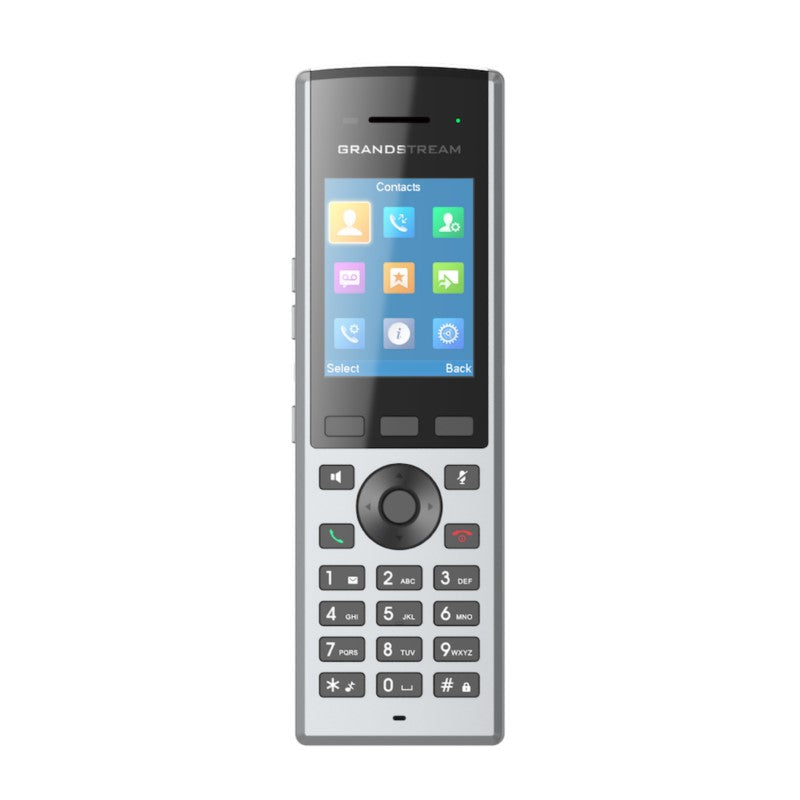
* The DP730 is a DECT cordless IP phone designed for businesses, warehouses, retail stores, and residential environments. It supports up to five handsets on each base station and delivers excellent mobility and telephony performance. • Supports a range of up to 400 meters outdoors (with DP752) and 50 meters indoors with long talk time and standby • Features: • HD audio on speakerphone, handset, and headset jack • Dedicated push-to-talk button, built-in proximity and accelerometer sensors for gesture control and alert notification • Seamless 1-touch door control with Grandstream’s GDS series of Facility Access devices • Software and firmware updates over-the-air • Peripherals: • 2.4 inch (240×320) color TFT LCD • 27 keys including 3 soft keys, 5 navigation/menu keys, 4 dedicated function keys, and 3 side leys • 3-color MWI LED • 3.5mm headset jack • Proximity and accelerometer sensors • Backlit keypad • Removable belt clip • Micro-USB port for alternative charging and non-battery operation • Protocol/Standards: • Hearing Aid Compatibility (HAC) compliant • Voice Codecs: • G.722 codec for HD audio and G.726 codec for narrow band audio • Telephony Features: • Hold, transfer, forward, 3-way conference, push-to-talk, intercom, call park, call pickup, downloadable phonebook, call waiting, call log, auto answer, click-to-dial, flexible dial plan

About This Product

The Grandstream DP730 is a DECT cordless handset designed for users who need reliable, high-mobility voice communication within a business or warehouse environment. It is not a standalone phone; it requires a Grandstream DP750 or DP752 base station to function, making it ideal for businesses already using or planning to deploy a DECT-based VoIP system. The handset pairs well with Grandstream's GDS series door access devices, enabling one-touch door control from anywhere on the property, a practical feature for retail stores or offices with secure entrances.

A key consideration for potential buyers is range: the DP730 offers up to 400 meters outdoors with the DP752 base, but indoor range drops to around 50 meters, which may be limiting in large or interference-heavy facilities like multi-floor offices or dense warehouses. While the handset supports up to five handsets per base station, deploying multiple handsets across a large area may require additional base stations to maintain coverage. It is well-suited for teams that need to move around a site floor, such as warehouse staff or retail associates, but may be overkill for a desk-bound user who would be better served by a standard wired IP phone.

For Canadian business deployments, the DP730 works with any SIP-based VoIP service, which is common among Toronto-area providers. The push-to-talk feature is a standout for fast communication among teams, while the accelerometer and proximity sensors add gesture control and movement-based alerts, which can be useful for safety in industrial settings. However, prospective buyers should factor in the cost of the required base station if not already owned, and test range in their specific environment before wide deployment.
Services We Provide
  • Professional Installation & Configuration
  • Ongoing Maintenance & Support
  • Troubleshooting & Repairs
  • System Upgrades & Updates



