
Grandstream GHP610W Compact Hotel Phone w/ built-in WiFi – White

Frequently Asked Questions

Start by verifying that the Wi-Fi connection is active and stable. Go into the phone’s network settings (via the menu or web interface) and confirm it has obtained a valid IP address. If the Wi-Fi is working, double-check the SIP account credentials (username, password, and server address) entered on the phone. A typo in the server address is one of the most common registration blockers.
Ensure the included 12V power adapter is securely plugged into both the phone and a working electrical outlet. If you're using a power strip, try a different outlet or plug the adapter directly into the wall. This phone does not support Power over Ethernet (PoE), so it must have its own power source.
Audio problems on a Wi-Fi phone are often due to poor signal or network congestion. First, check the Wi-Fi signal strength indicator on the phone—if it shows one bar, move the phone closer to the access point. If the signal is strong, try power cycling the phone and your router/access point to clear any temporary glitches.
Intermittent call drops are frequently linked to Wi-Fi interference or a weak signal. Check if other Wi-Fi devices in the area experience similar issues. Try switching the phone to the less congested 5GHz band if it is currently on 2.4GHz—you can change this in the phone’s network settings. If the problem persists, a site survey by a VoIP support team can identify interference sources.
The phone has a simple display and menu navigation is done via the keypad. Press the Menu key, then use the arrow keys to find Network Settings > Wi-Fi Settings. From there you can scan for nearby networks and enter the password. Alternatively, you can configure Wi-Fi remotely through the Grandstream Device Management System (GDMS) if your phone is already provisioned.
First, confirm that the provisioning server URL is correctly entered in the phone’s network settings and that the server is reachable from the phone’s Wi-Fi network. If you're using a DHCP option, ensure the option tag is correctly set. You can also try a manual reboot of the phone after provisioning; if it still fails, verify the configuration file format matches Grandstream’s requirements.
No, the GHP610W is a SIP-based IP phone and requires a VoIP service or PBX to operate. It cannot connect directly to a traditional analog telephone line. If you need to transition from analog, you would connect it to a VoIP adapter or use a hosted VoIP provider that supports SIP.
Speed-dial keys on this phone are programmable via the web interface or phone menu. Make sure you assigned the correct number and that the SIP account associated with the speed-dial is active. Also, check that you didn't accidentally set the key to a different function (such as DND or call park) instead of speed-dial.
The jitter resilience algorithm helps maintain voice quality when packet loss is up to 30%, but it is not a substitute for a healthy network. In very congested or high-latency Wi-Fi environments, you may still experience delays or audio artifacts. For best results, ensure your Wi-Fi signal is strong and the network has sufficient bandwidth for VoIP traffic.
IP Phones

Grandstream GHP610W Compact Hotel Phone w/ built-in WiFi – White
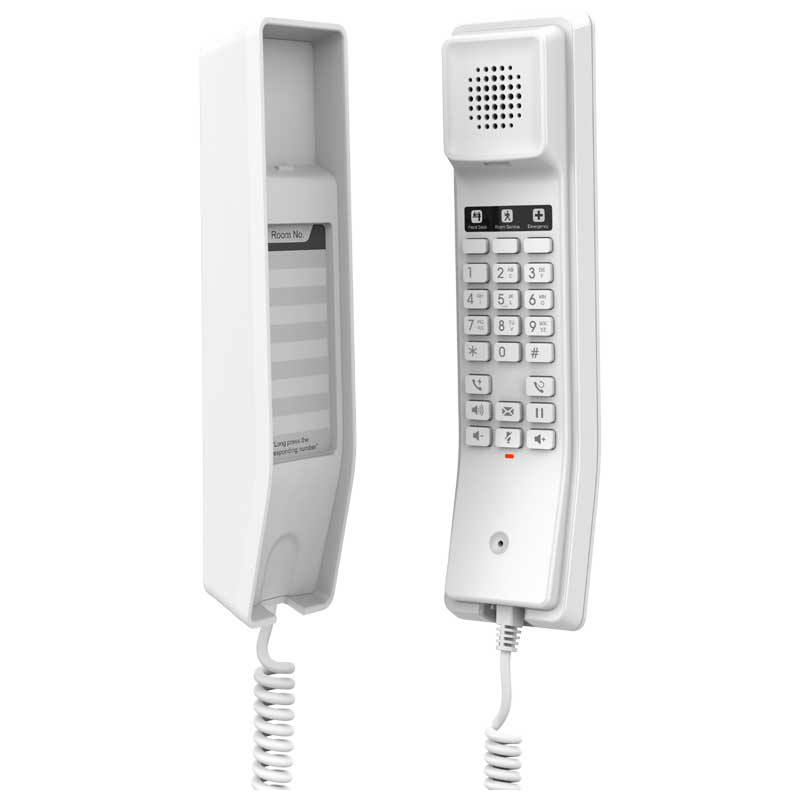
• The GHP610W is a compact IP phone with an HD speaker on the handset, 2 SIP accounts/lines, 10 speed dial keys and 3 programmable keys. • Part of the GHP Series of Hotel Phones, these simple IP phones are also ideal for hospitals, apartments, dormitories, retail and more. • Key features include: • 3-way voice conferencing • Advanced jitter-resilience algorithm to tolerate up to 30% packet loss without impacting voice quality • Integrated dual-band Wi-Fi support (2.4GHz & 5GHz 802.11 a/b/g/n/ac) • Enterprise-level protection including secure boot, dual firmware images and encrypted data storage • Technical Specifications: • Model: GHP610W • Package Content: GHP610W phone, handset with cord, base, universal power supply, quick installation guide • Color: White • Base Stand: 1 wall mountable base stand • Power & Green Energy Efficiency: • Universal power adapter • Input: 100~240Vac 50~60Hz • Output: 12V/0.5A(6W) • Network Interfaces: • Wi-Fi: Integrated dual-band 2.4GHz & 5GHz 802.11 a/b/g/n/ac • Protocols/Standards: SIP RFC3261, TCP/IP/UDP, RTP/RTCP, RTCP-XR, TLS, SRTP, IPv4, IPv6, HTTP/HTTPS, ARP, ICMP, DNS(A record, SRV, NAPTR), DHCP, SSH, TFTP,NTP, STUN, LLDP, TR-069, 802.1x • Advanced Features: • Support for multicast paging and E911 service • Support for advanced jitter-resilience algorithm • Support for GDS Door Opening • QoS: Layer 2 QoS (802.1Q, 802.1p) and Layer 3 (ToS, DiffServ, MPLS) QoS • Upgrade/Provisioning: • Firmware upgrade via FTP/TFTP / HTTP / HTTPS, fast boot in 15 seconds, mass provisioning using GDMS/TR-069 or AES encrypted XML configuration file • Security: • Secure boot, random default password, unique security certificate per device, administrator level passwords, 256-bit AES encrypted configuration file, SRTP, TLS, 802.1x media access control • Telephony Features: • Dial, Answer, Transfer, Conference, Redial, Flash, Hands-free, Voice Mail (with the server) Hold/Unhold, Mute /Unmute, flexible dial plan • Sound: • HD Audio: One HD handset support for wide band audio

About This Product

The Grandstream GHP610W is a compact, wall-mountable IP phone purpose-built for environments where simplicity and reliability matter more than feature density. Think hotel guest rooms, hospital wards, apartment buzzer systems, or dormitories—anywhere you need a clean, low-maintenance telephone that connects over existing Wi-Fi rather than requiring new Ethernet cabling. Its built-in dual-band Wi-Fi (2.4GHz and 5GHz) makes it especially attractive for retrofitting older buildings where running new network wires would be disruptive or costly. For a small business or property manager in the GTA, replacing analog phones with these units can be a straightforward step into VoIP without a full network overhaul.

This phone shines in basic voice communications: it supports two SIP accounts, ten speed-dial keys, and three programmable keys, plus HD audio in the handset for clear conversations. It also includes enterprise-class security features (secure boot, encrypted configuration, and unique certificates) that are welcome in any multi-tenant deployment. However, it’s not designed for power users—there’s no large colour display, no Bluetooth, and no PoE support, so each unit needs its own power adapter or a nearby outlet. If your staff rely on complex call handling, multiple lines, or integrated video, the GHP610W will feel limiting; for a busy front desk, a more feature-rich desk phone would be a better fit.

As a hospitality-focused device, the GHP610W pairs well with hosted VoIP services or an on-premise PBX like FreePBX or 3CX. Its quick boot time (around 15 seconds) and support for GDMS/TR-069 mass provisioning make it practical for deployments of dozens or hundreds of rooms. The Wi-Fi capability is a genuine cost-saver, but it also introduces a potential point of failure: if the wireless network is poorly configured or overloaded, voice quality can suffer. For that reason, it’s best deployed with a dedicated or carefully managed Wi-Fi SSID and good signal coverage—something a Toronto-based VoIP support provider can often help assess and tune.
Services We Provide
  • Professional Installation & Configuration
  • Ongoing Maintenance & Support
  • Troubleshooting & Repairs
  • System Upgrades & Updates



