
Grandstream GHP611 Compact Hotel Phone – Black

Frequently Asked Questions

First, confirm that the phone has a valid IP address by checking the network settings on the device. If it does, ensure that your SIP account credentials (username, password, and server domain) are entered correctly under the account settings. If the issue persists, verify that your network allows SIP traffic and that no firewall is blocking the required ports.
Make sure the power source is active: if you are using PoE, verify that your switch provides PoE and that the cable is securely connected at both ends. If using the included power adapter, check that it is plugged into a working outlet and that the adapter is the correct 12V/0.5A model. Reseating the Ethernet cable or trying a different port can help isolate a bad connection.
Speed dial keys are configured through the phone's web interface or via GDMS. On the phone itself, you can assign a speed dial by pressing the Menu button, navigating to the 'Speed Dial' option, and entering the desired extension or phone number for a specific key. The physical labels on the faceplate can be replaced with custom paper inserts for easy identification.
Check that the handset cord is fully inserted into both the phone and the handset. If you are using a headset, ensure it is compatible with the GHP611's RJ9 port. For calls over Wi-Fi, move the phone closer to the access point or switch to a wired Ethernet connection to rule out wireless interference. The jitter-resilience algorithm is designed to handle up to 30% packet loss, so transient noise may point to a network issue rather than a phone fault.
No, the GHP611 is an IP phone that requires a VoIP service or SIP-based PBX. It does not support analog lines. If you need to connect to a traditional phone line, you would need an ATA adapter, but that is not recommended for this device as it is built for pure IP environments.
Start by checking your network quality: run a ping test from the phone's settings to your router or server. If you see high latency or packet loss, try connecting the phone directly to the router with a known-good cable instead of through a switch. Also, disable Wi-Fi and use only the wired Ethernet port to eliminate wireless instability.
Firmware updates can be applied via the phone's web interface under 'Maintenance' > 'Upgrade', or through GDMS if you have a centralized management system. Ensure you download the correct firmware from Grandstream's support site for the GHP611 model. Do not interrupt the power during the update, and if the update fails, contact support before attempting a recovery.
Verify that your switch supports PoE and that it is delivering at least 6W of power (Class 2). The GHP611's Ethernet port is 10/100 Mbps, so a gigabit-only switch may not provide PoE if it is not backward-compatible. Try a different port on the switch or use the included power adapter to confirm the phone itself is functional.
Yes, the faceplate is swappable and can be replaced with a custom or blank one. You can order replacement faceplates from Grandstream or print your own using the template available in the product documentation. This is useful for branding or changing room numbers in a hotel without replacing the entire phone.
E911 service requires that you configure an emergency address on your SIP provider's account, not on the phone itself. Once your provider has the address on file, the GHP611 will support E911 calls automatically. For multi-unit deployments, ensure each phone's location is registered with the provider to comply with Canadian emergency service requirements.
IP Phones

Grandstream GHP611 Compact Hotel Phone – Black
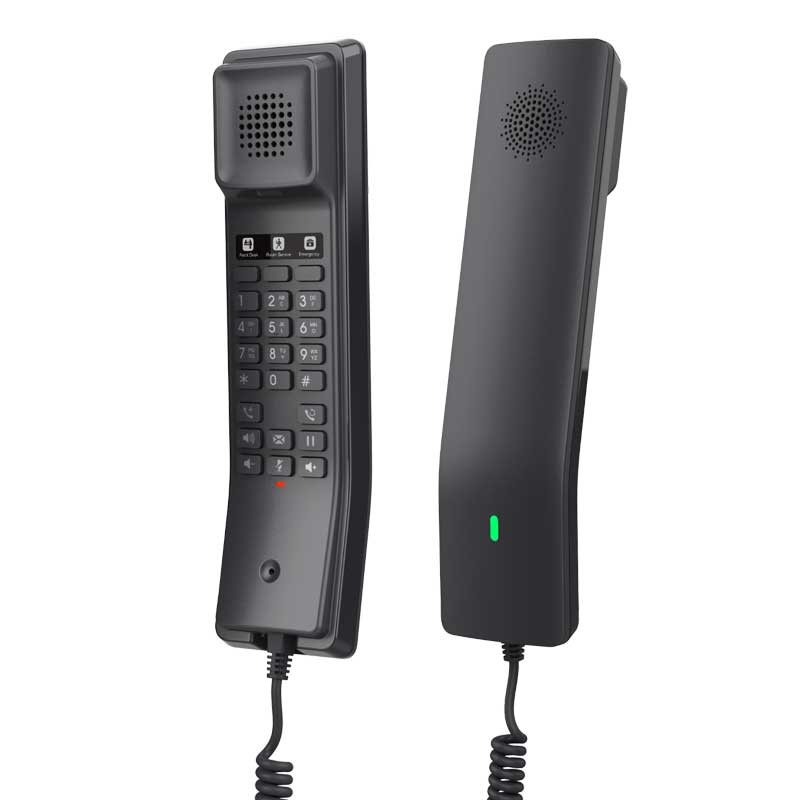
• Compact IP phone with HD speaker on the handset • 2 SIP accounts/lines and 10 speed dial keys • 3 programmable keys for customization • Part of Grandstream's GHP Series, ideal for hotels, hospitals, apartments, dormitories, and retail environments • Supports dual-band Wi-Fi and has an advanced jitter-resilience algorithm to tolerate up to 30% packet loss without impacting voice quality • Supported by Grandstream's Device Management System (GDMS) for centralized management and configuration Features: • 2 SIP accounts, 2 lines • GDMS online device management and provisioning • 3-way audio conferencing for easy conference calls • Includes one 100Mbps network port with PoE • Speed dial label and swappable faceplate to allow for easy customization • Hearing Aid Compatibility (HAC) • Enterprise-level protection including secure boot, dual firmware images, and encrypted data storage • Color: Black Technical Specifications: • Model: GHP611 • Package Content: GHP611 phone, handset with cord, base, quick installation guide • Power & Green Energy Efficiency: - Input: 100~240Vac 50~60Hz - Output: 12V/0.5A(6W) • Network Interfaces: - One auto-negotiation 10/100 Mbps ethernet port integrated PoE Class 2 - Protocols/Standards: SIP RFC3261, TCP/IP/UDP, RTP/RTCP, RTCP-XR, TLS, SRTP, IPv4, IPv6, HTTP/HTTPS, ARP, ICMP, DNS(A record, SRV, NAPTR), DHCP, SSH, TFTP, NTP, STUN, LLDP, TR-069, 802.1x • Advanced Features: - Support for multicast paging and E911 service - Support for advanced jitter-resilience algorithm - Support for GDS Door Opening • QoS: Layer 2 QoS (802.1Q, 802.1p) and Layer 3 (ToS, DiffServ, MPLS) QoS • Upgrade/Provisioning: - Firmware upgrade via FTP/TFTP / HTTP / HTTPS, fast boot in 15 seconds, mass provisioning using GDMS/TR-069 or AES encrypted XML configuration file • Security: - Secure boot, random default password, unique security certificate per device, administrator level passwords, 256-bit AES encrypted configuration file, SRTP, TLS, 802.1x media access control Telephony Features: • Dial, Answer, Transfer, Conference, Redial, Flash, Hands-free, Voice Mail (with the server) Hold/unhold, Mute/Unmute, flexible dial plan • Voice Conferencing: 2 SIP accounts and lines, up to 3-way conference Sound: • HD Audio: One HD handset support for wide band audio

About This Product

The Grandstream GHP611 is a compact IP phone designed specifically for the hospitality sector, including hotels, hospitals, and dormitories, where durability and ease of use are key. Its swappable faceplate and speed dial labels allow for quick branding or room-number customization, making it a good fit for front desks, guest rooms, or nurse stations. While it supports two SIP lines and basic conferencing, it is not a full-featured executive desk phone; its real strength is in high-traffic environments where simplicity and reliability matter. It pairs well with Grandstream's GDMS for centralized provisioning, which is a plus for multi-unit deployments in the GTA, but its single 100Mbps network port with PoE means it is not designed for high-bandwidth data tasks. For a small office with heavy call volumes, the lack of a second network port for daisy-chaining a PC might be a limitation, though for a dedicated hospitality phone, this is rarely an issue.
Services We Provide
  • Professional Installation & Configuration
  • Ongoing Maintenance & Support
  • Troubleshooting & Repairs
  • System Upgrades & Updates



