
Grandstream GHP611W Compact Hotel Phone w/ built-in WiFi – Black
Frequently Asked Questions
Grandstream GHP611W Compact Hotel Phone w/ built-in WiFi – Black
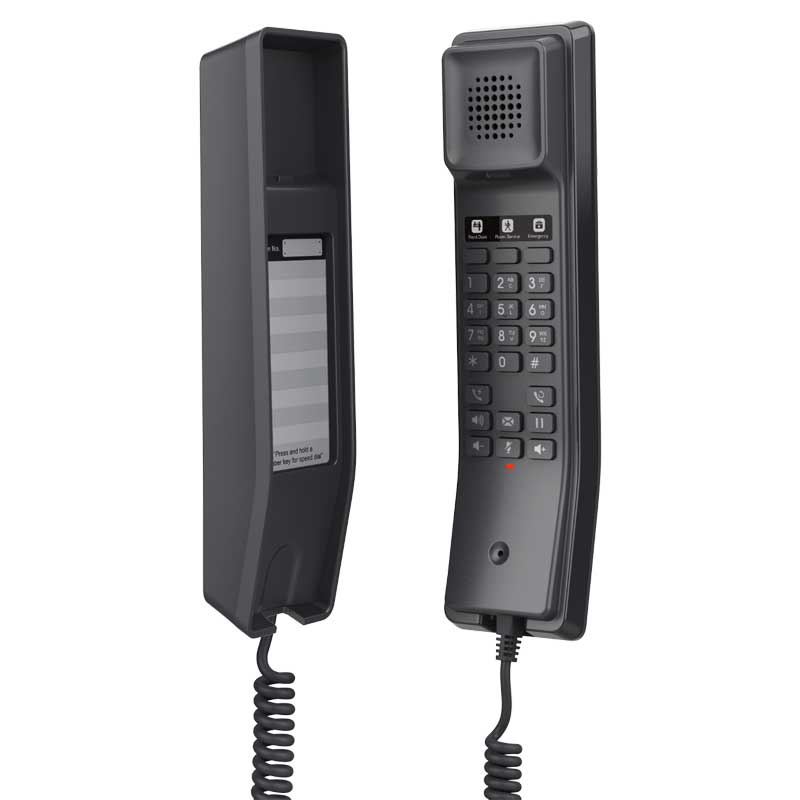
* Compact IP phone with HD speaker on the handset * 2 SIP accounts and lines, 10 speed dial keys, and 3 programmable keys * Ideal for hotel deployments, hospitals, apartments, dormitories, retail, and more * Supports 3-way voice conferencing, full-band OPUS voice codec, and advanced jitter-resilience algorithm * Features integrated dual-band Wi-Fi support (2.4GHz & 5GHz) * Supported by Grandstream’s Device Management System (GDMS) for centralized configuration and provisioning * Compact design suitable for desktop or wall-mounted use Features: • 2 SIP accounts, 2 lines • GDMS online device management and provisioning • 3-way audio conferencing for easy conference calls • Integrated dual-band 2.4GHz & 5GHz 802.11 a/b/g/n/ac • Speed dial label and swappable faceplate for customization • Hearing Aid Compatibility (HAC) • Enterprise-level protection including secure boot, dual firmware images, and encrypted data storage Technical Specifications: • Model: GHP611W • Package Content: GHP611W phone, handset with cord, base, universal power supply, quick installation guide • Color: Black • Base Stand: 1 wall mountable base stand • Power & Green Energy Efficiency: + Universal power adapter + Input: 100~240Vac 50~60Hz + Output: 12V/0.5A(6W) Network Interfaces: • Wi-Fi: Integrated dual-band 2.4GHz & 5GHz 802.11 a/b/g/n/ac • Protocols/Standards: SIP RFC3261, TCP/IP/UDP, RTP/RTCP, RTCP-XR, TLS, SRTP, IPv4, IPv6, HTTP/HTTPS, ARP, ICMP, DNS(A record, SRV, NAPTR), DHCP, SSH, TFTP, NTP, STUN, LLDP, TR-069, 802.1x • Advanced Features: Support for multicast paging and E911 service, support for advanced jitter-resilience algorithm, support for GDS Door Opening • QoS: Layer 2 QoS (802.1Q, 802.1p) and Layer 3 (ToS, DiffServ, MPLS) QoS • Upgrade/Provisioning: Firmware upgrade via FTP/TFTP / HTTP / HTTPS, fast boot in 15 seconds, mass provisioning using GDMS/TR-069 or AES encrypted XML configuration file Security: • Secure boot • Random default password • Unique security certificate per device • Administrator level passwords • 256-bit AES encrypted configuration file • SRTP, TLS, 802.1x media access control Telephony Features: • Dial, Answer, Transfer, Conference, Redial, Flash, Hands-free, Voice Mail (with the server) Hold/Unhold, Mute/Unmute, flexible dial plan, Speed dial server redundancy & fail-over Call out • Support for multicast paging and E911 service, advanced jitter-resilience algorithm Sound: • HD Audio: One HD handset support for wide band audio
About This Product
This model integrates dual-band Wi-Fi, which is its primary differentiator. This eliminates the need for Ethernet cabling at the bedside or desk, making it a strong candidate for retrofitting older buildings in cities like Toronto or Vancouver where running new cables is cost-prohibitive. It pairs well with Grandstream’s UCM series of IP PBXs and the GDMS cloud management platform, allowing a property manager to provision hundreds of devices with a consistent configuration. While it supports Power over Ethernet, the included power adapter is often the more practical choice for its typical deployment, given the reliance on Wi-Fi for network connectivity.
A buyer should understand that this phone’s two SIP accounts and three programmable keys are sufficient for its intended purpose, but it lacks the advanced call handling flexibility of an executive phone. The compact design and swappable faceplate for speed-dial labels are practical features, but this is a device built for a specific, controlled use case. It is overkill for a home office that only needs a basic softphone, but it is underpowered for a receptionist who handles multiple concurrent calls and needs busy lamp fields. The built-in security features, including secure boot and encrypted data storage, are a strong point for deployments where the phone may be in a publicly accessible area.
The GHP611W occupies a specific niche: a secure, Wi-Fi-enabled, easily managed endpoint for high-density, low-complexity environments. It is a workhorse designed for a single purpose, and within that scope, it is a well-considered tool. Its limitations are clear, which for a hotel or dormitory IT manager, is actually an advantage, as it restricts the potential for user-caused misconfiguration.
Services We Provide
- Professional Installation & Configuration
- Ongoing Maintenance & Support
- Troubleshooting & Repairs
- System Upgrades & Updates



