
Grandstream GHP620 Hotel Phone-White-No WiFi
AIM Telecom provides troubleshooting and configuration support for this product to businesses across Toronto and the GTA. Contact us to confirm whether the issue can be handled by phone or requires on-site service.
Get Support Call 416-312-4819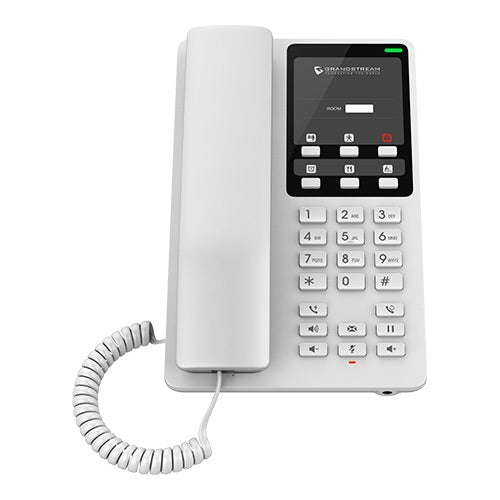
Common issues and fixes
Reviewed troubleshooting steps are not yet available for this model.
Ask AIM Telecom about this productAbout this product
The GHP Series of hotel phones feature easy-to-use IP phones for any hotel room, programmable and customizable based on the needs of hotels and their guests. The GHP620W and GHP621W models are equipped with integrated dual-band Wi-Fi to support wireless deployments.
Key features include:
• 2 SIP accounts/lines
• GDMS online device management and provisioning
• 3-way audio conferencing for easy conference calls
• Includes one 100Mbps network port with PoE
• Swappable faceplate to allow for easy logo customization
• Hearing Aid Compatibility (HAC)
• Enterprise-level protection including secure boot, dual firmware images and encrypted data storage
• Color: White
This series is supported by Grandstream’s Device Management System (GDMS), which provides a centralized interface to configure, provision, manage and monitor deployments of Grandstream endpoints. The GHP Series can be installed on desktop or wall-mounted and powered by PoE, power adapter, or USB Type-C charger.
Key features include:
• 2 SIP accounts/lines
• GDMS online device management and provisioning
• 3-way audio conferencing for easy conference calls
• Includes one 100Mbps network port with PoE
• Swappable faceplate to allow for easy logo customization
• Hearing Aid Compatibility (HAC)
• Enterprise-level protection including secure boot, dual firmware images and encrypted data storage
• Color: White
This series is supported by Grandstream’s Device Management System (GDMS), which provides a centralized interface to configure, provision, manage and monitor deployments of Grandstream endpoints. The GHP Series can be installed on desktop or wall-mounted and powered by PoE, power adapter, or USB Type-C charger.
More product details
The Grandstream GHP620 is a purpose-built IP phone for hospitality environments, designed to deliver reliable guest-room communication with minimal fuss. It connects over a wired Ethernet connection and draws power via PoE, making it easy to drop into existing hotel network infrastructure without adding power bricks to each room. The clean white housing and swappable faceplate let properties maintain a cohesive brand look, while the handset includes hearing aid compatibility for accessibility-conscious operators.
In practical terms, this model suits properties that have already standardized on a Grandstream PBX or use Grandstream’s Device Management System (GDMS) for centralized provisioning. Without built-in WiFi, it depends entirely on a wired LAN drop at the bed or desk location—something most purpose-built hotels already have, but a consideration for retrofits or smaller inns that might lean toward wireless models. The single 100Mbps network port provides basic connectivity; there is no pass-through port for a guest PC, so it won’t double as a mini-switch.
For a Canadian hotel, motel, or seniors’ residence in the GTA or elsewhere, the GHP620 pairs cleanly with most SIP-based VoIP services and Grandstream’s UCM appliances. Its two SIP accounts are ample for a guest line, and three-way conferencing covers occasional call needs without overcomplicating the user experience. Think of it as a no-frills room phone that covers the essentials: clear voice, easy deployment, and manageable cost at scale.
This is not the right pick for a front desk or back-office station that needs busy lamp fields, multiple line keys, or gigabit throughput; those tasks call for a full-featured desk phone. Similarly, if your property runs on analog lines or a proprietary PBX, an ATA-based solution might be a better bridge. For a modern IP-connected hotel room, however, it strikes a sensible balance of affordability and manageability.
In practical terms, this model suits properties that have already standardized on a Grandstream PBX or use Grandstream’s Device Management System (GDMS) for centralized provisioning. Without built-in WiFi, it depends entirely on a wired LAN drop at the bed or desk location—something most purpose-built hotels already have, but a consideration for retrofits or smaller inns that might lean toward wireless models. The single 100Mbps network port provides basic connectivity; there is no pass-through port for a guest PC, so it won’t double as a mini-switch.
For a Canadian hotel, motel, or seniors’ residence in the GTA or elsewhere, the GHP620 pairs cleanly with most SIP-based VoIP services and Grandstream’s UCM appliances. Its two SIP accounts are ample for a guest line, and three-way conferencing covers occasional call needs without overcomplicating the user experience. Think of it as a no-frills room phone that covers the essentials: clear voice, easy deployment, and manageable cost at scale.
This is not the right pick for a front desk or back-office station that needs busy lamp fields, multiple line keys, or gigabit throughput; those tasks call for a full-featured desk phone. Similarly, if your property runs on analog lines or a proprietary PBX, an ATA-based solution might be a better bridge. For a modern IP-connected hotel room, however, it strikes a sensible balance of affordability and manageability.