
Grandstream GHP621 Hotel Phone-Black

Frequently Asked Questions

First, check that the phone is receiving power and network connectivity—the PoE indicator should be lit if using PoE, or ensure the power adapter is connected. Next, log into the phone's web interface using its IP address and verify the SIP account settings: server address, username, password, and port numbers must match your provider's credentials. If those are correct, try a power cycle; if the issue persists, a Toronto-based VoIP support provider can usually resolve this remotely.
Confirm the handset cord is firmly plugged into both the phone and handset. Then check the phone's registration status: press the 'Voice Mail' key or check the LCD for a registration icon. If the phone isn't registered, verify that the network cable is connected to the LAN port and that your switch or router is providing a valid IP address via DHCP. If registration is fine but there's still no dial tone, the line might be on hold or the handset is defective—try a different handset if available.
These keys are configured through the phone's web interface or via auto-provisioning. Log into the web GUI, navigate to 'Programmable Keys' or 'DSS Keys', and assign each key to a SIP account, speed dial number, BLF, or other feature. For speed dial keys (digits 0-9 on the keypad), you'll find a separate 'Speed Dial' section under 'Settings'. If you're managing multiple units, use Grandstream's GDMS to push templates—this is much faster for hotel deployments in the GTA.
First, check the handset volume and ensure the handset cord is not damaged. If audio is fine on speakerphone but poor on handset, try a different handset. Network conditions can also cause issues; verify that the phone is connected to a stable network with low jitter and latency. The GHP621 supports the OPUS codec which handles up to 30% packet loss, but severe network congestion will still affect quality. Check if your SIP provider sends echo cancellation settings—if not, try enabling 'Acoustic Echo Cancellation' in the phone's web interface under 'Settings > VoIP Settings'.
The GHP621 only supports PoE (Power over Ethernet) out of the box—it does not come with an external power adapter. If your switch doesn't provide PoE, you'll need to use a PoE injector (like the Grandstream GPOE-AC) between the switch and the phone. This injector is widely available from Canadian distributors. Alternatively, you can replace your existing switch with a PoE-enabled model if you're deploying many phones.
This often happens when the phone is set to an unauthenticated user level or when provisioning locks are active. Log into the web interface and go to 'Maintenance > Upgrade' and ensure 'Config Protected' is unchecked. Then configure speed dials under 'Settings > Speed Dial'. Save and apply. If the phone is auto-provisioned, the provisioning server may overwrite local changes—check with your IT admin. A manual power cycle after saving usually forces the changes to take effect.
First, make sure the ringer volume is not turned all the way down—press the volume up key during idle mode to increase it. Next, verify that the phone is registered (look for a 'Registered' icon on the LCD). If registration is fine but no ring, check the SIP account's call forwarding or DND settings via the web GUI under 'Accounts > Account X > Call Features'. Also confirm that your SIP provider is sending the invite to the correct IP. If all else fails, reboot the phone and test with a call from another extension.
A factory reset should only be done as a last resort after confirming other troubleshooting steps fail. To reset, power off the phone, then press and hold the 'Voice Mail' button while reconnecting power. Continue holding until the status LEDs flash red, then release. Note that this erases all settings and returns the phone to default. If possible, contact your support provider first to try a remote reset or identify configuration issues without losing data.
Yes, the GHP621 is a standard SIP phone and should work with any SIP-based carrier in Canada as long as they provide PBX services or SIP trunking. You'll need to configure the account settings (server, username, password) provided by the carrier. Some carriers may require specific codec or DTMF settings—you can adjust those in the phone's web interface under 'Account X > Audio Settings' and 'SIP Settings'. For hotel deployments, integration with a property management system may require additional custom firmware, so consult your carrier or Grandstream support.
Conference calling requires that both SIP accounts are registered and the call initiate with an active call on one line. First, make sure you have two active calls (one established on each line). Then press the 'Conference' button—the phone will merge them. If the button does nothing, check that conference is enabled on your SIP account (web GUI: 'Account X > Call Features > Enable Conference'). Also verify that your provider supports three-way conference—some SIP trunks limit this. If it still fails, try a soft reset (power cycle), and if the issue persists, reach out to your VoIP provider.
IP Phones

Grandstream GHP621 Hotel Phone-Black
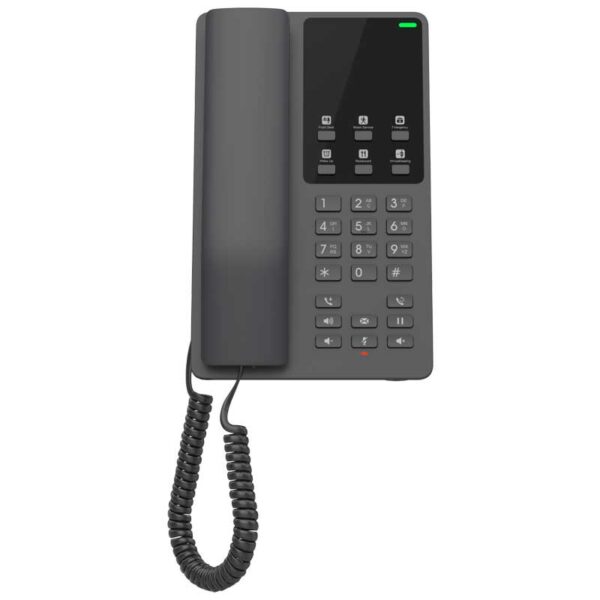
The GHP Series of hotel phones feature the GHP621, easy-to-use IP phones for any hotel room that can be programmed and customized based on the needs of hotels and their guests. This series features an HD speaker, 2 SIP accounts/lines, 6 programmable keys, 10 speed dial keys, 3-way voice conferencing, supports the full-band OPUS voice codec and provides an advanced jitter resilience algorithm that tolerates up to 30% packet loss without impacting voice quality. Key Features: • 2 SIP accounts, 2 lines • GDMS online device management and provisioning • 3-way audio conferencing for easy conference calls • Includes one 100Mbps network port with PoE • Swappable faceplate to allow for easy logo customization • Hearing Aid Compatibility (HAC) • Enterprise-level protection including secure boot, dual firmware images and encrypted data storage • Color: Black • Weight: 1.9 lbs • Dimensions: 8.27 × 5.2 × 3.54 in • Brand: Grandstream • Phone Type: Desk Technical Specifications: GENERAL INFO: • Model: GHP621 • Package Content: • GHP621 phone • Handset with cord • Base Stand • Faceplate • Quick Installation Guide • Color: Black • Base Stand: 1 Wall Mountable Base Stand NETWORK INTERFACES: • One auto-negotiation 10/100 Mbps ethernet port integrated PoE Class 2 • Protocols/Standards: • SIP RFC3261, TCP/IP/UDP, RTP/RTCP, RTCP-XR, TLS, SRTP • Network: IPv4, IPv6, HTTP/HTTPS, ARP, ICMP, DNS(A record, SRV, NAPTR), DHCP, SSH, TFTP, NTP, STUN, LLDP, TR-069, 802.1x TELEPHONY FEATURES: • Dial, Answer, Redial, Flash ,Hands-free, Voice Mail(with the server), Transfer, Conference, Hold • Voice Conferencing: • 2 SIP accounts and lines, up to 3-way conference • Feature Keys: • 26 keys, including: • 6 programmable keys • 12 Standard Phone Digits keys(0-9: speed dial keys configuration on web page, * , #) • 5 Function keys (Flash, Redial, Hands-free, Voice Mail, Hold) • 3 Volume Control keys, Up/Down/Mute(with red color LED) SOUND: • HD Audio: • One HD handset support for wide band audio

About This Product

The Grandstream GHP621 is a purpose-built IP phone for hotel guest rooms, designed to replace traditional analog hotel phones with a VoIP solution that integrates easily into existing PBX and property management systems. It's ideal for hotels and motels of any size, particularly those in Canadian markets like the GTA that are upgrading to SIP-based telephony and need a durable, simple-to-use endpoint for guests. The phone pairs well with Grandstream's UCM series PBXs or any standards-compliant SIP server, and its GDMS cloud management allows bulk provisioning and remote updates across hundreds of rooms—a major advantage for hotel IT teams.

A key tradeoff is the single 100Mbps Ethernet port with PoE, which means there's no passthrough port for a guest's laptop; hotels relying on wired guest networks will need to plan for separate data drops or rely on Wi-Fi. The phone's feature set—two SIP accounts, six programmable keys, and 10 speed-dial keys—is modest compared to executive desk phones, but that's intentional: hotel phones prioritize simplicity for transient users. The HD handset and OPUS codec support ensure clear voice calls even on networks with up to 30% packet loss, which is helpful in buildings with challenging wiring.

For Canadian hotel deployments, the GHP621 works with most major SIP carriers and supports the required codecs for toll-quality audio. However, it lacks a second network port for daisy-chaining a guest device, so properties offering in-room wired internet may need to evaluate their cabling. It's overkill for a small office needing multi-line conferencing, but underpowered for a hotel front desk that requires a larger display or expansion modules. For guest rooms, it hits the sweet spot: reliable, manageable, and guest-friendly.
Services We Provide
  • Professional Installation & Configuration
  • Ongoing Maintenance & Support
  • Troubleshooting & Repairs
  • System Upgrades & Updates



