
Grandstream GHP621W Hotel Phone with Built-in WiFi-Black

Frequently Asked Questions

Start by confirming the Wi‑Fi network the phone is connected to has internet access and that no captive portal is blocking SIP traffic. Then double‑check the SIP server address, account credentials, and that the phone’s firmware date is current enough for your provider’s requirements. If the issue persists, a Toronto‑based VoIP support provider can usually resolve this remotely.
Wi‑Fi does not provide electrical power. Verify that the USB‑C power adapter is plugged into a working outlet and firmly connected to the phone. If you are using PoE, remember that PoE requires a wired Ethernet connection—this model uses Wi‑Fi for data, so PoE is not available for power unless you also connect a network cable.
Poor audio over Wi‑Fi is usually a signal or congestion issue. Check the received signal strength on the phone’s display and move the phone closer to the access point if possible. Also verify that QoS or WMM is enabled on the wireless network and that the channel the access point is using isn’t heavily occupied by neighboring networks.
You can configure the speed dial keys through the phone’s web interface or, more efficiently, via Grandstream’s GDMS provisioning platform. Each key can be assigned a label and a destination extension or external number. For a multi‑room deployment, pushing the same configuration template to all phones is the recommended approach.
Check whether the access point has a session timeout or client inactivity timer set too aggressively. Also verify that the phone’s firmware is up to date, as older versions can have Wi‑Fi driver stability issues. If the property uses band‑steering, try locking the phone to the 2.4 GHz or 5 GHz band temporarily to see if stability improves.
No, the GHP621W is an IP phone that works over Wi‑Fi and requires a SIP‑based phone system or hosted VoIP service. It cannot be plugged into a traditional analog phone line without additional equipment such as an ATA or VoIP gateway.
First, confirm the phone can reach the provisioning server by checking the DNS settings and gateway IP on the phone’s network status page. The URL must be fully resolvable from the guest Wi‑Fi network. Also ensure the provisioning server’s certificate is valid if you are using HTTPS, and that the phone’s time and date are set correctly.
Yes, the GHP621W supports a configuration lock via the web interface or provisioning template. You can restrict access to the local settings menu with an administrator password, ensuring guests can only use the calling features you have exposed on the programmable keys.
IP Phones

Grandstream GHP621W Hotel Phone with Built-in WiFi-Black
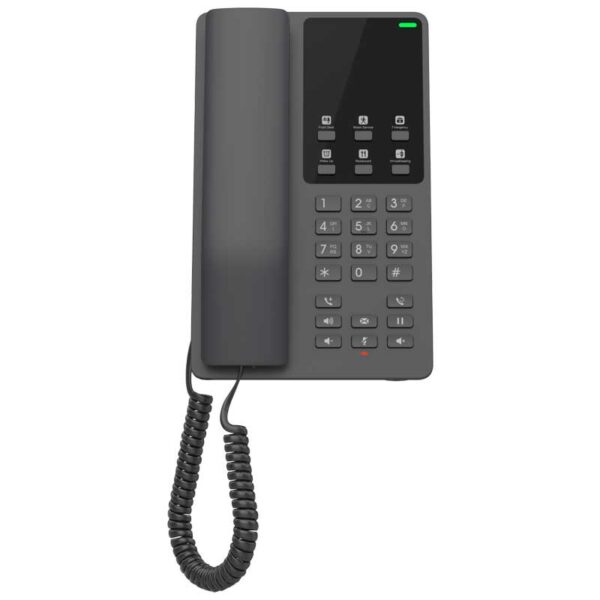
The GHP Series of hotel phones offers a range of features and benefits for hotels and other establishments. The GHP621W model is a popular choice, featuring an HD speaker, 2 SIP accounts/lines, 6 programmable keys, 10 speed dial keys, 3-way voice conferencing, and supports the full-band OPUS voice codec. Key Features: • Integrated dual-band Wi-Fi for wireless deployments • HD speaker with clear audio quality • 2 SIP accounts and lines for flexible calling options • 6 programmable keys and 10 speed dial keys for easy access to frequently used numbers • 3-way voice conferencing for seamless conference calls • Advanced jitter-resilience algorithm for reliable voice quality • Supports the full-band OPUS voice codec The GHP series IP phones can be installed on desktop or wall-mounted and can be powered by PoE, power adapter, or USB Type-C charger. The phones also feature a sleek and compact design, making them ideal for use in hotels, apartments, dormitories, hospitals, and retail establishments. Technical Specifications: • Model: GHP621W • Package Content: GHP621W phone, handset with cord, base stand, faceplate, universal power adapter, quick installation guide Additional Information: • Weight: 2.01 lbs • Dimensions: 8.27 × 5.2 × 3.54 in • Brand: Grandstream • Phone Type: Desk, WiFi / WiFi Capable

About This Product

The Grandstream GHP621W is purpose‑built for hospitality and multi‑tenant environments where a simple, reliable desk phone is needed without pulling new Ethernet cables to every room. Its integrated dual‑band Wi‑Fi makes it a practical fit for hotels, student residences, assisted‑living facilities, and similar properties that already have solid wireless coverage. Because it supports two SIP accounts and includes programmable speed‑dial keys, it can be configured so guests reach the front desk, housekeeping, or a concierge with a single button press.

This phone pairs naturally with a property’s existing Wi‑Fi infrastructure and a cloud‑based or on‑premise IP‑PBX that supports standard SIP registrations. It is not a replacement for a full‑featured desk set in a busy administrative or call‑center role—its strength is in the guest room, not the back office. The three‑way conferencing and HD speaker are useful for occasional multi‑party calls, but the device is first and foremost a straightforward room phone.

Anyone deploying the GHP621W at scale should be comfortable with provisioning Grandstream endpoints, typically via the vendor’s GDMS platform or a compatible auto‑provisioning server. Wi‑Fi performance will depend heavily on site design; in a property with marginal signal or high co‑channel interference, voice quality can degrade despite the phone’s jitter‑resilience algorithms. For a small motel or a single floor of rooms, the phone is straightforward to manage; for a 300‑room tower in downtown Toronto, the provisioning and wireless design effort becomes the real project.

From a Canadian business perspective, the GHP621W works with any SIP‑based service, including hosted PBX offerings popular in the GTA, provided the provider supports standard codecs such as OPUS or G.722. There is no built‑in analog failover, so if the property’s internet or Wi‑Fi goes down, the phone loses calling capability—a consideration for locations where 24/7 guest access to a phone is a safety requirement.
Services We Provide
  • Professional Installation & Configuration
  • Ongoing Maintenance & Support
  • Troubleshooting & Repairs
  • System Upgrades & Updates



