
Grandstream GHP630 Compact Hotel Phone with Color LCD-White

Frequently Asked Questions

First, confirm that the phone has a valid IP address—check the LCD’s network info and ensure the Ethernet cable is securely connected and the PoE switch (or injector) is delivering power. Next, verify the SIP server address, port, and account credentials under the phone’s settings menu. If those look correct, power cycle the phone and try again. Many registration issues are simply caused by a mistyped password or a temporary network hiccup.
Check that the handset cord is firmly plugged into both the phone and the handset, and that the phone is registered to your SIP server (look for the account status icon on the LCD). If it’s registered, try a different call path—use the speakerphone or a headset to see if the issue is specific to the handset. If none work, reboot the phone and verify your account is actually active on the PBX side.
Choppy audio usually points to network congestion or packet loss. Start by checking the Ethernet cable’s connection and ensuring the phone isn’t sharing a switch port with a busy data device. You can also try lowering the codec priority to G.711 (which uses more bandwidth but is less CPU-intensive) in the phone’s audio settings. If the issue persists, review your network’s Quality of Service (QoS) settings to prioritize voice traffic.
First, check if the Ethernet cable is firmly connected and the switch port you’re using is PoE-enabled (or that a PoE injector is working). You can test by plugging the phone into a known working PoE port or using the optional power adapter if you have one. If the LCD remains off, the phone may have a hardware fault—contact your vendor for support.
The USB-C port on the GHP630 is intended for charging only, not data transfer. Ensure you’re using a USB-C cable that supports power delivery (standard USB-C cables usually work). The phone itself must be powered via PoE or its optional power supply to provide charge to a connected device. If your phone still doesn’t charge, try a different cable or confirm the phone is receiving adequate power from the network.
The easiest way is through Grandstream’s GDMS cloud platform—add the phone’s MAC address to a provisioning template and assign it to the device. Alternatively, you can use a TFTP/HTTP server with a config file; point the phone to the server via its boot menu. For Canadian carriers like Rogers Business VoIP or Bell Business, you’ll need to obtain their specific SIP settings and apply them to the provisioning template.
Yes, the GHP630 is SIP standards-compliant (RFC3261), so it works with any standard SIP server. Create a SIP extension on your PBX, enter the server address and credentials into the phone’s account settings, and it should register. Just be aware that some advanced features like GDMS-managed updates won’t apply unless you set up your own provisioning system.
On the phone’s LCD menu, go to Features → Speed Dial. Choose an unused key (labeled 1-10 on the phone), enter the extension or phone number, and save. You can also pre-configure speed-dial entries via the web interface or provisioning file, which is more efficient for deploying multiple phones across a property.
The speakerphone uses a built-in microphone and speaker that can pick up room echo and background noise, even with acoustic echo cancellation (AEC). This is normal and not a fault. For clearer conversations, especially in noisy environments, use the handset or a headset. You can also adjust the speakerphone volume and try moving the phone away from walls or other reflective surfaces.
First, reboot the phone—this may resolve a temporary display glitch. If the issue persists, check the cable connecting the display to the main board (if you’re comfortable opening the device) and ensure the firmware is up to date. Garbled text can occasionally be caused by a firmware bug; updating via GDMS or the web interface often fixes it. If neither helps, the LCD may be faulty and the phone should be replaced under warranty.
IP Phones

Grandstream GHP630 Compact Hotel Phone with Color LCD-White
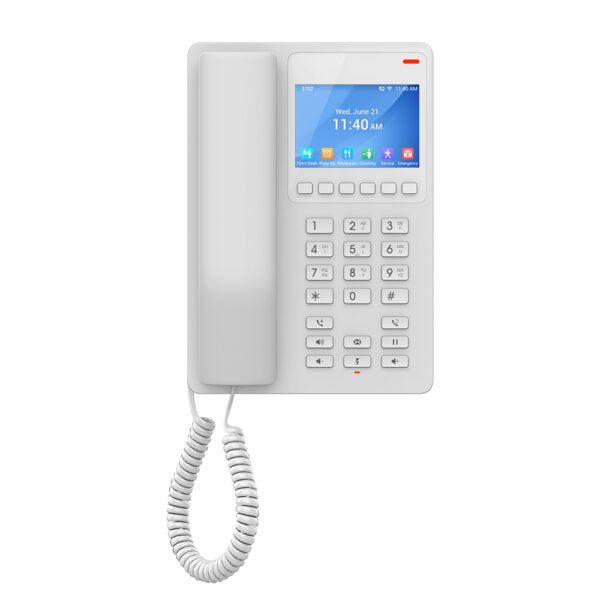
• The GHP Series of hotel phones features the GHP630 easy-to-use IP phone, programmable and customizable to meet hotels' needs. This series boasts an HD speaker, 2 SIP accounts/lines, 6 context-sensitive soft keys, 10 speed-dial keys, 3-way voice conferencing, full-band OPUS voice codec support, and a jitter-resilience algorithm tolerating up to 30% packet loss without impacting voice quality. • The GHP630 is supported by Grandstream Device Management System (GDMS), providing a centralized interface for configuration, provisioning, management, and monitoring of deployments. • Key features include: • 2 SIP accounts/lines • GDMS online device management and provisioning • 3-way audio conferencing for easy conference calls • One 100Mbps network port with PoE • USB Type-C charging port for modern smartphone charging • Hearing Aid Compatibility (HAC) • Enterprise-level protection, including secure boot • The phone's color is White. • Weight: 1.82 lbs • Dimensions: 8.27 × 5.79 × 3.54 in • Phone Type: Desk • Technical specifications include: • Model: GHP630 • Graphic Display: 3.5” High-Resolution (480×320) Color LCD • Box Contents: GHP phone, handset with cord, base stand, faceplate, and quick installation guide • Protocols/Standards: SIP RFC3261, TCP/IP/UDP, RTP/RTCP, RTCP-XR, TLS, SRTP, IPv4, IPv6, HTTP/HTTPS, ARP, ICMP, DNS(A record, SRV, NAPTR), DHCP, SSH, TFTP, NTP, STUN, LLDP, TR-069, 802.1x • Feature Keys: 26 keys, including context-sensitive soft keys, standard phone digits keys, function keys, and volume control keys • HD Audio: One HD handset support for wide band audio • Voice Conferencing: 2 SIP accounts and lines, up to 3-way conference • Voice Codecs and Capabilities: Support for G.729A/B, G.711µ/a-law, G.726, G.722 (wide-band), G.723, iLBC, full band Opus, Inband and out-of-band DTMF (in audio, RFC2833, SIP INFO), VAD, AEC, CNG, PLC, AGC, AJB

About This Product

The Grandstream GHP630 is purpose-built for the hospitality industry, making it a strong fit for hotel guest rooms, motels, or serviced apartments where a straightforward, reliable phone is needed. Its compact design and colour LCD keep things tidy on a nightstand or desk, while the integrated USB-C charging port lets guests charge their smartphones without hunting for an outlet—a thoughtful touch for modern travel. For property managers, the phone supports Grandstream’s Device Management System (GDMS), which streamlines provisioning and remote monitoring across an entire fleet, reducing on-site maintenance. This is especially valuable for large hotel chains or multi-building properties in urban centres like the GTA, where centralised oversight can cut support costs and guest disruption.

In terms of connectivity, the GHP630 includes a single 100Mbps Ethernet port with Power over Ethernet (PoE), so it can draw both network and electricity from one cable—ideal for installations where power outlets are scarce. However, note that this is not a Gigabit port, which is perfectly adequate for voice traffic but means it shouldn’t be used as a network passthrough for a high-speed data device alongside. The phone supports two SIP lines and three-way conferencing, which suits a standard guest room where only one or two calls are expected at a time. If your property demands more lines per room—say for executive suites with separate voice and fax lines—you’d need to pair this with a different model or supplement with additional devices.

Audio quality is a standout: full-band Opus and HD handset support, combined with a jitter-robust algorithm that maintains clarity even under moderate packet loss, make it reliable over less-than-perfect network links. This is particularly useful in older buildings or temporary networks common in hotel conversions. On the flip side, the phone lacks Wi-Fi and Bluetooth, so it must be hardwired, and its feature set is deliberately lean—no programmable expansion modules or advanced CTI integrations. It’s perfect for replacing aging analog guest-room sets in a SIP-based system, but overkill if your hotel only needs basic one-line service and you’re not looking to centralize management. For a straightforward, guest-focused deployment where ease of use and remote manageability matter more than cutting-edge extras, the GHP630 hits the mark.
Services We Provide
  • Professional Installation & Configuration
  • Ongoing Maintenance & Support
  • Troubleshooting & Repairs
  • System Upgrades & Updates



