
Grandstream GHP630W Compact Hotel Phone with Dual-Band WiFi 6-White

Frequently Asked Questions

Verify that the phone has an active network connection—if using Wi‑Fi, confirm the SSID and password are correct; if wired, ensure the Ethernet cable is securely plugged and the PoE switch or injector is powered. Then double‑check the SIP credentials (server address, username, password) entered in the phone’s web interface. If the issue persists, a Toronto‑based VoIP support provider can usually resolve this remotely.
First, confirm that your router or access point is broadcasting the correct SSID and that the Wi‑Fi passphrase is entered exactly on the phone. Try power‑cycling the phone by unplugging it for 30 seconds, then check if the network’s DHCP server has available addresses. If the problem continues, test the phone’s ability to connect to a different Wi‑Fi network to isolate the issue.
Voicemail is typically configured through your PBX or hotel phone system, not on the device itself. Contact your system administrator to ensure a voicemail box is assigned to your extension and to get the access number. Once that is done, you can program the voicemail key (the envelope icon) on the phone by entering the voicemail access number in the phone’s web portal under the ‘Function Keys’ settings.
A missing dial tone usually indicates the phone is not registered to your SIP server. Check the registration status in the phone’s LCD screen or web interface. If it shows ‘Not Registered,’ follow the registration troubleshooting steps. If the status is ‘Registered’ but still no dial tone, try a quick power cycle—unplug the phone for 10 seconds and plug it back in.
Yes, the GHP630W supports both 2.4 GHz and 5 GHz bands via its Wi‑Fi 6 (802.11ax) radio. You can configure it to connect to a 5 GHz network through the phone’s wireless settings. Note that 5 GHz offers faster speeds and less interference, but the signal range may be shorter through walls—test coverage in your specific room before committing to that band.
Provisioning failure often points to an incorrect provisioning server URL or network connectivity issue. Log into the phone’s web interface, navigate to the ‘Provisioning’ section, and confirm the server address and authentication credentials match what your system uses. Also verify that the phone can reach the server by using the built‑in network diagnostic tool. If the failure persists, contact your provisioning administrator.
Speed dial keys can be assigned through the phone’s web interface. Log in, go to ‘Function Keys,’ choose a phone key (for example, digits 0‑9 can be configured), and set the type to ‘Speed Dial.’ Enter the extension or phone number and optionally a display name. Save the changes. You can also assign speed dials via GDMS for bulk deployments, which is especially convenient for hotel chains.
Choppy or one‑way audio usually indicates network issues like packet loss, jitter, or incorrect firewall settings. First, check the phone’s network connection—if on Wi‑Fi, move closer to the access point or try a wired connection. Ensure your router has SIP Application‑Layer Gateway (ALG) disabled if it causes problems. For persistent issues, run a test with a different handset or contact your VoIP support team.
Yes, the single 100Mbps Ethernet port supports Power over Ethernet (PoE), so if your switch or injector provides PoE, that port will both connect to the network and power the phone. The USB‑C port is solely for charging guest devices and does not carry network traffic. If PoE is not available, use the included universal power supply to power the phone and still connect via Ethernet.
You can update the firmware through the phone’s web interface. Log in, go to ‘Maintenance’ → ‘Upgrade,’ and either point to a firmware server URL or upload a downloaded firmware file. Alternatively, if using GDMS, updates can be pushed centrally—this is recommended for hotel deployments to ensure consistent versions. Always back up your settings before a significant firmware upgrade and avoid interrupting the process.
IP Phones

Grandstream GHP630W Compact Hotel Phone with Dual-Band WiFi 6-White
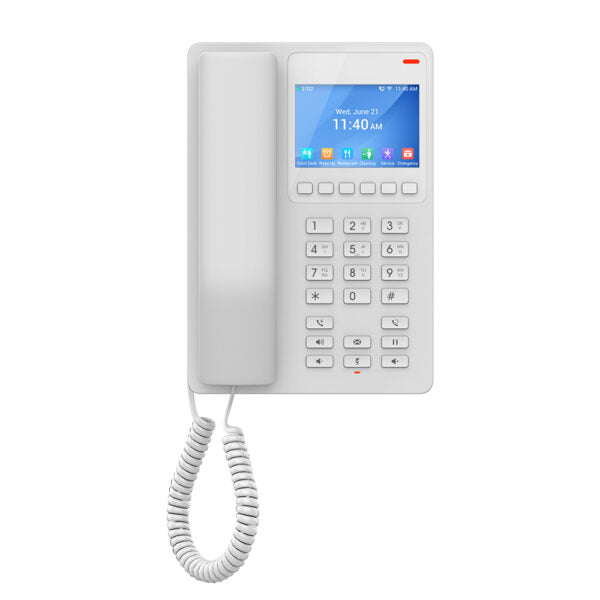
• The GHP Series of hotel phones features the easy-to-use IP phones for any hotel room, programmable and customizable based on hotel needs. • Integrated dual-band 802.11ax Wi-Fi 6 supports wireless deployments. • Key features: • 2 SIP accounts/lines • GDMS online device management and provisioning • 3-way audio conferencing • Includes one 100Mbps network port with PoE • USB Type-C charging port for modern smart phone charging • Hearing Aid Compatibility (HAC) • Enterprise-level protection including secure boot • Integrated dual-band 2.4GHz & 5GHz 802.11 a/b/g/n/ac/ax Wi-Fi 6 • Additional information: • Weight: 1.95 lbs • Dimensions: 8.27 × 5.79 × 3.54 in • Brand: Grandstream • Phone Type: Desk • Technical specifications: • GENERAL INFO: • Model: GHP630W • Graphic Display: 3.5” High-Resolution (480×320) Color LCD • Box Contents: GHP phone, Handset with cord, Base Stand, Universal power supply, Faceplate, Quick Installation Guide • Protocols/Standards: • SIP: SIP RFC3261, TCP/IP/UDP, RTP/RTCP, RTCP-XR, TLS, SRTP • Network: IPv4, IPv6, HTTP/HTTPS, ARP, ICMP, DNS(A record, SRV, NAPTR), DHCP, SSH, TFTP,NTP, STUN, LLDP, TR-069, 802.1x • Feature Keys: • 26 keys, including 6 Context-Sensitive Soft keys; 12 Standard Phone Digits keys (0-9: speed dial keys configuration on web page, * , #); 5 Function keys (Flash, Redial, Hands-free, Voice Mail, Hold); 3 Volume Control keys, Up/Down/Mute (with red color LED) • HD Audio: • One HD handset support for wide band audio • Voice Conferencing: • 2 SIP accounts and lines, up to 3-way conference

About This Product

The Grandstream GHP630W is a compact hotel phone designed for modern guest rooms where flexibility and ease of deployment matter. Its dual-band Wi-Fi 6 support allows placement anywhere in a room without running Ethernet cables, making it a strong fit for hotels that already have robust wireless infrastructure or for retrofitting older properties. The phone includes a single 100Mbps PoE port for wired installations, so property managers can choose the connectivity method that best suits their network topology. A USB-C port on the front lets guests charge their smartphones, adding a practical touch that guests appreciate. While Wi-Fi 6 offers improved reliability and capacity over older wireless standards, the phone’s wireless performance still depends on access point placement and signal strength; in high-density environments, wired backhaul may remain the more predictable option. The GHP630W integrates well with Grandstream’s GDMS for centralized provisioning and management, which is valuable for hotel chains or any multi-room deployment. For a small bed-and-breakfast or a single-floor hotel, this phone offers more wireless capability than needed, but its compact design and feature set scale comfortably to larger properties where each room needs a consistent, easy-to-use device. Canadian hoteliers, especially those deploying across the GTA, will find the phone works with standard SIP-based PBX systems and supports Canadian carrier requirements out of the box.
Services We Provide
  • Professional Installation & Configuration
  • Ongoing Maintenance & Support
  • Troubleshooting & Repairs
  • System Upgrades & Updates



