
Grandstream GHP631 Compact Hotel Phone with Color LCD-Black

Frequently Asked Questions

Check that the phone has a valid IP address (from a DHCP server or statically assigned) and that the SIP server address is correctly entered in the account settings. Also confirm that your PBX allows registration from the phone's IP range. If the issue persists, a Toronto-based VoIP support provider can usually resolve this remotely.
First, ensure the Ethernet cable is firmly connected to the phone and to a PoE switch or injector. If using a power adapter, verify it is plugged into a working outlet and to the phone. Try a different Ethernet cable and port to rule out a cable problem. A soft reset (unplug power for 10 seconds) often restores the display.
First, ensure the handset cord is securely plugged into both the phone and the handset. On the phone, check that the microphone volume is not muted or set too low in the audio settings. If the issue occurs only on speakerphone, test with the handset to isolate the problem. Also confirm that the network supports two-way audio and that no firewall is blocking RTP traffic.
Provisioning is typically done via the GDMS platform or by pointing the phone to a configuration file on a TFTP/HTTP server. Access the phone's web GUI (by entering its IP address in a browser) and enter the provisioning server URL in the appropriate field. For large deployments, use GDMS to auto-provision phones by MAC address.
Dropped calls are usually not caused by power problems but likely by network latency or jitter. Check that the phone is connected to a stable network and that QoS (Quality of Service) is configured on your network to prioritize VoIP traffic. Also ensure the phone's firmware is up to date from Grandstream's support site.
Verify that the Ethernet port on the wall or switch is active and providing PoE. Try connecting the phone directly to a different switch port known to work. If the phone still fails to get an IP, assign a static IP address via the phone's menu (Settings > Network > IP Settings) to check basic connectivity.
In the phone's web interface, navigate to the Maintenance section and enter the URL of your firmware server. Alternatively, use GDMS to schedule firmware updates across all devices. Grandstream recommends keeping firmware current for security and feature improvements.
First, confirm that all parties are on active calls (not on hold) when you press the Conference soft key on the GHP631. Some PBXs require conference resources to be available—check with your PBX administrator. Also verify that the phone's firmware supports three-way conferencing without a license.
Intermittent registration issues often point to network instability. Check the Ethernet cable connection and try a different cable. Verify that the SIP registration timer in the phone's settings matches the PBX's expiry value (commonly 3600 seconds). If the problem continues, test the phone on a different network segment.
Yes, the GHP631 uses standard SIP and should work with any RFC3261-compliant PBX. However, advanced features like message waiting indicator (MWI) or call park may require custom provisioning. Test a single unit with your PBX before bulk deployment.
IP Phones

Grandstream GHP631 Compact Hotel Phone with Color LCD-Black
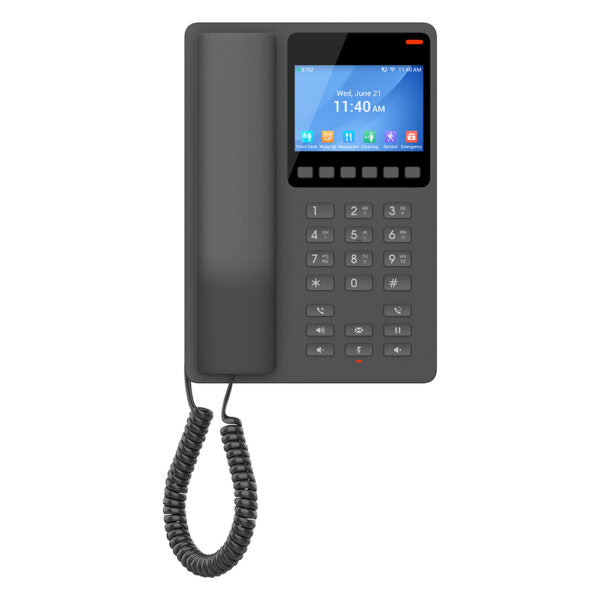
• The GHP Series of hotel phones features the easy-to-use IP phones for any hotel room, programmable and customizable based on hotel needs. • Key Features: • HD speaker • 2 SIP accounts/lines • 6 context-sensitive soft keys • 10 speed-dial keys • 3-way voice conferencing • Supports the full-band OPUS voice codec with an advanced jitter-resilience algorithm for up to 30% packet loss without impacting voice quality • The GHP631 is supported by Grandstream Device Management System (GDMS), providing a centralized interface to configure, provision, manage, and monitor deployments of Grandstream endpoints. • Additional Features: • Hearing Aid Compatibility (HAC) • Enterprise-level protection including secure boot • Color: Black • Technical Specifications: • Model: GHP631 • Graphic Display: 3.5” High-Resolution (480×320) Color LCD • Box Contents: GHP phone, Handset with cord, Base Stand, Faceplate, Quick Installation Guide • Protocols/Standards: SIP RFC3261, TCP/IP/UDP, RTP/RTCP, RTCP-XR, TLS, SRTP

About This Product

The Grandstream GHP631 is a compact IP phone designed specifically for hotel guest rooms. Its small footprint and straightforward interface make it a good fit for properties where simplicity and ease of use are priorities over extensive feature sets. The color LCD and context-sensitive soft keys can be programmed for common hotel services like housekeeping, front desk, or concierge, reducing the need for printed directories. The phone supports two SIP accounts, which could be used for a primary guest line and a secondary administrative line, though in most hotel deployments a single extension is sufficient.

This device is best suited for hotel environments where centralized provisioning and management are handled through a PBX or a device management platform like GDMS. It is not intended for power users or office settings that require advanced call handling, multiple line appearances, or a large directory. The 10 speed-dial keys and 3-way conferencing are basic but practical for guest use. Buyers should note that this phone lacks Wi-Fi and must be connected via Ethernet with PoE support from the switch or an included power adapter. In a Canadian context, the GHP631 works with any SIP-compatible hotel PBX, but for GTA properties, integration with local PBX vendors or cloud-based hotel phone systems should be verified for compatibility with provisioning templates.

A practical tradeoff is the reliance on GDMS for efficient deployment; without it, provisioning multiple units manually can be time-consuming. The phone supports OPUS codec with good packet loss resilience, which helps in environments with variable network quality, but for very large or complex hotel networks, a more ruggedized or feature-rich model may be justified. Conversely, for boutique hotels or budget-conscious properties, this phone may be overkill if only basic analog-like service is needed, but it provides a modern, feature-consistent experience across rooms.
Services We Provide
  • Professional Installation & Configuration
  • Ongoing Maintenance & Support
  • Troubleshooting & Repairs
  • System Upgrades & Updates



