
Grandstream GHP631W Compact Hotel Phone with Dual-Band WiFi 6-Black

Frequently Asked Questions

Start by confirming the Wi‑Fi network is active and the phone is connected to the correct SSID; you can check the connection status in the phone’s settings menu. Next, verify that the SIP account credentials and server address entered in the device’s profile exactly match what your provider or PBX has assigned. A common cause is a typo in the authentication name or password, or the SIP server port being blocked by the property’s firewall.
First, test the outlet with another device to rule out a wall‑power issue, then reseat the barrel connector at the back of the phone. If you are using PoE instead, confirm the Ethernet cable is plugged into a PoE‑capable switch port and that the switch is providing the expected power budget. A quick power cycle—unplugging the adapter or Ethernet cable for ten seconds—often resolves a one‑time startup glitch.
Choppy audio on a Wi‑Fi phone almost always points to wireless congestion or weak signal. Check the phone’s Wi‑Fi signal strength indicator; if it is low, move the access point closer or reduce physical obstructions. Also confirm that the 5 GHz band is being used where possible, as it is typically less crowded than 2.4 GHz in a hotel environment.
Start by ensuring the access point’s firmware is current and that band steering is not aggressively forcing the phone to a weaker band. On the phone side, disable any power‑saving Wi‑Fi features if they are enabled in the settings, as these can cause the radio to sleep and lose connectivity. If the issue persists, a Toronto‑based VoIP support provider can usually resolve this remotely by reviewing the wireless controller logs and adjusting the minimum data rate or roaming thresholds.
Speed‑dial assignments are typically set through the phone’s web interface or via the Grandstream Device Management System. Log into the phone’s IP address, navigate to the programmable keys section, and assign each key a destination number and a descriptive label. Changes can be pushed to many phones at once using GDMS, which is the recommended approach for a multi‑room deployment.
No, the USB‑C port on the GHP631W is designed exclusively for charging guest devices such as smartphones and tablets. The phone must be powered through its dedicated DC power adapter or a PoE network connection. Attempting to power the phone through the USB‑C port will not work and could damage the port.
First, check the in‑call volume setting by pressing the volume up key during an active call; the phone allows per‑call adjustment that may have been set low by a previous user. If the overall baseline is still too quiet, the default handset and speaker volume levels can be raised in the phone’s web configuration under the audio settings. Ensure the handset cord is fully seated at both ends, as a loose connection can also reduce volume.
A simultaneous restart of many Wi‑Fi phones can overwhelm the access points or the SIP server’s registration capacity. First, verify that the wireless network is fully operational and that the access points have finished rebooting. Then check the SIP server or PBX for any rate‑limiting or registration flood protection that may have temporarily blocked the phones; they should re‑register automatically once the server stabilizes.
IP Phones

Grandstream GHP631W Compact Hotel Phone with Dual-Band WiFi 6-Black
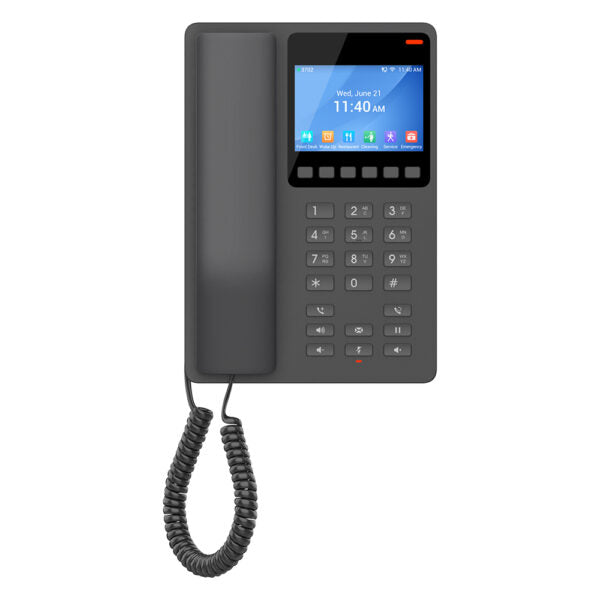
The GHP Series of hotel phones feature the GHP631W easy-to-use IP phone, programmed and customized based on the needs of hotels and their guests. • Dual-band 802.11ax Wi-Fi 6 for wireless deployments • HD speaker with advanced jitter-resilience algorithm to tolerate up to 30% packet loss without impacting voice quality • Two SIP accounts/lines, six context-sensitive soft keys, ten speed-dial keys, three-way voice conferencing • Supported by Grandstream Device Management System (GDMS) for centralized configuration and management • Sleek and compact design with PoE, power adapter, and USB Type-C charging port options Key Features: • 2 SIP accounts/lines • GDMS online device management and provisioning • 3-way audio conferencing • Integrated dual-band 2.4G/5G Wi-Fi 6 • Hearing Aid Compatibility (HAC) • Enterprise-level protection including secure boot • USB Type-C charging port for modern smartphone charging Additional Information: • Weight: 1.95 lbs • Dimensions: 8.27 × 5.79 × 3.54 in • Brand: Grandstream • Phone Type: Desk Technical Specifications: • Model: GHP631W • Graphic Display: 3.5” High-Resolution (480×320) Color LCD • Box Contents: • GHP phone • Handset with cord • Base stand • Universal power supply • Faceplate • Quick Installation Guide

About This Product

The Grandstream GHP631W is a purpose-built hotel phone that brings modern connectivity into guest rooms without the complexity of a traditional desk phone deployment. It is designed for properties where running Ethernet to every bedside table is impractical or expensive, relying instead on dual-band Wi‑Fi 6 to connect to the property’s wireless network. That makes it a strong fit for boutique hotels, renovated motels, and extended‑stay suites across the GTA that want a clean, cable‑free look while still offering guests the familiarity of a dedicated handset.

This phone pairs naturally with a cloud‑based or on‑premise Grandstream UCM platform and the GDMS management system, allowing housekeeping, front desk, and IT staff to provision and monitor devices from a single pane of glass. The integrated USB‑C charging port is a thoughtful touch that reduces clutter and addresses the real‑world need for guests to charge modern smartphones without hunting for an outlet. The compact footprint and hearing‑aid compatibility also make it suitable for accessible rooms and spaces where surface area is limited.

A practical trade‑off to consider is that the GHP631W relies entirely on Wi‑Fi for both SIP signaling and voice traffic. In properties with dense walls, heavy RF interference, or oversubscribed access points, call quality can degrade if the wireless design is not robust. It is not a device for environments that demand gigabit wired passthrough or advanced unified communications features like video or large‑scale BLF monitoring; those needs are better served by Grandstream’s GRP or GXV series desk phones. For guest‑facing voice service, however, the Wi‑Fi‑first design is a genuine advantage, not a compromise.

For a Canadian deployment, the phone’s dual‑band radio helps it coexist on both the crowded 2.4 GHz band and the cleaner 5 GHz band, which is useful in multi‑tenant buildings or downtown Toronto hotels where dozens of SSIDs compete for airtime. Power can be delivered via PoE or the included adapter, so it can slot into existing switch infrastructure or operate standalone. When the wireless network is planned with voice traffic in mind, the GHP631W delivers dependable guest‑room telephony in a package that is easy to manage and unobtrusive to guests.
Services We Provide
  • Professional Installation & Configuration
  • Ongoing Maintenance & Support
  • Troubleshooting & Repairs
  • System Upgrades & Updates



