
Grandstream GRP2602G 2-Line 4-SIP Carrier Grade IP Phone

Frequently Asked Questions

First, verify that the network cable is securely connected and the phone has a valid IP address (press the Menu key and look under Network). Then double-check the SIP account settings in the phone's web interface: the server address, username, and password must match exactly what your provider gave you. If the issue persists, a Toronto-based VoIP support provider can usually resolve this remotely.
Make sure the Ethernet cable is plugged into the LAN port and that your switch or PoE injector is delivering power. If you are using a PoE switch, confirm the port is enabled and not administratively shut down. Try a different known-good Ethernet cable and a different switch port to rule out a bad cable or port.
Access the phone's web interface by entering its IP address in a browser. Go to the Provisioning section and enter the URL of your provisioning server (HTTP or HTTPS). The phone supports zero-touch provisioning, so if you have a properly configured server, it will pull the config file on boot. You may also need to enable 'Authenticate Conf File' if your server requires credentials.
Check that your network has sufficient bandwidth and low latency – run a speed test from a computer on the same connection. Also ensure the phone is on a wired connection, not behind a weak Wi-Fi extender, and that Quality of Service (QoS) is configured on your router or switch to prioritize VoIP traffic. A simple power cycle of the phone and network equipment can also clear temporary issues.
Yes, the phone supports Plantronics, Jabra, and Sennheiser headsets via the Electronic Hook Switch (EHS) feature. Connect the headset to the RJ9 headset port on the back of the phone, and enable EHS in the phone's settings under Audio or Headset. For Bluetooth headsets, you would need a separate adapter since the phone does not have built-in Bluetooth.
You can update firmware through the phone's web interface under the Maintenance or Upgrade section. Enter the URL for the firmware file provided by Grandstream or your VoIP provider, then click Upgrade. Alternatively, if you use GDMS or a provisioning server, the phone can be upgraded remotely. Always back up your configuration before upgrading.
First, check the Ethernet cable – a loose or damaged cable can cause intermittent drops. Then look at the switch port: try a different port or a known-good cable. If the issue continues, examine the phone's network settings for a static IP vs. DHCP conflict – ensure the IP is not already in use by another device. A simple reboot of both the phone and the switch often resolves transient issues.
You can set up call forwarding through the phone's web interface under the Call Features or Settings section. Enter the destination number for forward all, busy, or no answer conditions. You can also use the phone's menu: press the Menu key, select Call Features, then Forward. Remember to save your changes.
This usually means the phone is not registered with the SIP server. Check that your network connection is active and that the SIP account credentials are correct. Also verify that the SIP server address is reachable from your network – try pinging it from a computer. If you are behind a firewall, ensure SIP and RTP ports are open.
Yes, the GRP2602G is a standard SIP phone and works with any VoIP provider that supports SIP, including Canadian carriers and hosted PBX services. You will need a SIP trunk or hosted account from the carrier, and you will configure the phone with the SIP server details they provide. Many Canadian VoIP providers also support zero-touch provisioning for Grandstream phones.
IP Phones

Grandstream GRP2602G 2-Line 4-SIP Carrier Grade IP Phone
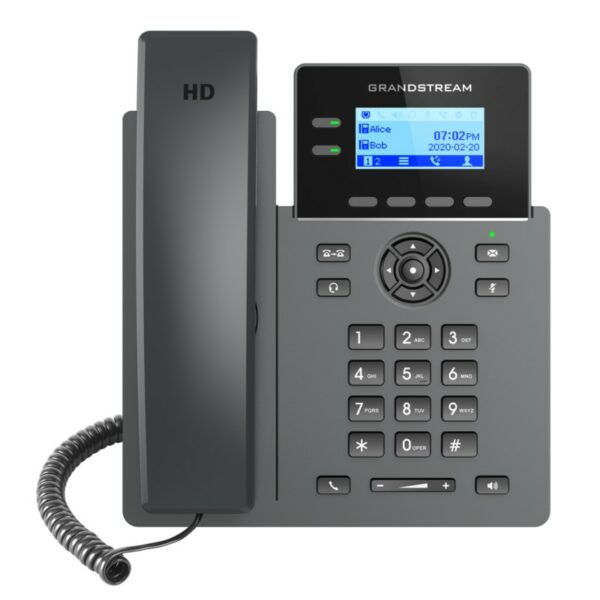
*Part of the GRP series of Carrier-Grade IP Phones, the GRP2602 is an essential 2-line model designed with zerotouch provisioning for mass deployment and easy management. • Sleek design • Wi-Fi support (GRP2602W) • 5-way voice conferencing to maximize productivity • Integrated PoE (GRP2602P/GRP2602G) • Full HD audio on both the speaker and handset • EHS support for Plantronics, Jabra, and Sennheiser headsets • Multilanguage support Features: • 2 lines • 4 SIP accounts • PoE + GigE • Supports 5-way audio conferencing • Enterprise-level protection including secure boot, dual firmware images, and encrypted data storage • Swappable faceplate to allow for easy logo customization • Full-duplex speakerphone with HD audio • Supported by GDMS • Electronic Hook Switch (EHS) support for Plantronics, Jabra, and Sennheiser headsets Additional Information: • Weight: 1.94 lbs • Dimensions: 8.19 × 7.09 × 2.50 in • Brand: Grandstream • Phone Type: Desk Technical Specifications: • DISPLAY: 132 x 48 (2.41’) backlit graphical LCD display • LINES: 2 lines • SIP ACCOUNT: 4 SIP accounts • CONFERENCING: 5-way audio conferencing • FEATURE KEYS: 2 line keys with dual-color LED and support for 4 SIP account, 4 XML programmable context sensitive soft keys, and 5 navigation, menu keys. • INTEGRATED POE: Yes • ETHERNET PORTS: Dual switched auto-negotiation 10/100/1000 Mbps • WIFI: None • BLUETOOTH: None • HD AUDIO: Yes

About This Product

The Grandstream GRP2602G is a wired desk phone built for business environments where call reliability and straightforward management matter more than flashy extras. It is a good fit for a small office, a retail front desk, a reception area, or a shared workspace in the Greater Toronto Area where you need two lines but want to keep the phone footprint and cost low. The device pairs well with a hosted VoIP service or an on-premises PBX that supports auto-provisioning, making it easy to deploy in bulk without touching each unit individually. The main tradeoff is that it has no Wi-Fi or Bluetooth, so it must be connected via Ethernet, and the 2-line interface means it is not suited for heavy call-center use or for power users who juggle many calls or need a larger display. It is overkill for a single-user home office where a basic single-line phone would do, but it is well matched for a growing business that wants carrier-grade features like dual firmware images and secure boot without paying for a multi-line executive model.
Services We Provide
  • Professional Installation & Configuration
  • Ongoing Maintenance & Support
  • Troubleshooting & Repairs
  • System Upgrades & Updates



