
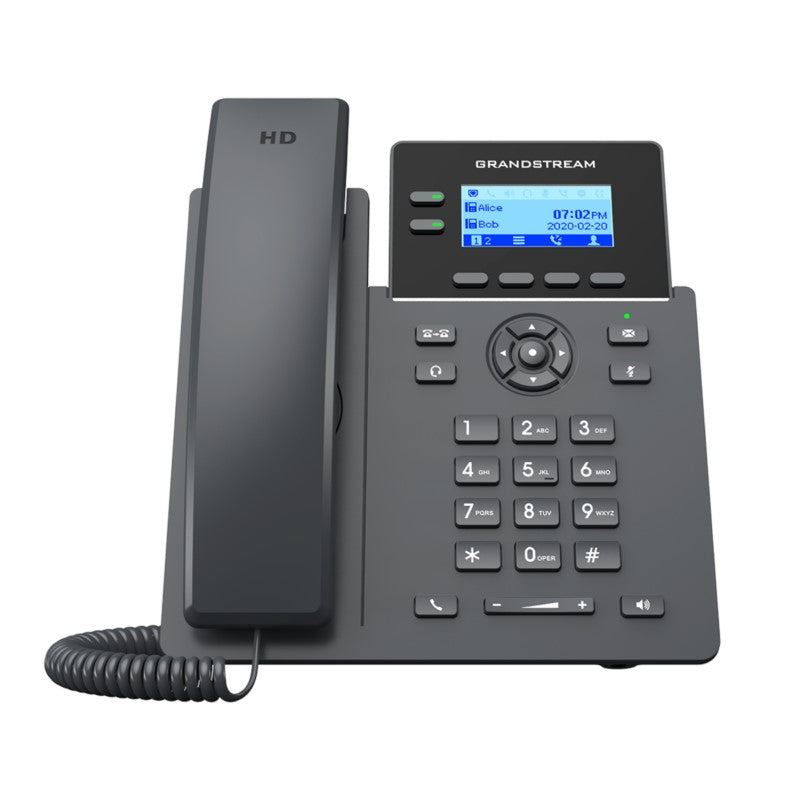
Grandstream GRP2602P 2-Line Essential IP Phone
Frequently Asked Questions
First confirm that the Ethernet cable is connected to the port labeled 'Internet' on the back of the phone, not the 'PC' passthrough port. Next, verify that the network switch port it's connected to actually supplies PoE—many switches have PoE disabled by default on certain ports or may not be PoE-capable at all. If the switch is managed, check its interface to see if PoE is enabled and delivering power on that specific port.
Start by confirming the SIP server address, username, and password in the account settings are exactly as your provider supplied them; a single mistyped character will prevent registration. Also check that the phone's IP address is on the same subnet as your network and can reach the internet or your PBX—try pinging the SIP server from another device on the same network. If your firewall or router has SIP ALG enabled, temporarily disabling it can sometimes resolve registration issues.
Lift the handset and press the volume up key during a call to rule out a muted or very low volume setting. If that doesn't help, try switching to speakerphone mode—if audio works there, the handset or its cord may be faulty. Also check that no headset is connected via the EHS port that might be routing audio away from the handset and speaker.
Confirm your headset model is explicitly listed as compatible with Grandstream EHS—Plantronics, Jabra, and Sennheiser are supported, but not every model within those brands works. The EHS cable must be the correct one for your specific headset base, not a generic cable. In the phone's web interface under Settings > Audio Control, verify that the headset type is set to match your connected device.
This model supports zero-touch provisioning via Grandstream's GDMS platform or a standard provisioning server using TR-069 or HTTP/HTTPS. You'll need to point the phone to your provisioning server's URL, which is typically done through DHCP option 66 or by configuring it in the phone's web interface under Maintenance > Provisioning. Once the URL is set, the phone will pull its configuration file automatically on next reboot.
Choppy audio is often a network quality issue rather than a phone hardware problem. Check if the issue happens on all calls or only certain ones—if it's consistent, look for packet loss or jitter on your network, especially if the phone is connected through a daisy-chained switch or a congested VLAN. A quick test is to connect the phone directly to your main switch or router with a known-good cable and see if the problem persists.
The GRP2602P does not have built-in Wi-Fi and relies on a wired Ethernet connection for both network access and power via PoE. If you must place it where no Ethernet jack exists, you could use a Wi-Fi bridge or a powerline adapter, but the phone itself still connects via its Ethernet port. For true wireless desk phones, you'd need to look at a different model with integrated Wi-Fi.
First swap the PoE source—plug the phone into a different PoE switch port or use a compatible PoE injector to rule out an underpowered port. A failing power supply or a switch port that can't deliver the required wattage is a common cause of random reboots. If the phone is stable with a different power source, the original switch port or injector likely needs attention.
IP Phones
Grandstream GRP2602P 2-Line Essential IP Phone
• The GRP2602 is a 2-line carrier-grade IP phone designed for mass deployment and easy management, featuring zerotouch provisioning. • Key features include: • 5-way voice conferencing to maximize productivity • Integrated PoE (GRP2602P only) • Full HD audio on both the speaker and handset • EHS support for Plantronics, Jabra, and Sennheiser headsets • Multi-language support • Enterprise-level security features such as secure boot, dual firmware images, and encrypted data storage • Supports 5-way audio conferencing for easy conference calls • Weight: 1.85 lbs • Dimensions: 10 × 9 × 3 in
About This Product
The Grandstream GRP2602P is built for organizations that need reliable, straightforward voice endpoints they can deploy in volume without a heavy management burden. It fits naturally into mid-sized offices, retail chains, and multi-site businesses where IT teams value zero-touch provisioning and centralized control. The integrated PoE simplifies desk setup by removing the need for a separate power adapter, making it a clean choice for cubicle rows or open-plan workspaces where Ethernet is already available.
This phone pairs well with hosted PBX platforms and on-premise Grandstream UCM systems, and it makes sense as a standard desk phone for users who primarily handle calls but don't need the complexity of a touchscreen or video. Its two-line capacity and five-way conferencing cover the needs of administrative staff, sales associates, and general office workers. EHS support means it slots neatly into workflows where a wireless headset is already part of the daily routine.
Buyers should understand the tradeoffs. The GRP2602P is a purpose-built voice tool, not a collaboration hub. It won't replace a softphone client for teams that rely on persistent chat, video meetings, or screen sharing. The monochrome display and button-driven interface are functional but not flashy, and users accustomed to smartphone-style interfaces may find the learning curve slightly steeper. For a two-line phone, however, it delivers the fundamentals well.
For a small professional office in the GTA with a dozen users, this model hits a sweet spot of cost and capability. It's overkill for a single-person home office where a softphone or a basic analog adapter would suffice, and it's underpowered for an executive who needs a busy lamp field, Bluetooth, or a larger color screen. In the right setting, it's a dependable workhorse that won't strain the IT budget.
This phone pairs well with hosted PBX platforms and on-premise Grandstream UCM systems, and it makes sense as a standard desk phone for users who primarily handle calls but don't need the complexity of a touchscreen or video. Its two-line capacity and five-way conferencing cover the needs of administrative staff, sales associates, and general office workers. EHS support means it slots neatly into workflows where a wireless headset is already part of the daily routine.
Buyers should understand the tradeoffs. The GRP2602P is a purpose-built voice tool, not a collaboration hub. It won't replace a softphone client for teams that rely on persistent chat, video meetings, or screen sharing. The monochrome display and button-driven interface are functional but not flashy, and users accustomed to smartphone-style interfaces may find the learning curve slightly steeper. For a two-line phone, however, it delivers the fundamentals well.
For a small professional office in the GTA with a dozen users, this model hits a sweet spot of cost and capability. It's overkill for a single-person home office where a softphone or a basic analog adapter would suffice, and it's underpowered for an executive who needs a busy lamp field, Bluetooth, or a larger color screen. In the right setting, it's a dependable workhorse that won't strain the IT budget.
Services We Provide
- Professional Installation & Configuration
- Ongoing Maintenance & Support
- Troubleshooting & Repairs
- System Upgrades & Updates



