
Grandstream GRP2602W WiFi 2-Line 4-SIP Carrier Grade IP Phone

Frequently Asked Questions

Start by checking whether the phone is within good range of your access point, ideally no more than 25–30 feet through a single wall. Interference from other 2.4 GHz devices (microwaves, cordless phones) can cause drops; try switching to the 5 GHz band if your network supports it. Also verify that the router is not set to auto-negotiate channel width—forcing 20 MHz on 2.4 GHz can improve stability.
Press the MENU key, navigate to Settings > Network > Wi-Fi Settings, and scan for your network. Select your SSID, enter the password using the keypad, and confirm. The phone will attempt to connect and obtain an IP address via DHCP. If it fails, double-check that your router's WiFi is broadcasting and that you've entered the correct password.
First, check that the handset or headset microphone is not blocked or muted. If using the speakerphone, ensure you're not too far from the phone—the noise shield works best within a couple of feet. If the issue persists, test with a wired Ethernet connection to isolate WiFi latency or packet loss; if audio improves, consider moving the phone closer to the access point or using a wired connection for important calls.
Plug the headset's RJ9 cable into the GRP2602W's headset jack, then enable EHS in the phone's Settings > Preferences > Headset Mode > EHS. Make sure the headset base station or dongle is paired with the headset. The phone should then automatically switch audio to the headset when you press the HEADSET key.
Yes, the phone supports shared-call appearance (SCA) and bridged-line appearance (BLA), which let multiple phones share the same SIP account. This is configured either through your PBX or via the phone's web interface under Account > SCA/BLA Settings. Note that both phones must be on the same network and provisioned correctly for call pickup and park to work smoothly.
A WiFi connection alone doesn't guarantee the phone can reach your SIP server. The phone needs to have a valid SIP account configured (SIP server address, credentials). Also check that your network allows outbound SIP traffic on UDP/TCP port 5060 and RTP ports 10000–20000. If using a firewall, you may need to enable SIP ALG or set port forwarding.
First, connect the phone to the internet (via WiFi or Ethernet) and note its MAC address. Log into your GDMS account, add the device by MAC, and assign a provisioning template or configuration file. The phone will contact GDMS on boot; you can also force a check by pressing Menu > Settings > Provisioning > Check for Update.
Try a full power cycle (unplug the power adapter or disconnect from power for 30 seconds, then reconnect). If the display is still garbled, check that the firmware is up to date via the web interface under Maintenance > Upgrade. A corrupted firmware image could cause display anomalies; Grandstream's dual firmware feature means a fallback image exists, but a downgrade should only be performed after consulting support.
Ensure you're on an active call and the other party hasn't hung up. Press the TRANSFER key once, enter the target extension or number, then press SEND or wait for the phone to complete the transfer. If blind transfer fails, check your PBX's transfer settings; some systems require attended transfer. Also verify that the phone's dial plan doesn't strip or alter digits mid-transfer.
Yes, OPUS is listed among supported codecs. To use it, both your SIP server and the other endpoint must also support OPUS. You can prioritize OPUS in the phone's web interface under Account > Audio Settings > Preferred Vocoder. If OPUS is not being used, the phone will fall back to G.722 or G.711 based on the server's capabilities.
IP Phones

Grandstream GRP2602W WiFi 2-Line 4-SIP Carrier Grade IP Phone
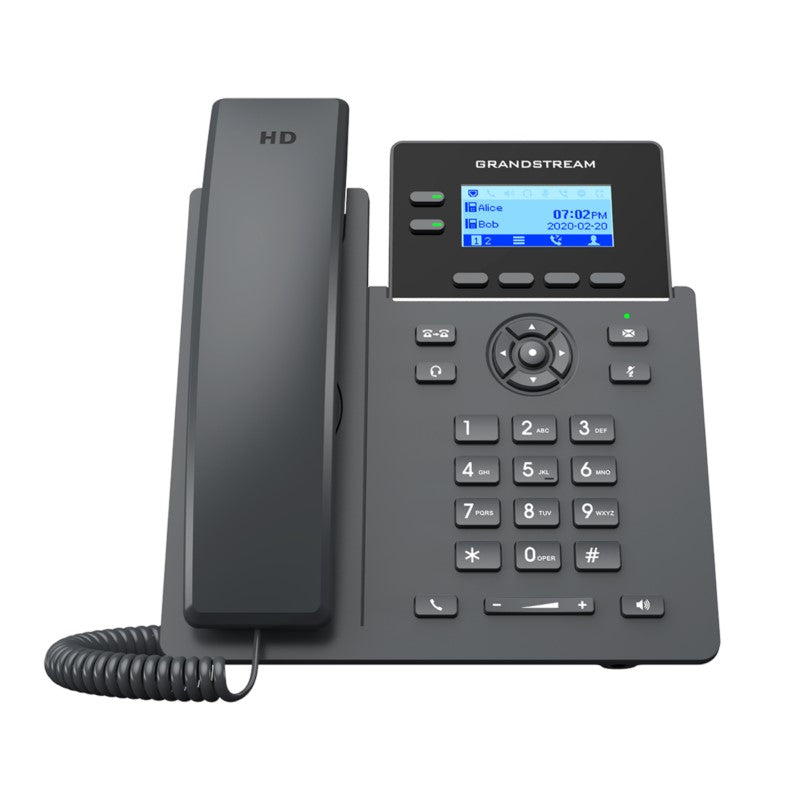
• The GRP2602 is a 2-line carrier-grade IP phone designed for mass deployment and easy management, featuring a sleek design and next-generation features such as Wi-Fi support, full HD audio, EHS support, and multi-language support. • Key features include: • Supports 2 lines and 4 SIP accounts • Supported by Grandstream's Device Management System (GDMS) for centralized configuration, provisioning, management, and monitoring • Electronic Hook Switch (EHS) support for Plantronics, Jabra, and Sennheiser headsets • Full-duplex speakerphone with HD audio to maximize audio quality and clarity • Equipped with noise shield technology to minimize background noise • Supports 5-way audio conferencing for easy conference calls • Enterprise-level protection including secure boot, dual firmware images, and encrypted data storage • Additional information: • Weight: 2 lbs • Dimensions: 11 × 9 × 3 in • Brand: Grandstream • Phone Type: Desk, WiFi / WiFi Capable • Technical specifications: • Protocols/Standards: SIP RFC3261, TCP/IP/UDP, RTP/RTCP, RTCP-XR, HTTP/HTTPS, ARP, ICMP, DNS(A record, SRV, NAPTR), DHCP, PPPoE, SSH, TFTP, NTP, STUN, SIMPLE, LLDP, LDAP, TR069, SNMP, 802.1x, TLS, SRTP, IPv6 • Network Interfaces: Dual switched auto-sensing 10/100 Mbps Ethernet ports • Wi-Fi: GRP2602W, Integrated dual-band Wi-Fi 802.11 a/b/g/n/ac (2.4Ghz & 5Ghz) • Graphic Display: 132 x 48 (2.41’) backlit graphical LCD display • Feature Keys: 2 line keys with dual-color LED and support for 4 SIP account, 4 XML programmable context sensitive soft keys, 5 (navigation, menu) keys. 8 dedicated function keys for: MESSAGE(with LED indicator), TRANSFER,HEADSET, MUTE, SEND/REDIAL, SPEAKERPHONE, VOL+, VOL- • Auxiliary Port: RJ9 headset jack (allowing EHS with Plantronics & Jabra & Sennheiser headsets) • Voice Codecs and Capabilities: Support for G.729A/B, G.711µ/a-law, G.726, G.722(wide-band), G.723,iLBC, OPUS, in-band and out-of-band DTMF(in audio, RFC2833, SIP INFO), VAD, AEC, CNG, PLC, AGC, AJB • Telephony Features: Hold, transfer, forward, 5-way conference, call park, call pickup, shared-call appearance(SCA)/bridged-line-appearance(BLA), downloadable phonebook(XML, LDAP, up to 2000 items), call waiting, call log(up to 800 records), off-hook auto dial, auto answer, click-to-dial, flexible dial plan, hot-desking, personalized music ringtones and music on hold, server redundancy and fail-over

About This Product

The Grandstream GRP2602W is a two-line IP phone built for small-to-medium business environments where wired Ethernet isn't always available or convenient. Its integrated dual-band Wi-Fi (2.4 GHz and 5 GHz) makes it a solid choice for desk workers in shared offices, retail counters, or home offices where running a cable is impractical. The phone also includes dual switched 10/100 Mbps Ethernet ports, so you can still connect it via cable when a port is nearby, and even daisy-chain a computer. For a business relying on a hosted VoIP provider, this phone can be provisioned and managed remotely through Grandstream's GDMS platform, simplifying deployment across a team. The HD audio and noise-shield technology help keep calls clear in open-plan settings, though the two-line limit means it won't suit a high-volume call center or a user who needs multiple simultaneous conversations. It supports Electronic Hook Switch (EHS) with common headset brands, which is practical for professionals who take a lot of calls hands-free. In a Canadian context, this phone works well with most SIP-based providers in the GTA, provided the WiFi network has sufficient coverage and bandwidth. The lack of PoE support (due to the WiFi model) means you'll need a nearby power outlet or a USB power adapter for some setups. While the display is small and monochrome, it's sufficient for call status and soft keys, and the phone's overall build quality suits a busy office environment.
Services We Provide
  • Professional Installation & Configuration
  • Ongoing Maintenance & Support
  • Troubleshooting & Repairs
  • System Upgrades & Updates



