
Grandstream GRP2603 3-Line Essential IP Phone

Frequently Asked Questions

First, verify that the SIP account credentials (username, password, and server address) are entered correctly in the phone's web interface or provisioning file. Also confirm that your network allows outbound SIP traffic on ports 5060/5061 and that the phone has obtained a valid IP address via DHCP. If the issue persists, a Toronto-based VoIP support provider can usually resolve this remotely.
The GRP2603 supports both PoE (802.3af) and an optional 5V DC power adapter. If you are using PoE, check that the Ethernet cable is securely connected to a PoE-enabled switch port. If using a power adapter, verify the adapter is plugged into a working outlet and that the barrel connector is fully inserted. Try a different cable or PoE port to isolate the issue.
For corded headsets, plug the headset into the RJ9 headset jack on the side of the phone. For wireless headsets from Plantronics, Jabra, or Sennheiser, you will need to connect the headset's EHS cable to the phone's dedicated EHS port and pair the headset per its instructions. The phone's EHS support is compatible with these brands only, so check your headset model.
First, ensure the handset and speakerphone are not too close to each other or to a speaker. Lower the handset volume slightly via the volume keys during a call. If the echo persists, check that the phone's firmware is up to date and that your VoIP provider's codec settings match the phone's preferred codec (G.711 or G.722). A simple power cycle can also clear temporary audio glitches.
Confirm the Ethernet cable is firmly connected to the phone's LAN port and to a working switch or router port. Try a different cable. If the phone still shows a 0.0.0.0 IP after a minute, manually set a static IP in the phone's network settings to test connectivity. If the network uses 802.1x authentication, ensure the correct credentials are configured on the phone.
The phone supports zero-touch provisioning via DHCP options (typically option 66) or by entering a provisioning server URL in its configuration interface. Place your configuration files on a TFTP, HTTP, or HTTPS server. The phone will automatically download and apply settings on boot. Grandstream's GDMS platform can also manage firmware and config centrally.
Check that the phone is connected to a wired Gigabit Ethernet port, not Wi-Fi. Run a speed test from a computer on the same network to ensure your internet connection has adequate bandwidth and low latency. If using QoS, prioritize SIP and RTP traffic. A simple power cycle of the phone and network equipment can clear temporary congestion issues.
Yes, the GRP2603 is SIP-compliant and works with any SIP-based VoIP provider. For Rogers or Bell business SIP services, you may need to configure specific codec preferences (G.711 is widely supported) and ensure the phone's NAT settings (STUN) are correct if behind a router. Your provider's support team can supply the exact account settings.
'No Service' usually means the phone cannot reach the SIP server. Double-check that the server address is typed correctly and that the phone's DNS settings resolve the server's hostname. Try pinging the server IP from a computer on the same network. If the network uses a firewall, confirm SIP ALG is disabled and that ports 5060/5061 are open.
Firmware can be updated via the phone's web interface under Settings → Upgrade. Enter the URL of the firmware file hosted on a TFTP/HTTP/HTTPS server, or use Grandstream's GDMS to push updates. Always verify the firmware file is the correct model-specific version from Grandstream's official site. A power cycle after upgrade is recommended.
IP Phones

Grandstream GRP2603 3-Line Essential IP Phone
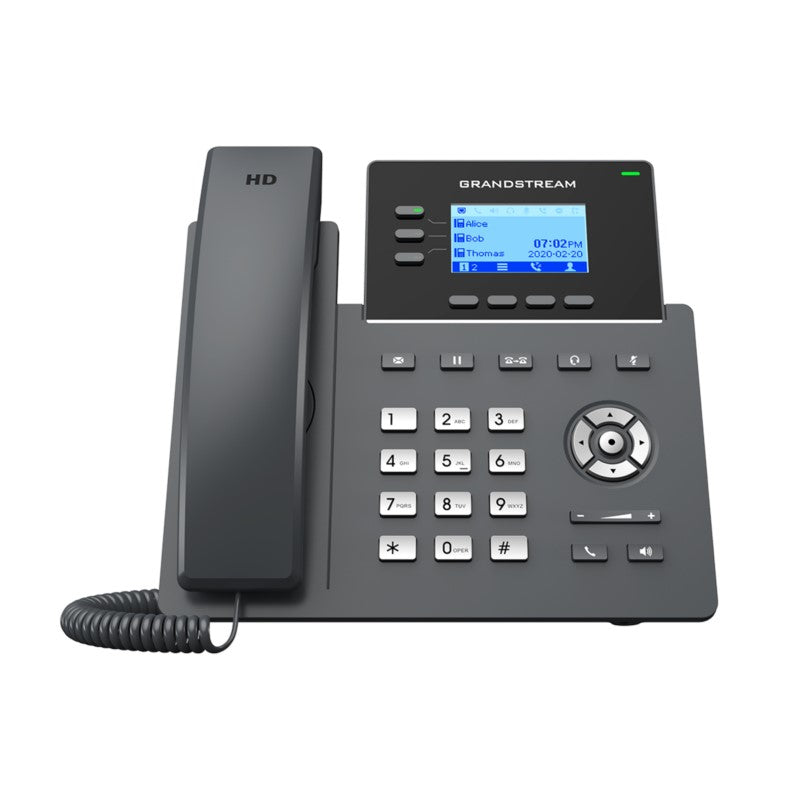
• The GRP2603 is a carrier-grade IP phone designed with zero-touch provisioning for mass deployment and easy management. Its sleek design includes 5-way voice conferencing, full HD audio, EHS support for Plantronics, Jabra, and Sennheiser headsets, and multi-language support. • Key features: • Zero-touch provisioning for streamlined deployments • Secure boot, dual firmware images, and encrypted data storage for enterprise-level security • Supported by Grandstream’s Device Management System (GDMS) for centralized management • Electronic Hook Switch (EHS) support for Plantronics, Jabra, and Sennheiser headsets • Full-duplex speakerphone with HD audio to maximize audio quality and clarity • Additional information: • Weight: 2.47 lbs • Dimensions: 11.73 × 8.31 × 3.19 in • Brand: Grandstream • Technical specifications: • Protocols/Standards: SIP RFC3261, TCP/IP/UDP, RTP/RTCP, RTCP-XR, HTTP/HTTPS, ARP, ICMP, DNS(A record, SRV, NAPTR), DHCP, PPPoE, SSH, TFTP, NTP, STUN, SIMPLE, LLDP, LDAP, TR069, SNMP, 802.1x, TLS, SRTP, IPv6 • Network Interfaces: Dual switched auto-sensing 10/100/1000 Mbps Ethernet ports • Graphic Display: 132 x 64 (2.7’’) backlit graphical LCD display • Feature Keys: 3 line keys with dual-color LED and support for 6 SIP accounts, 4 XML programmable context sensitive soft keys, 5 navigation, menu keys, and 9 dedicated function keys

About This Product

The Grandstream GRP2603 is a no-frills, carrier-grade desktop phone built for businesses that need a reliable, easy-to-manage endpoint without the bells and whistles of a high-end model. It is an excellent fit for reception desks, call centers, or general office cubicles where clear audio and multi-line capability matter more than a large color touchscreen. The phone supports three line keys (expandable to six SIP accounts) and includes full-duplex HD audio on speakerphone, making it practical for both one-on-one calls and small group conversations around a desk.

This model is particularly well-suited for managed VoIP deployments, such as those found in GTA office environments where an IT provider or internal team handles provisioning centrally. Its zero-touch provisioning and support for Grandstream's GDMS cloud management mean a large batch of these phones can be configured and updated remotely with minimal hands-on work. The dual Gigabit Ethernet ports are a plus for daisy-chaining to a nearby computer, preserving switch port density in a dense office layout. However, the small 2.7-inch monochrome LCD display may feel dated for users accustomed to larger, color screens, and the lack of a built-in Bluetooth module means headset connectivity relies on the EHS port for compatible cordless models.

A buyer should be aware that the GRP2603 is not intended for executive suites or roles that demand a high-resolution color screen, sidecar expansion, or video capabilities. It is also not ideal for a home office that requires a standalone speakerphone with a wide pickup range, as its full-duplex speakerphone is designed for close-in desk use. For a small business in the Greater Toronto Area rolling out a SIP trunk from a local carrier, this phone provides a solid, predictable experience without overpaying for features that will not be used. Its security features—secure boot, dual firmware images, and encrypted storage—add peace of mind for compliance-conscious deployments, but the phone's real strength is its simplicity and ease of mass provisioning.
Services We Provide
  • Professional Installation & Configuration
  • Ongoing Maintenance & Support
  • Troubleshooting & Repairs
  • System Upgrades & Updates



