
Grandstream GRP2603P 3-Line Essential IP Phone

Frequently Asked Questions

Start by verifying that the phone has a valid IP address and can reach the internet. Check your network cable connection and ensure the phone's LAN port LED is lit. Then log into the phone's web interface and confirm the SIP server address, username, and password are entered exactly as provided by your carrier. If the issue persists, a Toronto-based VoIP support provider can usually resolve this remotely.
First, make sure you're using the GRP2603P model (it has 'P' in the name) since only this variant supports PoE. Confirm the PoE switch port is enabled and delivering power (check the switch's LED or management interface). Try a different cable and a different switch port. If PoE still fails, a temporary power adapter (sold separately) can be used to verify the phone itself works.
One-way audio is often a network or firewall problem. Check that your SIP provider's audio ports (typically UDP 10000–20000) are not blocked. Also verify that the phone has a valid default gateway and DNS. If using a VPN or restrictive firewall, try placing a call from a different network (e.g., a direct connection to the modem) to isolate the cause.
Ensure you're using a compatible headset from Plantronics (now Poly), Jabra, or Sennheiser that supports EHS. Connect the headset's RJ9 cable to the phone's headset jack, then go to Settings > Preferences > Headset Mode and select the appropriate EHS option for your headset brand. If EHS doesn't work, try a simpler wired headset without EHS to confirm the phone's audio path is fine.
This usually means the phone isn't receiving power. If using PoE, check the cable connection and switch port as above. If using the optional power adapter, verify the adapter is plugged into a working outlet and the phone. Try a different Ethernet cable. If the display remains off despite confirmed power, the unit may need service.
First, check that the phone is registered by looking for a registration status on the display. If it shows 'No Service,' follow the registration troubleshooting steps. If registration is fine, check the line key assignment in the web interface under Accounts: ensure each line key is mapped to the correct SIP account. A quick reboot of the phone can also restore key functionality.
Yes, this phone is SIP-compatible and works with most Canadian hosted VoIP providers. You'll need to enter the provider's SIP server details, account credentials, and ensure your network doesn't block SIP traffic (UDP 5060). For providers that require specific codec settings, you can adjust those in the phone's web interface.
First, ensure each phone can reach the GDMS server either via the internet or a local provisioning server. In the phone's web interface, go to Settings > Provisioning and set the provisioning server URL to your GDMS or custom server address. Then assign a unique MAC-based configuration file on the server. GDMS allows you to push settings and firmware updates to all phones from a single dashboard.
Hot desking allows users to log into any GRP2603P with their own SIP credentials, making it ideal for shared workspaces. To enable it, the phone must be provisioned with a hot desking server URL and a login prompt. Users then enter their extension number and PIN on the phone to load their settings. Coordination with your PBX or provisioning system is required to set up the back-end.
Poor audio quality often points to network congestion or high jitter. Start by checking your network's bandwidth—VoIP requires at least 100 kbps per call for HD codecs. Try connecting the phone directly to the main router instead of through multiple switches. You can also lower the audio codec to G.711 or G.729 in the phone's settings to reduce bandwidth demands.
IP Phones

Grandstream GRP2603P 3-Line Essential IP Phone
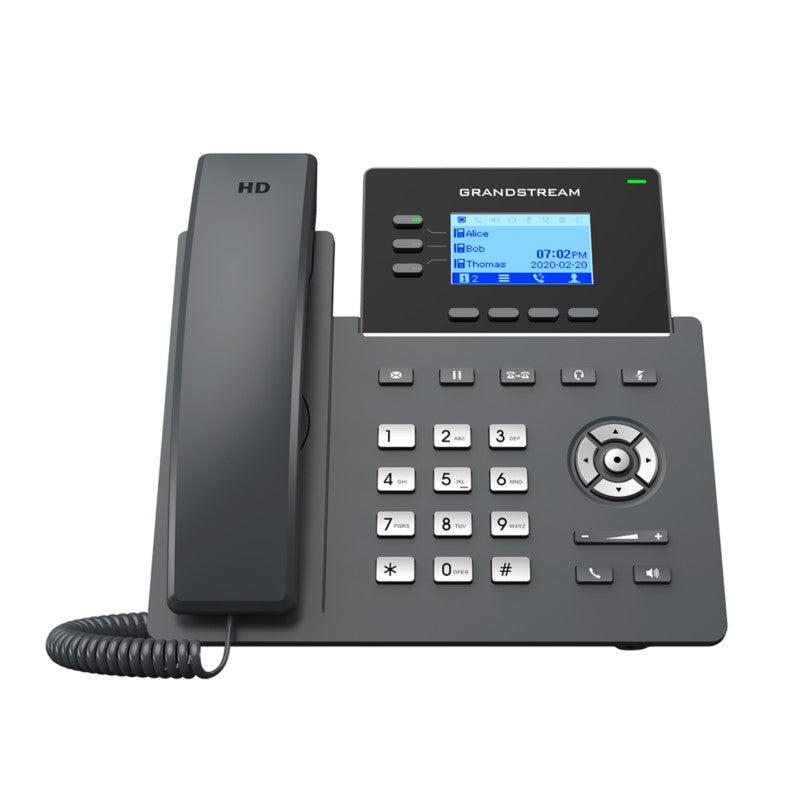
• Part of the GRP series, the GRP2603 is a 3-line model designed for mass deployment and easy management. Its sleek design features next-generation voice conferencing, full HD audio, EHS support, multi-language capabilities, and secure boot, dual firmware images, and encrypted data storage. • Key Features: • 3 lines, 6 SIP accounts, up to 3 call appearances • Supported by GDMS for centralized interface configuration, provisioning, management, and monitoring • Electronic Hook Switch (EHS) support for Plantronics, Jabra, and Sennheiser headsets • Full-duplex speakerphone with HD audio for maximum audio quality and clarity • Equipped with noise shield technology to minimize background noise • Dual switched autosensing 10/100/1000 Mbps Gigabit Ethernet ports with integrated PoE (for GRP2603P only) • Supports 5-way audio conferencing for easy conference calls • Enterprise-level protection including secure boot, dual firmware images, and encrypted data storage • Technical Specifications: • Protocols/Standards: SIP RFC3261, TCP/IP/UDP, RTP/RTCP, RTCP-XR, HTTP/HTTPS, ARP, ICMP, DNS(A record, SRV, NAPTR), DHCP, PPPoE, SSH, TFTP, NTP, STUN, SIMPLE, LLDP, LDAP, TR069, SNMP, 802.1x, TLS, SRTP, IPv6 • Network Interfaces: Dual switched auto-sensing 10/100/1000 Mbps Ethernet ports, integrated PoE (for GRP2603P only) • Graphic Display: 132 x 64 (2.7’’) backlit graphical LCD display • Feature Keys: 3 line keys with dual-color LED and support for 6 SIP accounts, 4 XML programmable context sensitive soft keys, 5 navigation, menu, and dedicated function keys • Auxiliary Port: RJ9 headset jack (allowing EHS with Plantronics & Jabra & Sennheiser headsets) • Voice Codecs and Capabilities: Support for G.729A/B, G.711µ/a-law, G.726, G.722(wide-band), G.723,iLBC, OPUS, in-band and out-of-band DTMF(in audio, RFC2833, SIP INFO), VAD, AEC, CNG, PLC, AGC, AJB • Telephony Features: Hold, transfer, forward, 5-way conference, call park, call pickup, shared-call appearance(SCA)/bridged-line-appearance(BLA), downloadable phonebook(XML, LDAP, up to 2000 items), call waiting, call log(up to 800 records), off-hook auto dial, auto answer, click-to-dial, flexible dial plan, hot-desking, personalized music ringtones and music on hold

About This Product

The Grandstream GRP2603P is a solid entry-level IP phone built for organizations that need to deploy many handsets quickly and manage them centrally. It's a natural fit for small to medium-sized offices, multi-location businesses, or call center environments where every desk needs a reliable, no-frills phone. With support for up to six SIP accounts across three line keys, it can handle a modest volume of calls without overwhelming the user. The built-in Power over Ethernet (PoE) on this model simplifies installation by eliminating the need for separate power adapters, which is especially handy in open-plan layouts or locations where power outlets are scarce.

Where the GRP2603P truly shines is in its ability to be managed remotely through Grandstream's GDMS platform, making it an excellent choice for IT teams that oversee fleets of devices across the GTA or beyond. It pairs well with any SIP-based PBX and works with most Canadian VoIP carriers, including Bell, Rogers, and Telus, as well as hosted providers. The Gigabit Ethernet ports ensure it won't become a bottleneck on modern networks, and the HD audio with noise shield delivers clear calls even in moderately noisy environments.

That said, this phone has practical limits. The small 2.7-inch display is fine for basic call handling but won't show much presence or directory information at a glance. The three line keys feel constrained if you manage more than a few active calls or need multiple shared-line appearances on a busy reception desk. For a power user who juggles many concurrent conversations or relies heavily on programmable buttons, a model with more line keys and a larger screen would be a better fit.

On the flip side, the GRP2603P can be overkill for a single home-office user who only needs one line and doesn't need centralized management. It's also underpowered for a high-volume call centre agent who depends on extensive CTI integration or wants a colour touchscreen. For its target audience—businesses that need a dependable, manageable, and affordable desk phone—it hits a sweet spot.
Services We Provide
  • Professional Installation & Configuration
  • Ongoing Maintenance & Support
  • Troubleshooting & Repairs
  • System Upgrades & Updates



