
Grandstream GRP2604 3-Line Essential IP Phone

Frequently Asked Questions

First, check that both ends of the Ethernet cable are firmly seated and that the cable is plugged into the LAN port, not the PC port. If you are using Power over Ethernet, confirm the switch port is actually providing PoE and is not administratively disabled. Try a different known-good cable and a different switch port to rule out a physical layer issue before looking at configuration.
Verify that the handset or headset is properly connected and that you have not accidentally muted the call. If you are using a headset with EHS, ensure the headset base is correctly paired and the EHS cable is securely attached to the phone’s EHS port. Confirm with your VoIP provider that the codec negotiated on the call is one the phone supports, such as G.711 or G.722.
Double-check the SIP server address, username, and password entered in the account settings; a single typo will prevent registration. Ensure your network firewall is not blocking SIP port 5060 or the port your provider uses, and that SIP ALG is disabled on your router if you are behind one. If the issue persists, a Toronto-based VoIP support provider can usually resolve this remotely by reviewing the server logs and phone configuration.
You can adjust this from the phone’s menu under Preferences or LCD Settings. Look for an option called 'Backlight Timeout' or 'Active Backlight Level' and set a shorter duration or lower brightness. The phone will still wake the display instantly when a call comes in or a key is pressed.
The GRP2604 supports 5-way conferencing, so you can bridge the active call with two held calls and then dial a new party. Press the Conference soft key while on an active call, select a held line to join, and repeat the process to add the next participant. If you need to add a fourth party, use the same Conference key to dial the new number once the initial three are connected.
Confirm the headset is fully plugged into the RJ9 headset port on the bottom of the phone, not the handset port. If you are using an EHS-compatible wireless headset, check that the EHS cable is connected to the phone and that the headset’s base station is set to the correct electronic hookswitch mode for Grandstream. Test with the handset to confirm the phone’s microphone circuit itself is functional.
Swap the Ethernet cable and try a different port on your PoE switch or injector; an intermittent power delivery issue is the most common cause. If the phone is powered by a DC adapter, make sure you are using the correct Grandstream power supply and that it is not overheating. Check that the phone is running the latest stable firmware, but do not attempt a firmware downgrade without first confirming with support that the current version is known to cause this behaviour.
Log into the phone’s web interface, navigate to the Account settings, and select an unused account tab. Enter the SIP credentials for your second line, then assign it to one of the three line keys under the Programmable Keys section so it appears on the phone’s main screen. The phone supports up to six accounts, but only three can have a dedicated line key with LED indication.
This is often a packet loss or jitter problem on the network path. Check that QoS is enabled on your router or switch to prioritize voice traffic, and try a call to a different external number to see if the issue is specific to one destination. If the problem is limited to calls over a VPN or remote worker connection, the latency on that link may be too high for the codec in use.
The GRP2604 supports zerotouch provisioning through Grandstream’s GDMS platform or your own provisioning server using a standard configuration file. You can pre-configure a template with your SIP server, account credentials, and preferred settings, then point the phones to that URL via DHCP Option 66 or by pre-loading the server path. Once they boot on your network, they will fetch the configuration automatically.
IP Phones

Grandstream GRP2604 3-Line Essential IP Phone
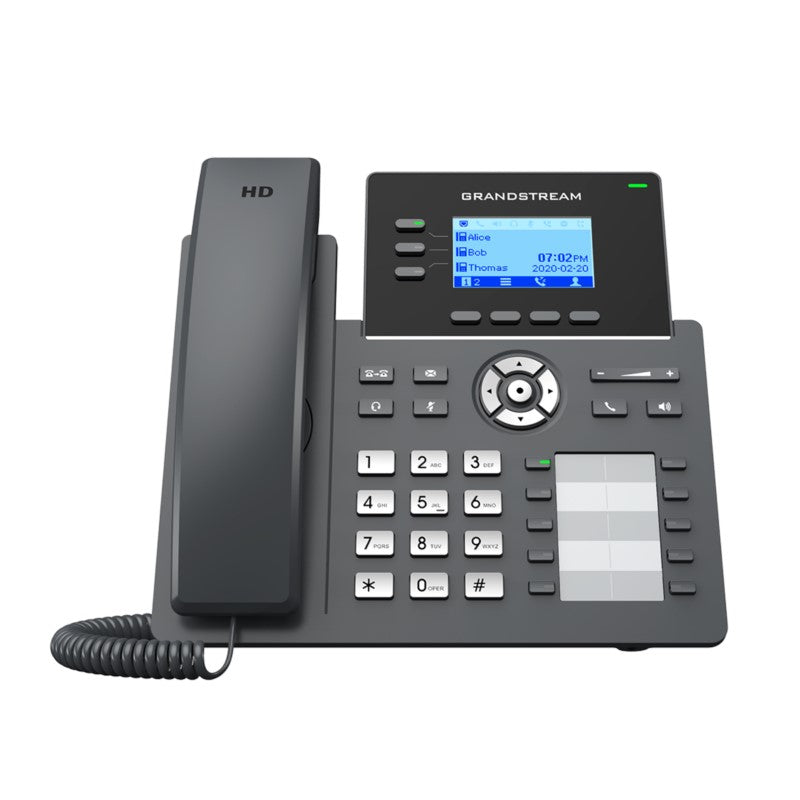
• The GRP2604 is a 3-line carrier-grade IP phone designed for mass deployment and easy management. It features zerotouch provisioning, making it ideal for on-site or remote desktop workers. Key Features: • 5-way voice conferencing for enhanced productivity • Full HD audio on both speaker and handset for clear communication • Electronic Hook Switch (EHS) support for Plantronics, Jabra, and Sennheiser headsets • Multi-language support for global compatibility • Enterprise-level security features, including secure boot, dual firmware images, and encrypted data storage Additional Information: • Weight: 2.47 lbs • Dimensions: 11.73 × 8.31 × 3.19 in • Brand: Grandstream Technical Specifications: • Protocols/Standards: SIP RFC3261, TCP/IP/UDP, RTP/RTCP, RTCP-XR, HTTP/HTTPS, ARP, ICMP, DNS(A record, SRV, NAPTR), DHCP, PPPoE, SSH, TFTP, NTP, STUN, SIMPLE, LLDP, LDAP, TR069, SNMP, 802.1x, TLS, SRTP, IPv6 • Network Interfaces: Dual switched auto-sensing 10/100/1000 Mbps Ethernet ports • Graphic Display: 132 x 64 (2.7’’) backlit graphical LCD display • Feature Keys: 3 line keys with dual-color LED and support for 6 SIP accounts, 4 XML programmable context sensitive soft keys, 5 navigation, menu, and BLF/SOFD keys. • Voice Codecs and Capabilities: Support for G.729A/B, G.711µ/a-law, G.726, G.722(wide-band), G.723,iLBC, OPUS, in-band and out-of-band DTMF(in audio, RFC2833, SIP INFO), VAD, AEC, CNG, PLC, AGC, AJB

About This Product

The Grandstream GRP2604 is a practical choice for businesses that need a reliable, no-nonsense desk phone for everyday use. It fits well in cubicle farms, open-plan offices, and home-office setups where a worker handles a moderate volume of calls across a few lines. Because it supports up to six SIP accounts across its three line keys, it suits roles like customer service or inside sales where an employee might monitor a personal extension, a department queue, and a general line simultaneously. The zerotouch provisioning and TR-069 support make it especially attractive for IT teams managing fleets of phones across multiple locations, including remote workers scattered around the GTA or beyond.

This model pairs naturally with hosted VoIP platforms that support Grandstream’s provisioning framework, and it works well alongside entry-level headsets from Plantronics, Jabra, or Sennheiser thanks to its built-in EHS support. The full-duplex speakerphone and wideband audio codec support mean it can hold its own in a small huddle room, though it is not a replacement for a dedicated conference speaker. For a business migrating from older ATA-plus-analog-phone setups, the GRP2604 offers a clean, modern alternative without stepping up to a touchscreen or video endpoint.

A buyer should understand that the 132 x 64 pixel backlit display, while perfectly legible for call handling and directory lookups, is not a high-resolution screen. It is not designed for rich visual applications or extensive on-screen contact browsing. The phone also lacks built-in Wi-Fi or Bluetooth, so it must be connected via Ethernet, and any wireless headset pairing will require a dedicated base or adapter. For a desk that cannot easily reach a network drop, this may mean adding a small switch or powerline adapter.

For a receptionist or executive assistant who juggles a high volume of lines and needs a large sidecar or a colour screen with quick visual scanning, the GRP2604 may feel underpowered. In those cases, a model with a larger display and expansion module support would be more appropriate. Conversely, for a common-area phone in a break room or hallway where only occasional calls are made, this device is overbuilt; a simpler single-line phone would serve just as well at a lower cost.
Services We Provide
  • Professional Installation & Configuration
  • Ongoing Maintenance & Support
  • Troubleshooting & Repairs
  • System Upgrades & Updates



