
Grandstream GRP2604P 3-Line Essential IP Phone

Frequently Asked Questions

Start by confirming the Ethernet cable is plugged into the correct LAN port (not the PC port) and that you have link lights. Open the phone’s web interface and verify the SIP server address, outbound proxy (if any), and account credentials match what your provider gave you. Check that your firewall is not blocking SIP port 5060 or the RTP port range, and ensure the server is reachable by pinging its IP from a computer on the same local network.
Confirm you are using the LAN port; the PC port does not receive PoE. Try a different Ethernet cable and a different switch port, as a failed port or insufficient power budget can prevent startup. If the phone still does not light up, check the switch’s PoE status LEDs and power allocation settings. If the issue persists, a Toronto‑based VoIP support provider can usually resolve this remotely.
Reduce the speaker volume slightly, as high levels can cause feedback, and try switching to the handset to see if the problem follows. Reposition the phone away from walls or reflective surfaces if you are using the speakerphone. In the phone’s audio settings, make sure Acoustic Echo Cancellation (AEC) is enabled—on rare provisioning errors this can be switched off.
One‑way audio is typically a NAT or firewall problem. On your router, disable SIP ALG (often a checkbox in the firewall settings) and ensure UDP port 5060 and the RTP port range (usually 5004–65000) are forwarded to the phone’s IP. Enable STUN on the phone under SIP settings and enter your provider’s STUN server. Restart the phone and router after making these changes.
Verify that the headset is a model compatible with EHS (Plantronics, Jabra, or Sennheiser) and that the cable is fully inserted. In the phone’s web interface, go to Settings > Audio Control and ensure the headset type is set to the correct brand and that Electronic Hook Switch is enabled. Try a known‑working headset to rule out a hardware fault.
BLF functionality relies on SUBSCRIBE/NOTIFY messages from the PBX. On the phone’s BLF configuration page, confirm the target extension number is exact (including any prefix) and that the monitor type matches what your PBX uses (usually “dialog-info” or “RFC 4235”). Watch the phone’s SIP trace or status to verify it is receiving NOTIFY packets. Consult your PBX documentation if the event package is not being sent.
During an active call, press the “Conf” soft key, dial the next party, and wait for them to answer. Press “Conf” again to merge the calls. You can repeat the process to add up to five participants total. The phone’s display will indicate when the conference is active and allow you to manage or end individual legs.
Yes, as long as the provider supports standard SIP credentials and does not require proprietary firmware. Enter the server address, username, and password manually via the web interface, or use Grandstream’s GDMS to push a configuration template. The phone is widely compatible with most Canadian business VoIP services.
First note the current firmware version from the phone’s status page. Download the latest stable firmware only from Grandstream’s official support site, never from third‑party links. Before updating, make a backup of the phone’s configuration via the web GUI. Use GDMS to push the update remotely, or upload the file manually; if you are unsure about the procedure, a Toronto‑based VoIP support provider can assist to avoid any risk of interruption.
IP Phones

Grandstream GRP2604P 3-Line Essential IP Phone
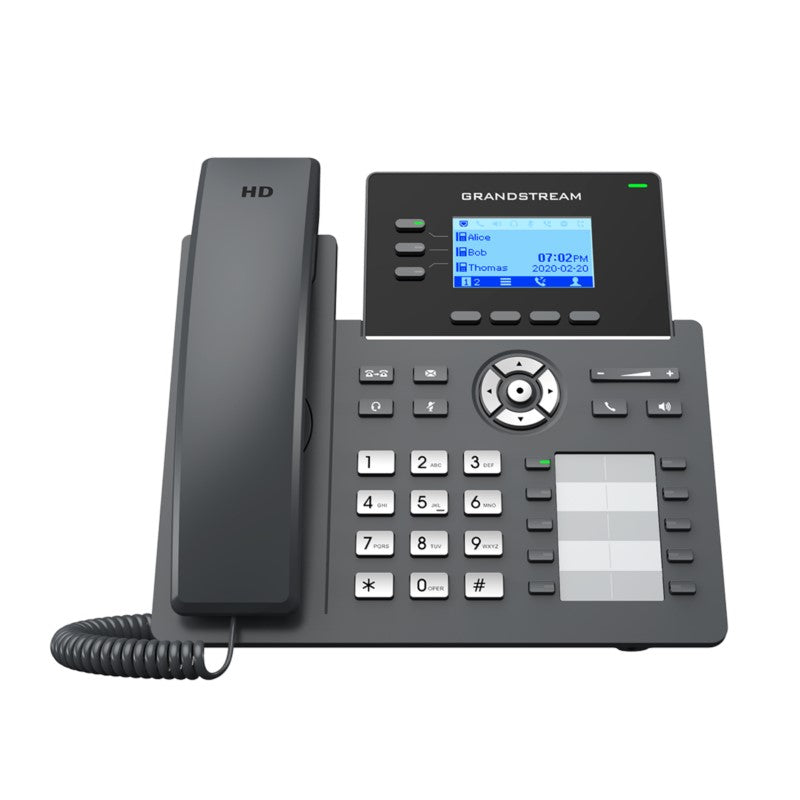
• The GRP2604P is a 3-line carrier-grade IP phone designed for mass deployment and easy management, featuring a sleek design and next-generation features such as: • 5-way voice conferencing • Full HD audio on both the speaker and handset • EHS support for Plantronics, Jabra, and Sennheiser headsets • Multi-language support • Key Features: • 3 lines, 6 SIP accounts, up to 3 call appearances • Supported by Grandstream’s Device Management System (GDMS) • Electronic Hook Switch (EHS) support for Plantronics, Jabra, and Sennheiser headsets • Full-duplex speakerphone with HD audio • Equipped with noise shield technology to minimize background noise • Dual switched autosensing 10/100/1000 Mbps Gigabit Ethernet ports with integrated PoE • Supports 5-way audio conferencing for easy conference calls • Enterprise-level protection including secure boot, dual firmware images, and encrypted data storage • Additional Information: • Weight: 2.37 lbs • Dimensions: 11.73 × 8.31 × 3.19 in • Brand: Grandstream • Technical Specifications: • Protocols/Standards: SIP RFC3261, TCP/IP/UDP, RTP/RTCP, RTCP-XR, HTTP/HTTPS, ARP, ICMP, DNS(A record, SRV, NAPTR), DHCP, PPPoE, SSH, TFTP, NTP, STUN, SIMPLE, LLDP, LDAP, TR069, SNMP, 802.1x, TLS, SRTP, IPv6 • Network Interfaces: Dual switched auto-sensing 10/100/1000 Mbps Ethernet ports, integrated PoE • Graphic Display: 132 x 64 (2.7’’) backlit graphical LCD display • Feature Keys: 3 line keys with dual-color LED and support for 6 SIP accounts, 4 XML programmable context sensitive soft keys, 5 (navigation, menu) keys. 10 BLF keys, 8 dedicated function keys for: MESSAGE(with LED indicator), TRANSFER, HEADSET, MUTE, SEND/REDIAL, SPEAKERPHONE, VOL+, VOL- • Auxiliary Port: RJ9 headset jack (allowing EHS with Plantronics & Jabra & Sennheiser headsets) • Voice Codecs and Capabilities: Support for G.729A/B, G.711µ/a-law, G.726, G.722(wide-band), G.723,iLBC, OPUS, in- band and out-of-band DTMF(in audio, RFC2833, SIP INFO), VAD, AEC, CNG, PLC, AGC, AJB • Telephony Features: Hold, transfer, forward, 5-way conference, call park, call pickup, shared-callappearance(SCA)/bridged-line-appearance(BLA), downloadable phonebook (XML, LDAP, up to 2000 items), call waiting, call log (up to 800 records), off-hook auto dial, auto answer, click-to-dial, flexible dial plan, hot-desking, personalized music ringtones and music on hold, server redundancy and fail-over

About This Product

The Grandstream GRP2604P targets small to mid-sized businesses that need a robust, centrally manageable desktop phone without the cost and complexity of higher-end executive models. Its three line keys and support for up to six SIP accounts make it a natural fit for reception desks, administrative staff, or managers who handle a modest volume of calls but still require features like conference calling and headset integration. In a Canadian context, it is commonly adopted by multi-branch organizations across the GTA and southern Ontario, where IT teams can leverage Grandstream’s Device Management System (GDMS) to provision and support handsets remotely.

This phone pairs smoothly with leading headset brands (Plantronics, Jabra, Sennheiser) thanks to its built‑in EHS, and its gigabit passthrough port keeps a desktop PC connected without extra cabling. It works with any standards‑based SIP platform, from an on‑premises Grandstream UCM to a cloud‑based PBX or a carrier’s hosted service. These integration points make it a versatile choice when you are expanding an existing fleet or refreshing a legacy system.

Potential buyers should be aware of its limits. With only three call appearances, a user who routinely juggles four or more active calls will quickly outgrow this phone; in a high‑volume sales or support role, a six‑line model would be more appropriate. Conversely, for a shared breakroom or a light‑duty extension, the GRP2604P is over‑specified and a simpler one‑line phone would be a better value. Where it shines is the project deployment that needs consistent, secure, and instantly manageable endpoints without touching every desktop.
Services We Provide
  • Professional Installation & Configuration
  • Ongoing Maintenance & Support
  • Troubleshooting & Repairs
  • System Upgrades & Updates



