
Grandstream GRP2610 2-Line IP Phone

Frequently Asked Questions

First, confirm that the Ethernet cable is plugged into the correct port on the phone — the LAN port, not the PC passthrough. Log into the phone’s web interface and check the network status; if it shows a valid IP address from your DHCP server, look in the account settings for a registration status line. Usually ‘No Service’ means the SIP account credentials or server address are wrong, or the firewall is blocking the SIP port. Verify the configuration from your provider and try a simple power cycle. If the issue persists, a Toronto‑based VoIP support provider can often identify the root cause remotely.
One‑way audio typically points to a network issue, not a faulty phone. Power down the GRP2610 and restart the router and any switches between the phone and the internet, then power everything back up in order. If that doesn’t help, log into the web portal and confirm the STUN server or NAT traversal settings match what your VoIP carrier recommends. A quick check: place a test call to an internal extension — if that works but external calls don’t, the problem is likely at your firewall or SBC. Avoid making configuration changes until you’ve pinpointed the pattern.
Make sure you’re using an RJ9 headset, not a 2.5 mm or USB connector; the GRP2610’s dedicated headset port only accepts a wired RJ9 plug. Press the headset button on the phone and listen for the dial tone through the headset earpiece. If there is no sound, try another known‑working RJ9 headset to rule out a fault with the headset itself. If you use an EHS‑compatible Plantronics model, check that the EHS cable is properly seated and that the phone’s headset type is set to ‘Plantronics EHS’ under the web UI’s headset settings.
Open the phone’s web interface and go to the Account 2 tab. Fill in the same kind of information you used for the first account — SIP server, user ID, authentication name, and password — using the details from your second phone line provider. Make sure ‘Account Active’ is set to Yes and assign the second account to a free line key (often Line Key 2) on the Basic Settings page. Save and apply, then watch the registration status; it should change to ‘Registered’ within a minute if everything is correct.
BLF keys rely on the phone subscribing to the presence information from your PBX. First, confirm that the PBX extension you’re monitoring actually supports BLF. In the phone’s web UI, go to Advanced Settings > BLF and verify that the BLF URI (like sip:[email protected]) is exactly correct for each key. Also ensure that the phone’s main SIP account that handles the subscription has the necessary permissions on the PBX side. Save the configuration and give it a minute to update. If still not working, test with a BLF key for an extension you know is idle and ringing.
First, check if the phone is actually receiving power by looking for any light on the screen or the LEDs. If nothing appears, try a different power outlet and make sure the adapter’s barrel plug is fully inserted into the phone. If you’re using Power over Ethernet instead of the adapter, verify that the switch port provides PoE and that the Ethernet cable is straight‑through, not a crossover cable. A quick cross‑check: move the phone to a known‑working PoE port or connect the included 5V adapter. If it powers up there, the original port or cable is the culprit.
Yes, you can customize the ringtone per account. Log into the web interface, navigate to Account > Account 1 (or whichever account you use for external calls), and look for the ‘Ringtone’ dropdown. Pick a different .wav ringtone from the list provided in the phone’s firmware. If you need a custom sound, you can upload a new ringtone file under Settings > Audio Control > Music on Hold/Ringtone using a .wav file that matches the phone’s format requirements. Test by calling the line from your mobile phone.
The GRP2610 stores its configuration in non‑volatile memory, so a simple power loss should not wipe settings. If settings were lost, the phone may have been triggered to do a factory reset inadvertently — for example, by holding down a key sequence during boot. To protect against future problems, use the GDMS cloud platform or a local configuration server to back up the phone’s configuration. If the phone is provisioned via a remote configuration file, make sure that file is persistent. If you’re in a GTA office and cannot resolve the cause, a local VoIP support provider can investigate whether the phone is receiving a forced reprovision command from the network.
Start by moving the phone to a different switch port or a known‑good wall jack to rule out a faulty cable or port. In the phone’s menu (if accessible), try setting the network mode from DHCP to static, point it to a known‑available IP address, subnet mask, and gateway just as a test; if it connects, the DHCP server on your network may be unresponsive. If you still can’t get an IP, reboot the phone with the handset lifted, then check the switch’s MAC address table to see if the phone’s MAC appears. Often the cause is a cabling or DHCP pool exhaustion issue, not the phone itself.
It is possible to have the same SIP account on the GRP2610 and a softphone if your PBX or service provider allows multiple registrations (SIP forking). In that scenario, calls will ring both devices, and the first answer wins. If your provider does not support forking, you may get a registration conflict and one device will unregister. Check with your carrier or PBX administrator whether shared line appearance (SCA) or forking is enabled for your extension. If yes, simply register the same credentials on the softphone; if not, consider creating a separate extension or using call forwarding from one device to the other.
IP Phones

Grandstream GRP2610 2-Line IP Phone
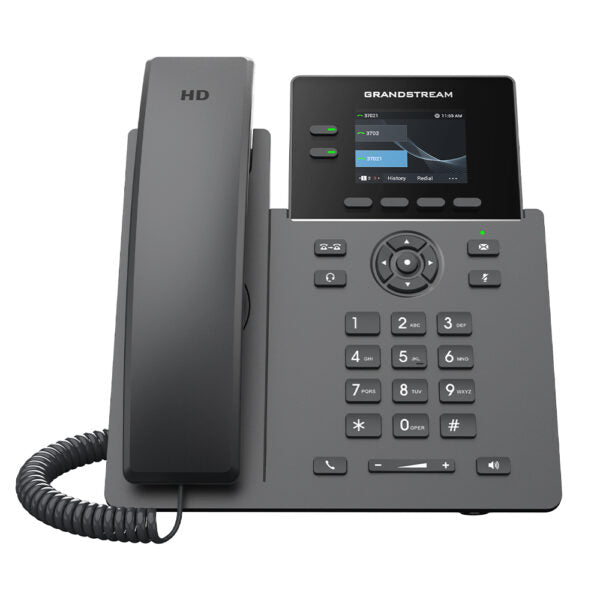
• The GRP2610 is a powerful 2-line carrier-grade IP phone designed with zero-touch provisioning for mass deployment and easy management. • It features a sleek design, 8 virtual multi-purpose keys (VPKs), a color LCD with swappable face plates for easy logo customization, and more. • Key Features: • Supports 2 SIP accounts and 2 multi-purpose line keys • Swappable faceplate to allow for easy logo customization • Equipped with noise shield technology to minimize background noise • Supported by GDMS which provides a centralized interface to configure, provision, manage and monitor • HD audio supporting all major codecs, including wideband codecs G.722 and Opus • Up to 8 BLF keys • Enterprise-level protection including secure boot, dual firmware images, and encrypted data storage • Supports 5-way audio conferencing for easy conference calls • 2 Lines • 2 SIP Accounts • 2.4 in Screen • Color • Weight: 1.98 lbs • Dimensions: 11.28 × 8.29 × 2.24 in • Phone Type: Desk GENERAL INFO: • Model: GRP2610 • Package Contents: • GRP2610 phone • Handset with Cord • Phone Stand • 5V Power Adapter • Network Cable • Quick Installation Guide Protocols/Standards: • SIP RFC3261, TCP/IP/UDP, RTP/RTCP, HTTP/HTTPS, ARP, ICMP, DNS(A record, SRV,<br>NAPTR), DHCP, PPPoE, TELNET, TFTP, NTP, STUN, SIMPLE, LLDP, LDAP, TR-069,<br>802.1x, TLS, SRTP, IPV6 Network Interfaces: • Dual switched auto-sensing 10/100 Mbps Ethernet ports Graphic Display: • 2.4-inch (320×240) TFT color LCD Feature Keys: • 2-line keys with up to 2 SIP accounts, 4 XML programmable context sensitive<br>softkeys, navigation/menu keys, 8 dedicated function keys for: MESSAGE (with LED<br>indicator), TRANSFER, HEADSET, MUTE, SEND/REDIAL, SPEAKERPHONE, VOL+, VOL- Auxiliary Port: • RJ9 headset jack (allowing EHS with Plantronics headsets) Voice Codecs and Capabilities: • Support for G7.29A/B, G.711µ/a-law, G.726, G.722(wide-band), G723, iLBC, OPUS,<br>in-band and out-of-band DTMF (in audio, RFC2833, SIP INFO), VAD, CNG, AEC, PLC,<br>AJB, AGC Telephony Features: • Hold, transfer, forward, 5-way conference, call park, call pickup, shared-call appearance (SCA)/bridged-line-appearance (BLA), downloadable phonebook (XML, LDAP, up to 1000 items), call waiting, call log (up to 1000 records), XML customization of screen, off-hook auto dial, auto answer, click-to-dial, flexible dial plan, hot-desking, personalized music ringtones and music on hold, server redundancy and fail-over HD Audio: • Yes, HD handset and speakerphone with support for wideband audio QoS: • Layer 2 QoS (802.1Q, 802.1P), and Layer 3 (ToS, DiffServ, MPLS) QoS Security: • User and administrator level passwords, MD5 and MD5-sess based authentication,<br>256-bit AES encrypted configuration file, SRTP, TLS, 802.1x media access control,<br>secure boot. Temperature and Humidity: • Operation: 0°C to 40°C • Storage: -10°C to 60°C • Humidity: 10% to 90% non-condensing Physical: • Dimension: 203mm x 186mm x 28mm • Unit weight: 0.4kg • Package weight: 0.9kg

About This Product

The GRP2610 is a practical choice for a small office or branch location that needs a straightforward, carrier-grade IP phone without a steep learning curve. It suits desk workers who handle one or two lines, such as a paralegal, accountant, or inside sales rep. The two SIP account support gives enough flexibility for a second identity or a fallback registration, while the zero‑touch provisioning and GDMS cloud management make it easy for an IT team to deploy and reconfigure devices from a single interface.

This model pairs naturally with Grandstream’s own UCM series of IP PBXs, but it is standards‑based and works well with any SIP‑compliant hosted or on‑premise PBX. In a Canadian setting, it connects seamlessly to popular SIP trunk providers and is a common sight in Toronto‑area co‑working spaces and professional services firms. The swappable faceplate is a small but thoughtful touch for partners who want to co‑brand the phone for a customer.

The main tradeoffs are what you would expect at this price: the 2.4‑inch color screen is bright but small, and the phone does not offer Wi‑Fi or Bluetooth, so each unit needs a wired Ethernet drop. It is ideal for a desk with a single network cable already in place. Audio quality is crisp thanks to the HD codec support and noise shielding, but there is no advanced algorithmic noise cancellation on the handset itself beyond that.

Where the GRP2610 might be overkill is a single‑line user who only ever makes and answers calls on one extension — a simpler analog terminal adapter with a basic phone can do the job at lower cost. On the opposite end, a receptionist or dispatcher who needs to monitor many extensions at once will quickly outgrow the eight virtual BLF keys and would be better served by a model that supports an expansion module, such as the GRP2614 or higher. For a two‑line knowledge worker who values reliable voice and easy management, it hits the sweet spot.
Services We Provide
  • Professional Installation & Configuration
  • Ongoing Maintenance & Support
  • Troubleshooting & Repairs
  • System Upgrades & Updates



